
Loading...
Loading...
Loading...
Loading...
Loading...
Loading...
Loading...
Loading...
Loading...
Loading...
Loading...
Loading...
Loading...
Loading...
Loading...
Loading...
Loading...
Loading...
Loading...
Loading...
Loading...
Loading...
Loading...
Loading...
Loading...
Loading...
Loading...
Loading...
Loading...
Loading...
Loading...
Loading...
Loading...
Loading...
Loading...
Loading...
Unlocking efficiency and savings across industries and sectors
A complete end-to-end solution, Proven is designed to provide the widest possible range of options to build, deploy, scale, and manage verifiable credential ecosystems, and is interoperable and compatible with current and emerging global protocols and standards for decentralized identity, including the European Union’s new standards for digital identity (eIDAS) and digital wallets (EUDI).
It’s easy to implement and scale, from simple use cases to managing national and global identity verification, and unlike many digital credential solutions that claim to be decentralized, with Indicio technology, you are always in full control of your data.
Verifiable credentials can hold all kinds of valuable information in a tamper-proof way, as any attempt to alter that information breaks the credential.
Instant, cryptographic proof of who issued a credential, and that the person presenting it is the rightful owner — an identity fraud killer.
Mutual authentication allows you to always able to verify who you are sharing data with before sharing it — and they you.
Data is shareable across disparate systems without direct integration.
Data is immediately actionable — if you trust the source of the credential, you can trust the data.
Data is more secure — no need for third parties to store the data in centralized databases to manage authentication.
Takes the hassle out of data privacy compliance — a person is in control of their data and can share it by consent.
Protect biometric systems and data from AI deepfakes.
Indicio Proven is the most advanced solution for decentralized identity using verifiable credentials and Open Badges 3.0. It gives you maximum speed and flexibility to build, launch, scale, and manage verifiable credential ecosystems.
It’s built for interoperability. Indicio Proven works with existing and emerging global standards, including EU eIDAS and EUDI digital wallets.
It’s fast to implement. Integrate Proven with your current systems and can be configured in days—not months.
Issuer & Verifier Agents The software needed to create, issue, and verify credentials.
Mobile App & Mediator The software to download, store, and use credentials on mobile devices.
Verifiable Credential Schema Flexible template for creating credentials.
Verifiable Data Registry or Network Make use of a robust and stable distributed ledger, professionally managed by Indicio, choose the provider or registry technology that works best for you, or have us build your own network.
Technical support & training Indicio Proven includes personalized onboarding, comprehensive documentation, and expert-led training to ensure your team is set up for success at every stage.
Learn how easy it is to get started, use, and generate value using Indicio Proven!
Verifiable credentials are a breakthrough. Gartner calls them “magnitudes of improvement in terms of efficiency, cost and assurance” in its 2024 Market Report for decentralized identity.
Deploy your way. Use Indicio Proven on premises, in AWS, Azure, Google Cloud, Oracle, or with any provider you choose.


The following sections are an engineering focused API guide to Indicio Proven.
The Indicio proven API is secured using an API key, which must be included in the request header as x-api-key.
To add the API key, click the "Authorize" button and enter your API key.
Endpoints for managing connections
Indicio Proven is the world’s most advanced platform for decentralized identity using verifiable credentials and Open Badges 3.0.
It is designed to provide the widest possible range of options to build, deploy, scale, and manage verifiable credential ecosystems.
It is built to be interoperable and compatible with current and emerging global protocols and standards for decentralized identity, including the European Union’s new standards for digital identity (eIDAS) and digital wallets (EUDI).
It’s easy to implement — a platform that can work with your existing systems, and it is configurable in days rather than months.
And it’s easy to scale from simple use cases to managing national and global identity verification.
Verifiable credentials are a powerful new way to authenticate identity and data. As Gartner Research notes in its 2024 Market Report for Decentralized Identity, they represent “magnitudes of improvement in terms of efficiency, cost and assurance.”
Indicio Proven allows you to build in a way that works best for you, with flexible deployment options, including on premises, in Amazon Web Services, Azure, Google Marketplace, Oracle, or a provider of your choice.
The software needed to create, issue, and verify credentials.
The software to download, store, and use credentials on mobile devices.
Flexible template for creating credentials.
Make use of a robust and stable distributed ledger, professionally managed by Indicio, choose the provider that works best for you, or have us build your own distributed ledger network.
Verifiable credentials can hold all kinds of valuable information in a way that any attempt to alter that information breaks the credential.
Instant, cryptographic proof of who issued a credential, and that the person presenting it is the rightful owner — an identity fraud killer.
You are always able to verify who you share data with before sharing it — and they you.
Data is shareable across disparate systems without direct integration.
Endpoints for creating and managing invitations
Endpoints for sending and retrieving basic messages
Authenticate with base API key
Endpoints for managing Decentralized Identifiers (DIDs)
Endpoints for fetching governance files
Endpoints for issuing and retrieving credentials
Data is immediately actionable — if you trust the source of the credential, you can trust the data.
Data is secure — no need for third parties to store the data in centralized databases to manage authentication.
Takes the hassle out of data privacy compliance — a person is in control of their data and can share it by consent.
Verifiable credentials can protect biometric data from AI deepfakes.
Endpoints for email verification
Endpoints for managing contexts
Indicio Proven™ provides the tools to establish a Trusted Digital Ecosystem (TDE). You can immediately issue, verify, and manage credentials. While the options are almost limitless, this tutorial will lead you through a simple workflow that illustrates some of Proven’s core capabilities.
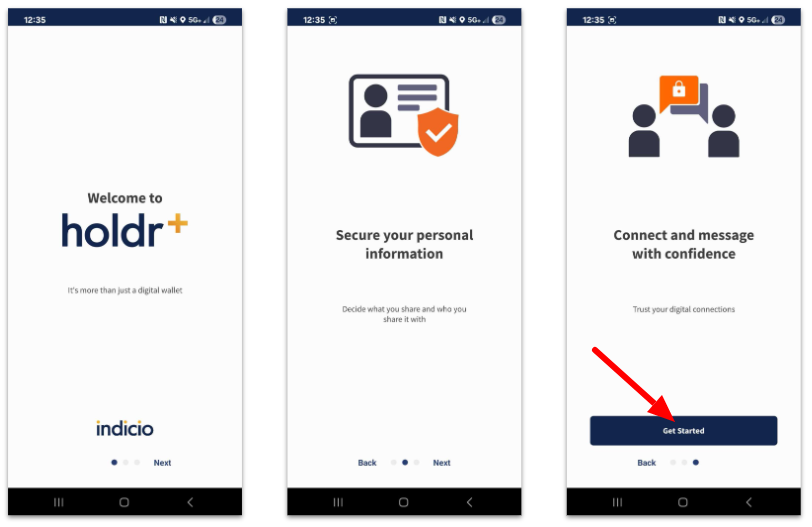
In order to interact with Proven, please download and install the free Holdr+ wallet from either the Apple App Store or the Google Play Store.
Swipe past the first two images and click Get Started on the third image as shown below.
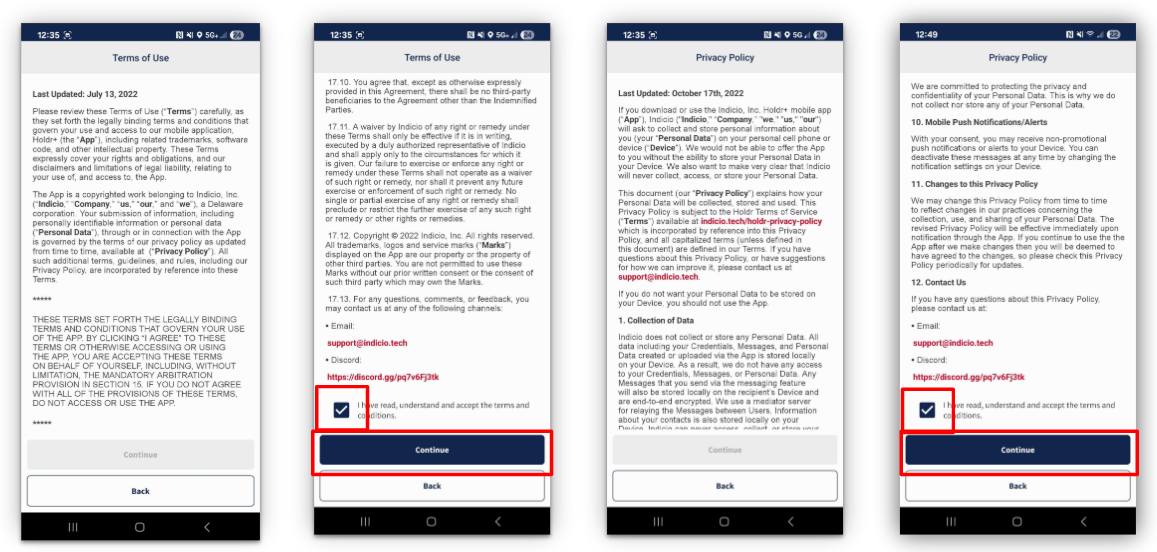
Read and accept the Terms of Use and the Privacy Policy. Check the box verifying you've read, understand, and accept the terms.
Click Continue for both the Terms and the Privacy policies.
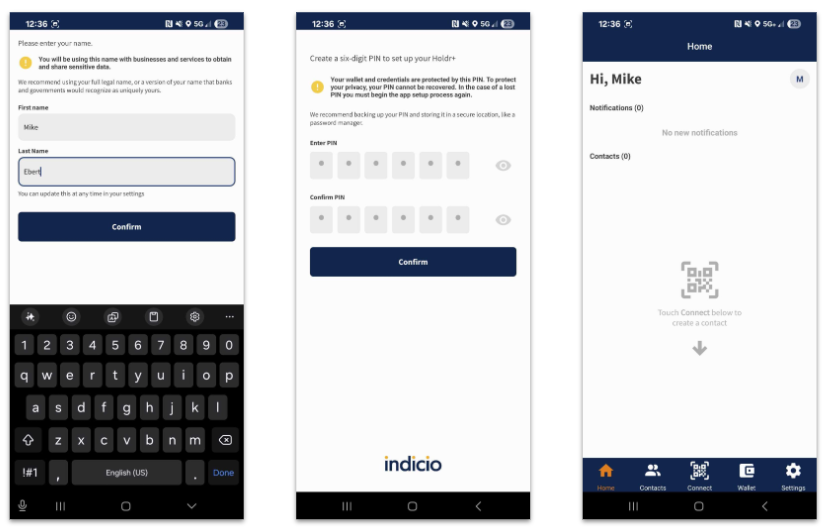
Enter First Name and Last name (first image below).
Choose a PIN (second image).
When you are done, you will see your empty wallet home screen (third image).
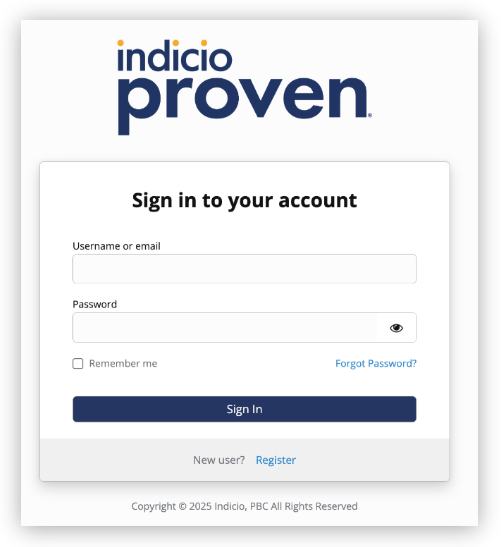
The next step is to log in to Proven.
Visit: https://your.url.com/admin
Username: admin
Password: 123!@#!@#QWEqwe
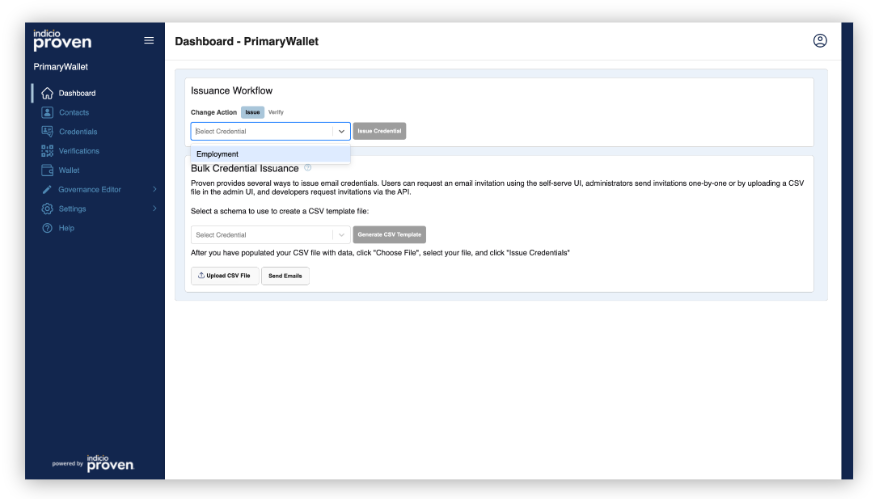
On the Proven UI home page, select a credential to issue from the top drop down and click on Issue.
We selected Employment because it looks similar to a lot of different types of credentials.
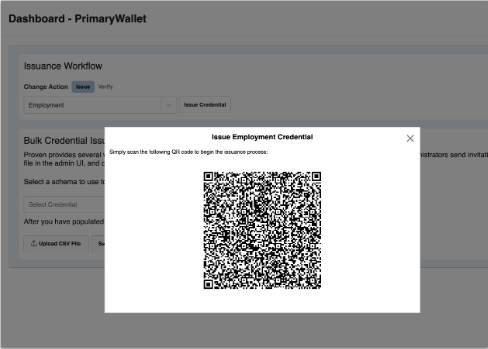
Proven will display a QR code that your mobile wallet can use to connect after you've selected a credential.
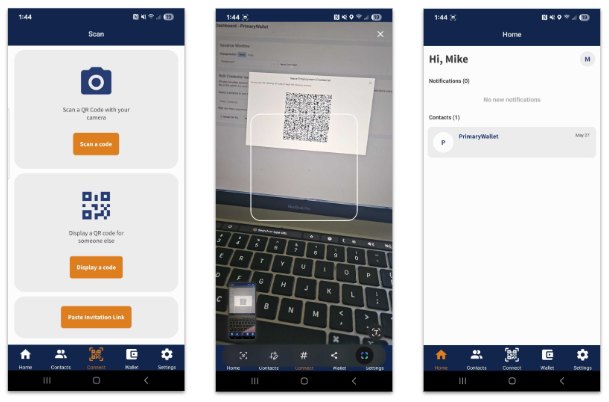
In the Holdr+ wallet, click on the Connect button found in the bottom center of the screen.
Click Scan a code.
Scan the QR code.
You will see a new connection added to your Holdr+ home screen.
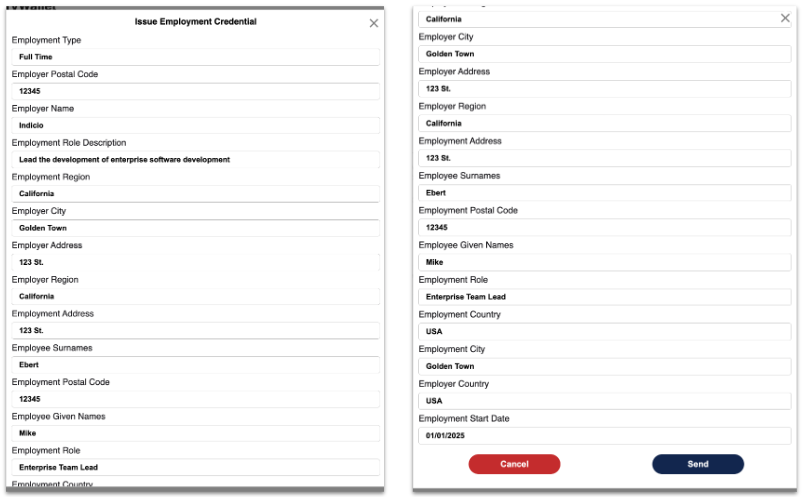
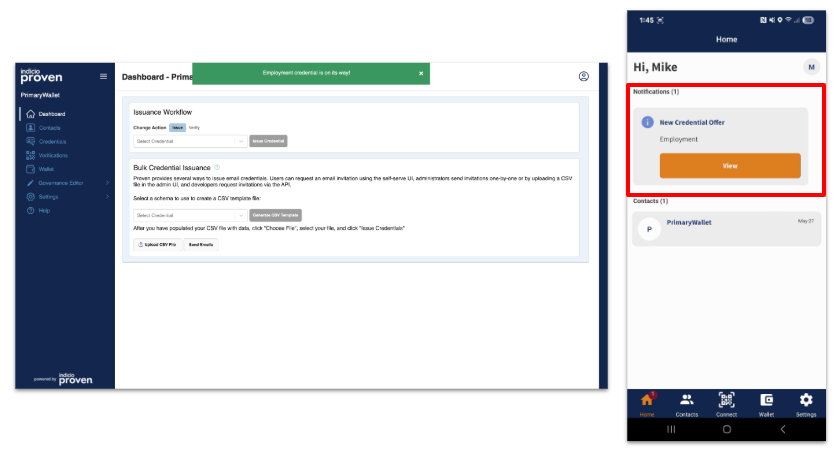
After connecting, Proven will display a form with all of the different attributes for the credential you selected. Fill in these fields and click Send. Entering fake data is acceptable.
Proven displays a success message that says a credential offer was sent.
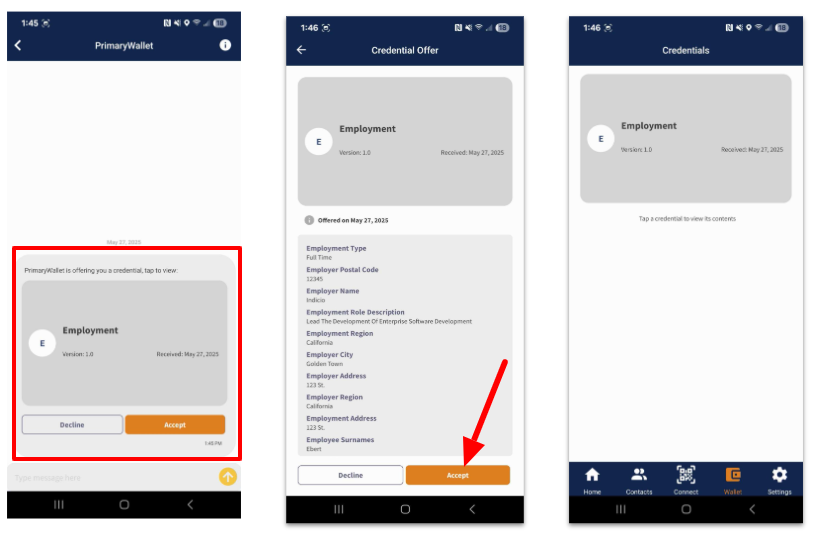
Holdr+ will display the offer on your home screen. Click View to see the details.
Click on the card to see the credential details.
Click Accept to add the credential to your wallet.
You can see the credential on your wallet screen.
After accepting the credential, Proven displays a success message.
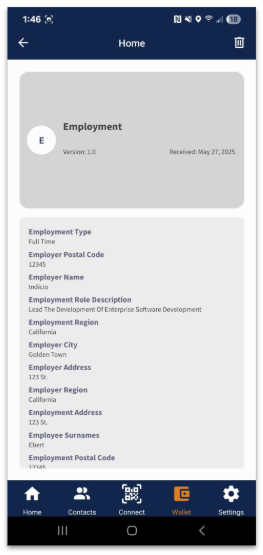
Click on a credential in your Holdr+ wallet to view the details at any time.
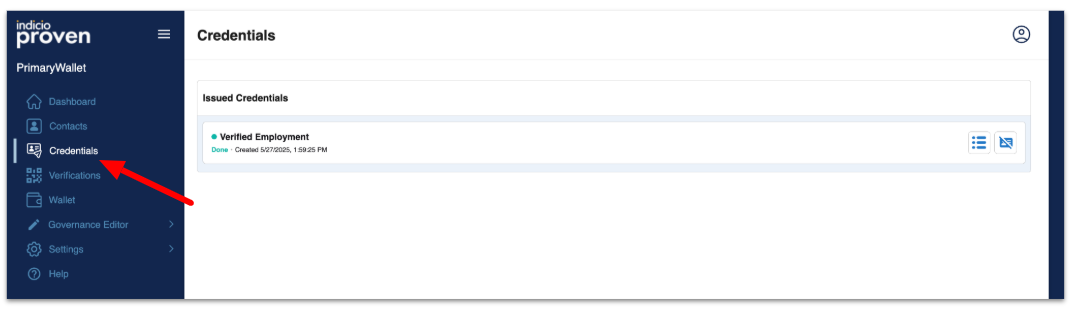
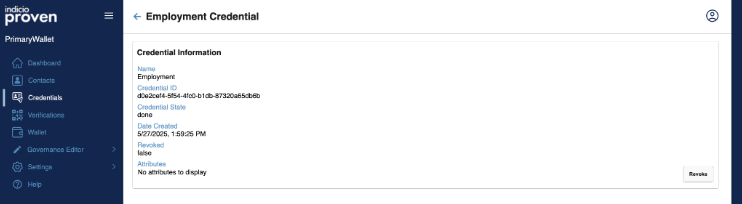
View the list of issued credentials by clicking Credentials in the left menu.
Click on a credential in the list to view its details. General credential information and a list of attributes and their values are displayed on the credential details screen.
Sign out of Proven by clicking on the icon in the top right corner of the screen.

This tutorial goes through a series of steps to exercise a few of the key features of the Proven API and help you begin to construct your own workflows.
To connect, one agent must issue an invitation to the other. Generally, the server agent issues an invitation to the mobile agent by displaying an invitation URL encoded in a QR code.
Use the following API endpoint: .
Set your x-api-key header to: 9^2m@qw2w885dKXxaup6TQ&CQT4@=RNW (or your production API key).
Submit the following as the POST body:
The API will respond with something similar to the following:
Once you have an invitation, use it to establish a connection between the two agents.
Use the invitation_url from the API response and provide it to a connecting agent such as Holdr+ using Postman:
When working with Postman, you can copy the invitation_url and use a website such as to create and display a QR code that mobile agents like Holdr+ can read.
Use Holdr+ to read the QR code by clicking on Connect in the middle of the bottom menu and pointing the camera at the QR code.
After the connecting agent reads the QR code and connects, you should see the most recent connection in Proven under Contacts.
After establishing a connection, perform the first of two key operations by issuing a credential.
Send a credential offer to a particular contact using the credentials API.
Use the following API endpoint: .
Set your x-api-key header to: 9^2m@qw2w885dKXxaup6TQ&CQT4@=RNW (or your production API key).
Submit the following as the POST body (notice the invitation_id OR contact_id
The API will respond with the following message:
The connected agent will receive a credential offer. In Holdr+, you will see a notification on the home screen. Click on it to view the offer details and to click Accept or Decline.
Accept the credential offer so that you can use it in the verification step.
After establishing a connection, the second key operation to perform is to verify a credential. In this tutorial, you will verify the credential you just issued in the previous step using the verifications API.
Use the following API endpoint: .
Set your x-api-key header to: 9^2m@qw2w885dKXxaup6TQ&CQT4@=RNW (or your production API key).
Submit the following as the POST body (notice the invitation_id OR contact_id
The API will respond with something similar to the following:
The connected agent will receive a presentation request. In Holdr+, you will see a notification on the home screen that you can click to view the request details and to click Accept or Decline.
Accept the request to send your credential information so that you can view it in the next step.
After requesting the presentation of a credential from the connected agent (and sharing it if you are the one controlling the connected agent), you can request the verification result.
If the user responds quickly or you set a long timeout, it is possible to get the presentation data back in the verification request itself. However, in most cases, you have to request the data at a later time.
Request the result of a verification from the verifications API using the GET method and a URL that contains the verification ID number. For example, the verification_id is 3 as seen in the response in the section.
Use the following API endpoint with the correct ID in the URL: .
Set your x-api-key header to: 9^2m@qw2w885dKXxaup6TQ&CQT4@=RNW
The API will respond with something similar to the following:
Note the result_data. You can now see the value of each of the attributes that you requested and use them for other credentials or in other parts of your existing or new systems.
Webhooks provide real-time notifications about events on Proven agents. They are delivered as HTTP POST requests to a configured endpoint.
{
"contact_id": "",
"alias": "API Invitation",
"invitation_type": "CV1",
"invitation_mode": "once",
"accept": "auto",
"public": false,
"invitation_role": "Holder",
"invitation_label": "CV1",
"invitation_status": "active",
"invitation_description": "Invitation created through API",
"invitation_active_starting_at": null,
"invitation_active_ending_at": null,
"uses_allowed": ""
}{"invitation_url":"https://proven.mediator.indiciotech.io?c_i=eyJAdHlwZSI6ICJkaWQ6c292OkJ6Q2JzTlloTXJqSGlxWkRUVUFTSGc7c3BlYy9jb25uZWN0aW9ucy8xLjAvaW52aXRhdGlvbiIsICJAaWQiOiAiNmQ0Y2QxZjYtNWJmMi00MjQ3LTg1ZmQtY2UxNzk5MjYyNDY3IiwgInJlY2lwaWVudEtleXMiOiBbIkFjOTFEWHE2ZEZzWXBZcmMyVlMzWDRrUnhHWGZtaGhaVXo1NUpSUkdSdkF5Il0sICJyb3V0aW5nS2V5cyI6IFsiRXJLRGVkNkQ1Tm9nUXpMVlBwczlrcFNXYWdxTndiVlE4RXpIcGdoTHE4UlQiLCAiMkRBQjZNU2V2bnFjc2ZoMzJIOEFrdlBIcHNzVmY3Wnl0UlZHOThTdXZXUjUiXSwgImxhYmVsIjogIlByb3ZlbiIsICJzZXJ2aWNlRW5kcG9pbnQiOiAiaHR0cHM6Ly9wcm92ZW4ubWVkaWF0b3IuaW5kaWNpb3RlY2guaW8ifQ==","invitation_id":52,"contact_id":""}{
"invitation_id": 52,
"contact_id": "",
"schema_id": "Gj39gdivhMneKBaamMsX7P:2:User:1.0",
"attributes": [
{
"name": "user_email",
"value": "mike@indicio.tech"
},
{
"name": "username",
"value": "mike.ebert"
},
{
"name": "user_id",
"value": "1"
},
{
"name": "user_roles",
"value": "admin"
}
]
}{
"success": "Credential was offered"
}{
"invitation_id": 52,
"contact_id": "",
"schemas": [
{
"schema_id": "Gj39gdivhMneKBaamMsX7P:2:User:1.0",
"schema_attributes": [
"user_email"
]
}
],
"timeout": "10",
"rule": "no rule"
}[
{
"verification_id": 3,
"connection_id": "27194181-8bf5-4207-aad3-51e7ad7bbea5",
"contact_id": null,
"invitation_id": 52,
"schema_id": "Gj39gdivhMneKBaamMsX7P:2:User:1.0",
"schema_attributes": [
"user_email"
],
"timeout": 10,
"rule": "no rule",
"meta_data": null,
"complete": false,
"result": false,
"result_string": "Pending",
"result_data": null,
"presentation_exchange_id": [
"911fe7d1-1485-4997-99d8-ef858c9eab64"
],
"error": "",
"created_at": "2024-01-16T21:05:23.816Z",
"updated_at": "2024-01-16T21:05:27.000Z"
}
]{
"verification_id": 3,
"connection_id": "27194181-8bf5-4207-aad3-51e7ad7bbea5",
"contact_id": null,
"invitation_id": 52,
"schema_id": "Gj39gdivhMneKBaamMsX7P:2:User:1.0",
"schema_attributes": [
"user_email"
],
"timeout": 10,
"rule": "no rule",
"meta_data": null,
"complete": true,
"result": true,
"result_string": "Verified",
"result_data": [
{
"name": "user_email",
"value": "mike@indicio.tech"
}
],
"presentation_exchange_id": [
"911fe7d1-1485-4997-99d8-ef858c9eab64"
],
"error": "",
"created_at": "2024-01-16T21:05:23.816Z",
"updated_at": "2024-01-16T21:05:33.964Z"
}Payload Format:
Description: This is triggered when a connection is fully established.
Event Type: connection:completed
Payload Example:
Description: This is triggered when a credential is successfully issued.
Event Type: credentials:done
Payload Example:
Description: This is triggered when a presentation is successfully verified.
Event Type: presentation:verified
Payload Example:
Description: This is triggered when a credential is successfully issued.
Event Type: oid4vc-credential:issued
Payload Example:
Description: This is triggered when a presentation is successfully verified.
Event Type: presentation:verified
Payload Example:
Description: This is triggered when a presentation is successfully verified.
Event Type: webhook:basic-message
Payload Example:
Header: x-api-key (optional)
Example: x-api-key: 24680AEIOUY
Use the x-api-key header (recommended).
Use HTTPS for all endpoints.
Verify request signatures if available.
Validate JSON schema of incoming payloads.
Header
Example Value
Description
Content-Type
application/json
Request content type
X-API-Key
24680AEIOUY
Authentication key
User-Agent
node-fetch/1.0
Client identifier
Content-Length
1584
Request body size in bytes
Accept-Encoding
gzip,deflate
Supported compression methods
{
"event": "event_type",
"webhook": {
// Event-specific data
}
}{
"event": "connection:completed",
"webhook": {
"connection_id": "13eeacd4-0c4e-495e-81cc-d66c6eeb8545",
"invitation_key": "2St9MAnpToLcnUxhfskNBYgNxzS4vzAy42kSWPF8AY9e",
"invitation_msg_id": "7f7392eb-a334-43c9-bdb0-b1a109de1f91",
"contact_id": null,
"purpose": "invitation purpose",
"wallet_id": "f161e7a3-9a88-4f2c-a988-cc9cf3fbea2f",
"discovered_features": [
{
"pid": "https://didcomm.org/present-proof/2.0",
"roles": [
"prover",
"verifier"
]
},
// ... additional protocol features
]
}
}{
"event": "credentials:done",
"webhook": {
"state": "done",
"connection_id": "13eeacd4-0c4e-495e-81cc-d66c6eeb8545",
"cred_ex_id": "794657e2-187e-4642-b5f2-77dd27138a49",
"thread_id": "d92933ef-74d8-4e53-9d4a-6526feb991c5",
"wallet_id": "f161e7a3-9a88-4f2c-a988-cc9cf3fbea2f",
"role": "issuer",
"initiator": "self",
"created_at": "2025-03-13T22:14:41.138935Z",
"updated_at": "2025-03-13T22:15:02.479961Z",
"credential_id": null
}
}{
"event": "presentation:verified",
"webhook": {
"state": "done",
"connection_id": "13eeacd4-0c4e-495e-81cc-d66c6eeb8545",
"pres_ex_id": "7ec0d756-58e8-402d-9688-2dc4cd48cf17",
"thread_id": "00b7fe05-79a1-44a8-91bd-8f0fe47f249d",
"wallet_id": "f161e7a3-9a88-4f2c-a988-cc9cf3fbea2f",
"role": "verifier",
"initiator": "self",
"verified": "true",
"created_at": "2025-03-13T22:15:04.202161Z",
"updated_at": "2025-03-13T22:15:14.343137Z"
}
}{
event: 'oid4vc-credential:issued',
webhook: {
exchange_id: 'd3e347d2-e6df-45cf-bb02-27a929311260',
supported_cred_id: '413f8b60-6587-40bd-95ee-58797c3d6543',
credential_subject: {
given_name: 'Alice',
family_name: 'Smith',
something_nested: { key1: { key2: { key3: 'something nested' } } },
source_document_type: 'id_card',
age_equal_or_over: {
'12': true,
'14': true,
'16': true,
'18': true,
'21': true,
'65': false
}
},
verification_method: 'did:sov:NQ6iZJjvwdMzedXHzxX1vf#key-1',
state: 'issued',
issuer_id: 'did:sov:NQ6iZJjvwdMzedXHzxX1vf',
code: 'Naqioo54ryqIAbNbfcWYTg',
token: 'eyJ0eXAiOiAiSldUIiwgImtpZCI6ICJkaWQ6c292Ok5RNmlaSmp2d2RNemVkWEh6eFgxdmYja2V5LTEiLCAiYWxnIjogIkVkRFNBIn0.eyJpZCI6ICJkM2UzNDdkMi1lNmRmLTQ1Y2YtYmIwMi0yN2E5MjkzMTEyNjAiLCAiZXhwIjogMTc0MjA3NDM2Mn0.JffFZI7MgkWyZDLckUpY75flch4HdMqIHnUh1suHAoOOjjQ0OD9nNCNChNl5uCHrWZnrxsT9nQl-npZGqGDIDA'
}
}{
event: 'oid4vc-presentation:verified',
webhook: {
pres_def_id: 'b1c679d4-6edb-4d22-ba65-553dd7f6ef0a',
presentation_id: '28e70110-57b4-494e-b13b-aa728eac88c4',
request_id: '00f70502-0618-4b9e-af9f-e8af07f6edcd',
matched_credentials: {
'ID Card': {
something_nested: { key1: { key2: { key3: 'something nested' } } },
source_document_type: 'id_card',
age_equal_or_over: {},
sub: 'did:jwk:eyJrdHkiOiJFQyIsImNydiI6IlAtMjU2IiwieCI6IkFlRzUyZk9oVnliN2VsYWtxVEFwc25ab2RCMkhuRGQ0YzE0d2NtRTRsOWMiLCJ5IjoiLW5VTmljSi0yUVV0UTNaVjBSc0NMMzNEVmVtcFNNUXBheG04VWQ0ZXlSayJ9',
cnf: {
kid: 'did:jwk:eyJrdHkiOiJFQyIsImNydiI6IlAtMjU2IiwieCI6IkFlRzUyZk9oVnliN2VsYWtxVEFwc25ab2RCMkhuRGQ0YzE0d2NtRTRsOWMiLCJ5IjoiLW5VTmljSi0yUVV0UTNaVjBSc0NMMzNEVmVtcFNNUXBheG04VWQ0ZXlSayJ9#0'
},
vct: 'testCard',
iss: 'did:sov:NQ6iZJjvwdMzedXHzxX1vf',
iat: 1741987962,
given_name: 'Alice',
family_name: 'Smith'
}
},
state: 'presentation-valid'
}
}{
event: 'basic-message:received',
webhook: {
connection_id: '9775b821-be93-4980-94d9-e3deaf6698d3',
message_id: '4a977851-e5be-40fd-b3d6-3e01ae249c77',
content: 'New',
state: 'received',
sent_time: '2025-03-14T02:28:57.839Z',
locale: 'en',
wallet_id: '122b480d-2813-42b5-9146-2d359a5dd807'
}
}

Indicio Proven™ provides the tools to establish a Trusted Digital Ecosystem (TDE). Out of the box, you can issue, verify, and manage user credentials. Once you have a user credential, other workflows become possible because you can trust you are working with a known person or agent. The issuer’s role is to send invitations to the contacts to offer them user credentials. The issuer also manages contacts.
After logging into the Admin screen, you will land on the home page. To issue yourself a User credential first select the User credential from the dropdown list. If the user credential does not appear, then a browser refresh might be required. Then click Issue. Scan the displayed QR code with your mobile identity wallet app. Complete the form, then click Send. Accept the offered credential on your mobile device.
This selection just shows a list of all invitation QR codes that have been generated by this instance of Proven.
Contacts are connections between the Proven Issuer and other agent applications. Not all software includes an editable label; therefore, some contacts will show the name of the software rather than the name of the person. The following information is displayed when first clicking into Contacts:
Contact Name: The name of the mobile app user
Connection Status:
Invite: an invitation has been sent
Request: the second party has received the invite and is requesting a connection.
Response: the system has responded with details to finish setting up the connection.
Created At: the date and time the invitation was sent.
Click on a specific contact to view more information. You can use this interface to issue credentials to Users who have connected to Proven using the main URL. At the bottom of the screen, there is a section of all the credentials issued to a user. To view more detailed information on any issued credential, click on it. This displays things such as the credential name, ID, state, and date created. It also displays certain attributes, such as the different parts of the user credential and the date the credential was validated.
A credential is encrypted data. When the Credentials tab is displayed it shows one of the following in the Status column:
Offer Sent: A credential is created, and a connection is sent to the mobile app user
Credential Acked: The mobile app user has acknowledged the offer and sent a request for a credential.
Credential Issued: the system has created a credential
Click on any credential to view more information
A credential can be issued by using the Workflow section on the Home page or a similar method on the selected Contact page. Both methods offer a drop-down menu to choose the credential, but the Workflow section requires establishing a connection via the displayed QR code after selecting the credential from the menu. Subsequently, a form appears for the user to provide attribute values for the selected credential. After submitting the form, the credential will be issued.
It's important to note that while most credentials follow this flow, some credentials (e.g. Email) may require additional steps before issuance.
Users have access to the Proven Issuer admin system and can be created by anyone with the Admin role. Idicio uses a third party, Kekcloak to manage users. To manage users, follow the steps below.
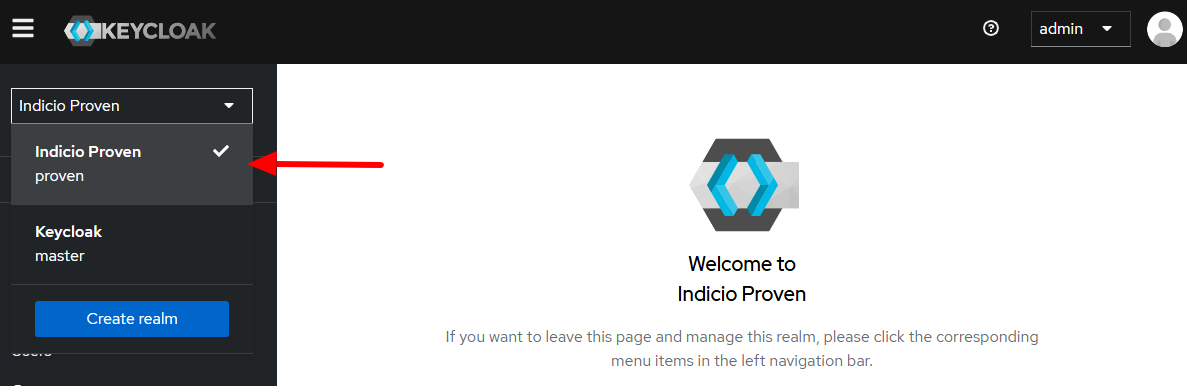
Log in to Keycloak. The address is https://yourURL/identiy.
Change the realm to Indicio Proven. (Image 1)
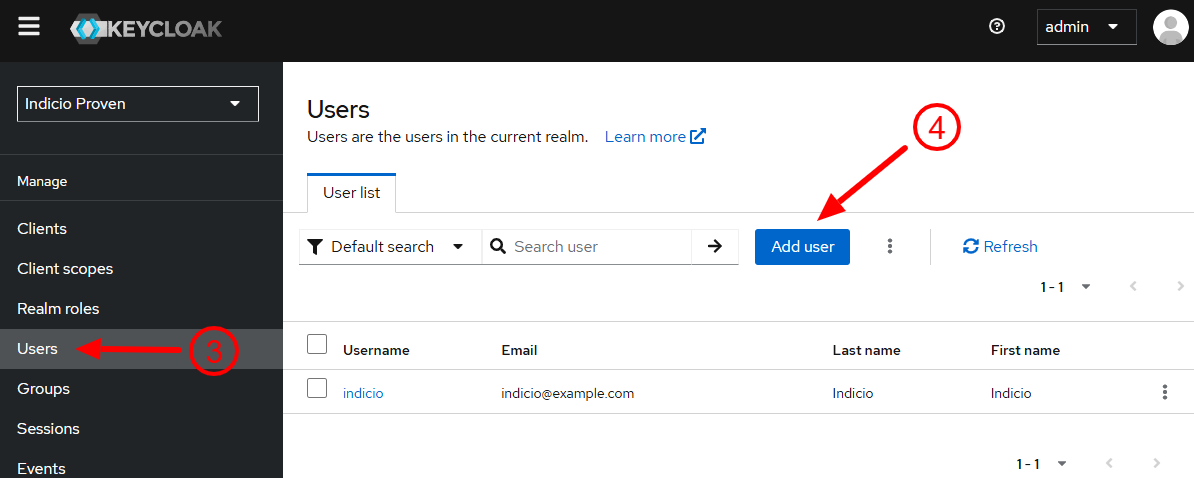
Click on Users. (Image 2)
Click Add user
Invitations are only valid for 24 hours after they are issued. If the new user doesn’t sign in within that time period, press the envelope in the Resend column to reissue the invite. Usernames are established as new users log in for the first time.
You can edit the following items for users. Refer to the Create New Users section for help.
Log in to Keycloak.
Click Users in the left menu.
Click on the user you wish to edit.
Edit the user’s name or email.
If you wish to delete a user, follow the steps below:
Log in to Keycloak.
Click Users in the left menu.
Click on the three vertical dots found to the right of the user.
Click Delete.
Groups define how user access is managed. Each wallet (aka agent) has its own group. A user be assigned to the correct group to have access to the wallet.
Log in to Keycloak.
Go to Groups found in the left menu.
Click Create group.
Assign a Name.
In Settings, an admin can customize the screen to match the branding of the organization. Below are the options and descriptions:
Organization Details:
Organization name: as it appears below the logo on the left
Website title: name as it appears on the browser’s tab
Change Logo: This takes any properly formatted image file which is transparent or has a background that matches the admin system background (the default background color is white, #ffffff):
Click Save when all desired changes are made
The following document describes the major steps to integrate with Proven and incorporate verifiable credentials and decentralized identity into your software, solutions, and workflows. This guide covers all of the necessary information in recommended order and assumes you have general software development knowledge and only an introductory level understanding of decentralized identity technology.
This guide starts with an introduction to decentralized identity technology and guides you through architecting your solution. Next, set up a development environment, learn the API and SDK calls, and implement your integration. As your integration nears completion, configure your staging and production environments and test what you’ve developed. Finally, launch, evaluate, maintain, and update your solution.
Feel free to skip sections you already understand or to jump straight to what you want to learn. Remember, this is a guide to help you understand how your solution could be implemented, but you should consider your specific requirements, make adjustments, and customize as necessary.
Decentralized identity provides a way for people, organizations, devices, and even AI agents to identify themselves digitally.
It also provides a way to reliably trust the information presented by a person or device or a device that has a digital identity.
It does this by issuing digitally-signed data in the form of Verifiable Credentials that can be held in digital wallets.
Active: the second party has acknowledged the connection.
Enter the Username. (Image 3)
The other fields are optional, but may be useful: (Image 3)
First name
Last name
Click Create. (Image 3)
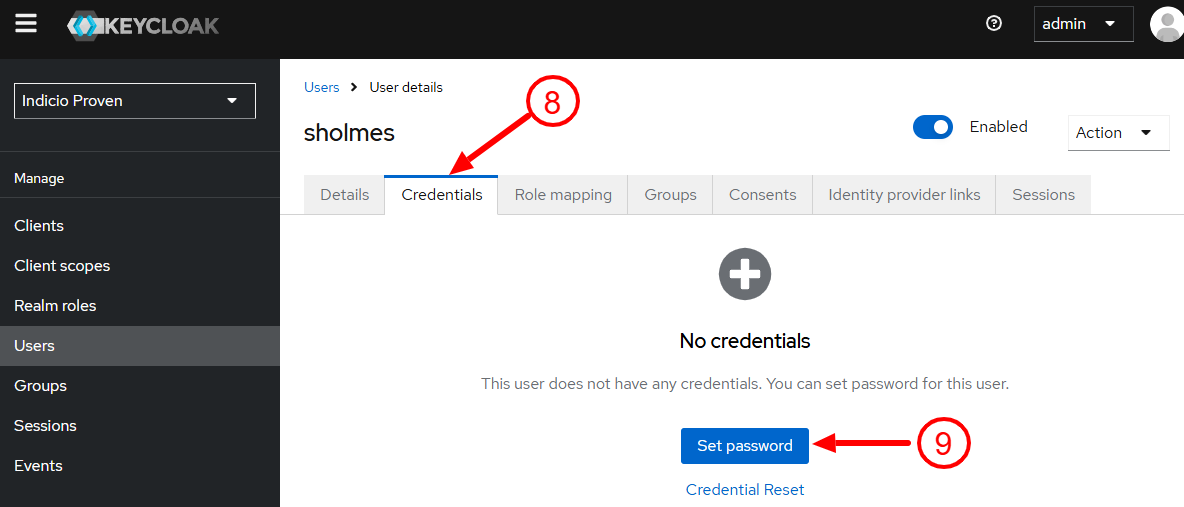
Click the Credentials tab. (Image 4)
Click Set password. (Image 4)
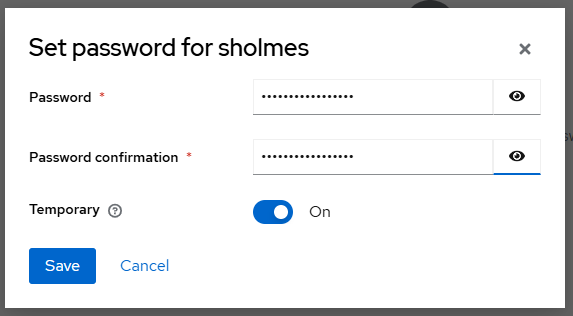
Enter the information in the box that opens: (Image 5)
Password
Password confirmation
Turn on Temporary. This requires the user to reset his or her password when they log in the first time.
Click Save.
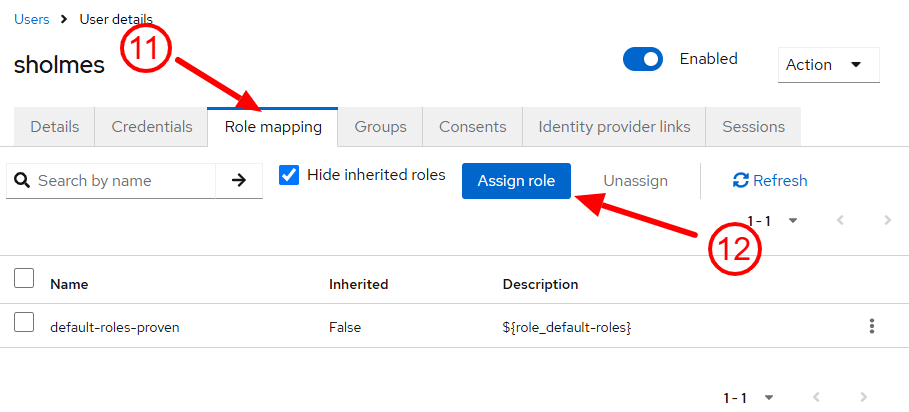
Click the Role Mapping tab. (Image 6)
Click Assign Role. (Image 6)
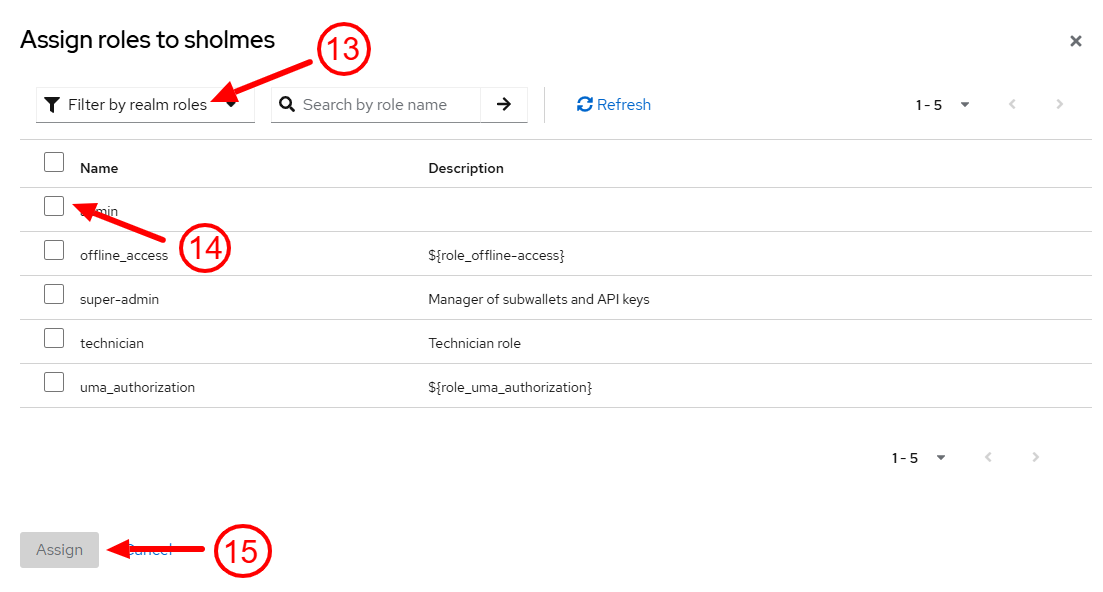
Select Filter by Realm Role from the drop-down. (Image 7)
Click on all desired roles: (Image 7)
admin:
This role can do all regular agent functions: connections, DID creation, credential issuance and presentation, messaging, governance file management, schema management
This role can also create and revoke API keys (only for their own wallet(s); in contrast, super-admins can create/revoke API keys for any subwallet)
offline_access: This is a KeyCloak role and Indicio does not make use of it.
super-admin:
This role is for management of multitenancy
Super admins can create subwallets, query all subwallets, and create and revoke API keys for all subwallets
Highest level of privilege
technician:
This role is a reduced version of admin privileges; it can do messaging, connections (can't delete a contact), credential issuance (can't delete a received credential), credential presentation, can't manage governance files, can't create a did, can manage invitations (can't delete an invitation), can't manage schemas (only read them), can't manage settings, can't manage its own API keys
Overall, can't delete resources. A technician can do issuance and presentations, but an admin role is needed for the full issuance setup if a new schema needs to be created
uma_authorization: This is a KeyCloak role and Indicio does not make use of it.
Click Assign. (Image 7)
Click on the Groups tab. If a group doesn't exist, you may need to create a group.
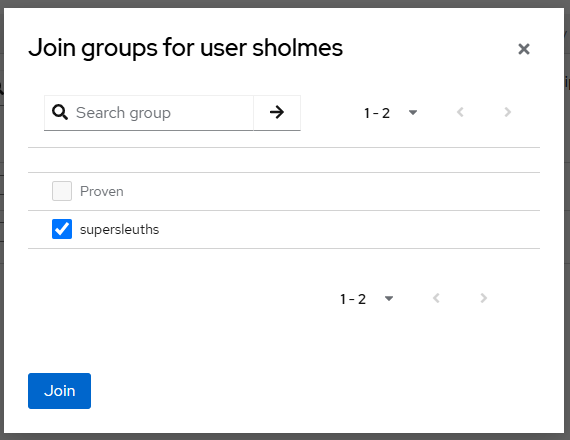
Click Join Group.
Select any groups applicable. (Image 8)
Click Join. (Image 8)
Reset the user’s password
Add or remove roles.
Add or remove groups.
Confirm you want to delete the user.
Click Create.
Click on the group you just created.
Select the Members tab.
Click Add members.
Add any desired users in the dialog that appears. These are the users that should have access to the wallet that will be associated with this group
Click Add.
Go to Attributes tab.
Click Add attributes.
Key: proven_group_id
value: [WalletNameHere]
Click Save.
Change logo: on email stream and on the left.
Change logo 192 x 192: used when a mobile device is used instead of a desktop.
Change logo 512 x 512: used for mobile devices.
Update favicon.io: image found next to the name in the browser’s tab.
Web App Manifest: The web app manifest provides app information to devices which treat the admin portal as a single-page application (such as mobile devices).
Short name
Full name
Theme color
Background color
SMTP Configuration: This is the email account used when sending credentials and invitations to users. It must be set up before any credential invitations can be issued. If your company has a no-reply email, it is acceptable to use it here.
Host: mandatory field — the hostname or IP address to connect to (defaults to ‘localhost’).
Mail Username: mandatory field — the username (for Gmail accounts, mail username must be the same as the user email, e.g., johndoe@example.com).
User email: mandatory field — the user email
User password: mandatory field — the password for the email account (or an app password if a Gmail account is used)
Port: optional field — the port which the email system uses to accept email sending requests (defaults to 587 if Encryption Type is false or 465 if true).
Encryption: optional field — if true, the connection will use TLS when connecting to server. If false, (the default), then TLS is entered if the server supports the STARTTLS extension. In most cases, set this value to true if you are connecting to port 465. For port 587 or 25 keep it false.
Theme: The theme changes the colors of the different elements. Below is a list of the possibilities and the elements affected:
Primary color: action buttons (submit, confirm, save, edit, etc.), current tab color, and username.
Secondary color: hover-over tab, tooltip symbols.
Tertiary color: home page hover-over color.
Neutral color: disabled buttons and form elements.
Negative color: warnings that pop up, delete buttons, cancel buttons.
Warning color: undo buttons.
Positive color: successes that pop up.
Text color: all text with the exception of tooltips.
Text light: text on buttons
Border: most of the border lines found in the application; it uses a full CSS declaration, such as “1pxsolid #ddd.”
Drop shadow: some of the various boxes in the application; they require a full CSS declaration, such as “3px 3px 3px rgba(0, 0, 0, 0.3).”
Primary background: background of all the boxes.
Secondary background: every other row of the tables.

Thus, if you trust the issuer of the credential, you can trust the information stored in the credential.
This enables digital identity and data to be shared and verified in a fully portable and seamless manner, without reference to certificate authorities, identity providers, or “phoning home” to the source of the data or cross-checking against the same data held in a centralized database.
One consequence of decentralized identity is that Verifiable Credentials allow data to be held by the owner (the holder) of the data, typically on their mobile device. This allows people to control who they share their data with and to share it in ways that, depending on the Verifiable Credential format, maximize privacy through selective disclosure and zero-knowledge proofs.
This means that decentralized identity solves key challenges for data privacy regulations, such as the European Union’s GDPR.
A Verifiable Credential holder can only share their data by consent. They can share data selectively or through zero-knowledge proofs to preserve privacy. This meets the GDPR minimization requirements for consent, data, and purpose (an organization explicitly receives consent from the data owner to use their data, limits the amount of personal data requested, and ties it to a specific use). By being able to verify data cryptographically without needing to centrally store that data, Verifiable Credentials also meet GDPR requirements for security.
There are two additional important elements to a credential ecosystem. The first of these is governance. Governance involves establishing and automating trust within a credential use case: Who are the trusted issuers of credentials? Who are the trusted verifiers? What information needs to be presented?
These rules are published in machine-readable files by the natural authority for the ecosystem.
The second element is how trust is operationally determined, or in other words, how is the cryptography to verify a credential facilitated? The information about credential issuers (such as DIDs and public keys), schemas, revocation, and the linkages between these data types needs to be stored in a trusted location called a Verifiable Data Registry. There are many ways to do this. Three of the most common ways include:
Blockchain distributed ledger. The advantage of using a distributed ledger is that it provides credential resilience and longevity.
Witness networks. Instead of using a network of nodes to run a ledger, a collection of devices can use other conventions or software to store, secure, and share registry info.
Other trust mechanisms. Some methods of storing registry information are simpler than ledgers or witness networks and establish trust in other ways. For example, hosting the information on a web server and using DNS infrastructure to establish trust is relatively straightforward. Depending on the server infrastructure, this may be less robust than a ledger or witness network.
In summary, decentralized identity removes the inherently vulnerable processes generally used to identify people and organizations online — processes otherwise known as centralized and federated identity.
With the vulnerabilities eliminated, identity and data can be easily and instantly shared and authenticated anywhere using fraud- and AI-resistant ways.
Now that you have learned about the basics of decentralized identity, you’re ready to architect your solution to incorporate decentralized identity and verifiable credentials.
Some of the key decisions that you need to make include which DID method(s), schema(s), credential format(s), and protocol(s) to use. You need to assess how many issuers and verifiers are required, how these software agents integrate with existing systems, what wallet(s) and application(s) to use, and a strategy for trust establishment.
DID methods are important because they are used to uniquely identify your software and set up the cryptography at the heart of decentralized identity. They are tied to your trust establishment mechanism. Sometimes they are also tied to credential formats and communication protocols due to the choices developers make when developing decentralized identity software packages.
Some popular choices include did:web and did:webvh, did:key, did:sov and did:indy, did:ion, and did:ethr.
It is important to note that some decentralized identity systems do not utilize DIDs for identifiers, cryptography, or trust establishment (e.g. mdoc/mDL).
One of the most important elements of your integration are the schemas of the verifiable credentials. A schema defines the attributes or data fields in a verifiable credential. These determine which “packets” of information you need to make reusable and verifiable around your system. For example, if you were working with an educational ecosystem, you might need schemas for student IDs, tuition receipts, class completion certificates, and diplomas.
Once you’ve identified which schemas you need, you’ll want to identify any existing schemas that you can or need to use. If a suitable or required schema doesn’t exist, you’ll need to create one, which involves specifying which attributes to include in the schema and naming it.
Sample User Schema:
For encoding your schema into credentials, you will need to select one or more credential formats. Each format has pros and cons that may make some formats more suitable than others for your specific use cases.
The choice of credential format may be influenced by factors such as regulatory requirements, jurisdictional constraints, privacy and data protection considerations, and interoperability requirements with existing ecosystems or partners. Indicio can assist in navigating these considerations and selecting formats that align with your technical and compliance needs.
There are currently four major verifiable credential formats in widespread use; but, like many other technologies, there will be future updates, additions, and competing specifications to consider. After integrating Proven into your solution, you’ll need to schedule a periodic review of available credential formats.
Mdoc refers to a mobile document, and mDL refers specifically to a mobile driver’s license as defined by the ISO/IEC 18013-5 standard. These formats are primarily used for government-issued digital identity documents, including driver’s licenses and other official credentials.
Implementing mdoc and mDL support is more complex than many other credential formats. It typically requires CBOR-based binary encoding, integration with certificate-based public key infrastructure (PKI), and conformance to ecosystem-specific trust frameworks. In addition, participation in many mdoc and mDL ecosystems may require formal approvals or certification processes, particularly for government and regulated deployments.
SD-JWT Verifiable Credentials are based on the JSON Web Token (JWT) standard and use selective disclosure mechanisms to allow holders to reveal only specific claims during presentation. The format is simpler to implement than some other credential types because it builds on widely adopted JWT tooling and web security primitives.
SD-JWT VCs are among the formats approved for use within the eIDAS 2.0 and EUDI Wallet ecosystems. However, they do not currently provide native support for zero-knowledge proofs or cryptographic unlinkability across presentations. As a result, deployments that require reduced correlation across repeated use often rely on issuing credentials in batches or using additional operational controls.
JSON-LD Verifiable Credentials are defined by the W3C Verifiable Credentials Data Model and use JSON-LD to represent credential data in a flexible, extensible format. They are commonly used in decentralized identity systems and support a wide range of credential types and use cases.
JSON-LD credentials can be issued to a holder and presented across systems without being bound to a single platform. However, in their base form, they do not provide native support for selective disclosure or zero-knowledge proofs. Implementations that require these privacy-preserving features typically rely on additional cryptographic extensions or alternative credential formats.
AnonCreds (Anonymous Credentials) are a credential format designed to provide strong privacy guarantees, including selective disclosure, zero-knowledge proofs, and cryptographic unlinkability across repeated presentations, making them well-suited for privacy-sensitive use cases. Many current implementations rely on supporting infrastructure such as distributed ledgers for credential metadata and revocation, as well as DIDComm-based communication protocols.
There are some major protocols in use with verifiable credentials, which are used for issuing credentials, requesting and sharing presentations, and, with DIDComm, performing other operations related to decentralized identity. Typically, implementations start with one or a small number of protocols. Additional protocols can be added later to improve system interoperability or when they’re needed for their unique capabilities. They can also be added to create implementations with novel properties.
OID4VC (OpenID for Verifiable Credentials) defines standardized protocols for both verifiable credential issuance (OID4VCI) and verifiable credential presentation (OID4VP). It builds on OpenID and OAuth flows that are already familiar to many developers, making integration straightforward. Because it leverages existing authentication patterns and infrastructure, OID4VC enables secure credential exchange with minimal additional overhead. One con to using OID4VC is that it does not establish a persistent connection, so additional interactions will require new URLs.
DIDComm includes protocols for issuance and verification, among others. DIDComm’s major strength is that it can maintain a persistent connection, which allows two connected agents to carry out additional operations and utilize established trust over time.
While implemented in different ways, these are all “proximity” protocols–protocols used when two software agents are within close range of each other. This is simultaneously their strength and weakness.
The Digital Credentials (DC) API is supported by both Android and iOS and allows for simpler verifiable credential support on websites.
After you have determined how to manage all of the previous considerations, you can plan for credential issuance in your solution. Generally speaking, you need one credential issuing agent for each distinct entity making verifiable statements. You also need to consider where in your workflow you need to collect and validate data and when it needs to be issued to a holder’s wallet. This will determine where code updates or additions will need to be made in your existing system.
The next step is to plan for credential verification in your solution. Again, generally speaking, you need one verifying agent for each entity that needs to verify credential data (through the use of verifiable presentations). For each verifier, determine which credentials and credential attributes you need. You need to decide where in your workflows the data needs to be verified and ingested so you can plan for updates or additions.
When considering your wallet and application strategy, there are several important questions to answer. Will you use an existing wallet (such as Holdr+)? Will you white-label an existing wallet? Will you build or modify an app to include wallet functionality using an SDK (such as Indicio’s Holdr SDK)? Do you need to support multiple apps or wallets?
Aside from the cryptography involved with issuing and verifying credentials, you also need a way to identify which parties are trusted. There are various ways to do this, including DIF Credential Trust Establishment, ToIP Trust Registries, x.509 certificate chains with VICAL, and OAuth.
To integrate with Proven, you will need to install your own copy of Proven and configure it to meet your specific needs. The following instructions are one way you can install Proven by yourself. If you need assistance or other installation options, please get in touch with us — Proven works with a wide variety of hosting options.
Follow the instructions in the GC Proven User Installation Guide to get a baseline Proven installed. Using the example instructions in the above document as a guide, add one or more schemas as needed for your application.
You might also need to add an invitation for use by your application. Use the following steps if needed:
Log in to the Proven UI.
Click INVITATIONS in the main menu.
Click the large + button in the lower right corner.
Fill in the fields. Start with the following common values, then adjust to your preferences as needed:
OOB Invitation: True
Protocol: DID Exchange 1.1
Alias: your choice, used to refer to the invitation within Proven
Invitation Mode: Multi
Uses: leave blank for no limit or enter a specific number (e.g. 5000) to cap how many times the invitation will be used
Accept: Auto
Public: False
Their Role: your choice, could be used to categorize connections
Their Label: your choice, usually used by other agents as a friendly name for this agent
Workflow Status: Active
Description: your choice, usually a short reminder of what this invitation was created for
Purpose: your choice, this is a unique “handle” to use when linking invitations to specific workflows or behavior
Active Starting Time: unused in this version
Active Ending Time: unused in this version
Once the invitation is created, click on the new invitation, then copy the new invitation URL into your application.
Congratulations, you now have an instance of Proven that you can use for learning, experimentation, and development!
Once you’ve architected your solution and configured an instance of Proven to use in development, it’s time to learn how to use Proven and the Holdr SDK.
The Indicio Proven API Tutorial demonstrates how to connect, issue, and verify an AnonCreds credential using a Proven Agent and the Holdr+ Mobile Wallet application.
See API Calls for OID4VCI and OID4VP SDJWT for instructions to issue and verify an SD-JWT VC or JWT VC using a Proven Agent and then using the SDK.
See Indicio Proven API Documentation to view the API calls to issue and verify JSON-LD type credentials using a Proven Agent.
You can also refer to the Indicio Proven API Reference to learn more about individual API calls.
The Holdr Mobile SDK Documentation describes how to install, configure, and use the Holdr SDK.
Now that you have a solution architecture, a development system, and some experience with Proven and the Holdr SDK, you are ready to implement your integration.
We’ll describe a process that works well for us and then share some useful tips, hints, and information.
We like to follow these high-level steps during our integrations:
Publish schemas and configure your Proven agent(s) to use them.
Issue a test credential using dummy data to an existing wallet (such as Holdr+).
Use Holdr+ to present the test credential to your Proven verifier.
Write code in your existing system to retrieve and collect data for a credential and then call the Proven API to issue the credential to the existing wallet.
Write code in your system to receive webhooks. Try out these endpoints manually.
Configure the webhooks in your Proven verifier to send verifiable presentation data to your system’s new endpoints.
Now that real credential data can be used to create credentials and real presentation data can be ingested by your system, you can start working on your own wallet application instead of using Holdr+.
Create a white label version of Holdr+, add the Holdr SDK to your existing application, or begin coding a new application using the Holdr SDK.
Keep the following tips and information in mind while you are integrating decentralized identity into your solution using Proven:
(Developer) licenses
Expiration - Proven licenses include an expiration date. To ensure that your solution is running within its license agreement and continues to function, make careful note of when your software license expires.
Renewal - Although your license includes a short grace period, you will have more success if you begin the renewal process before your grace period begins so that your renewed license is ready to go right when you need it.
Enforcement - Indicio Proven and the Indicio Holdr SDK will stop working after their license grace periods expire, usually after 60 days.
Development tips & tricks
Source control - We recommend keeping your code in a source control solution to make sure that your code is versioned and backed up.
Backups - We also recommend performing periodic backups of the different parts of your solution to help provide a robust system that can survive most emergencies or disasters.
Indicio Support
For any support-related issues that you encounter, please feel free to directly contact anyone at Indicio that you already have contact with, or use our Indicio support email, , to share your issues and we will get back to you as soon as we can.
Testing during development
Unit/integration/E2E testing
Although there is a later section focused entirely on testing, it is wise to write many of your tests (both automated and test scripts for humans) during your development phase.
Happy/unhappy path testing
Now that your solution has been developed and integrated with Proven, it is time to build a staging environment for testing of a production-like environment (which can also be used for demonstrations). While it’s possible to use the Proven instance created for development for this purpose, we recommend using a different environment for staging so that development efforts do not compromise your efforts to test and demonstrate your solution.
The Proven Staging environment is built in the same way as instructed in the Configure Development Environment section. Be sure to add all schemas that were included and needed from your development environment and remember to incorporate any learnings that you have experienced along the way.
The Proven Staging environment should be nearly an exact replica of what you built for Development. If you are using Hyperledger Indy as your VDR, you will want to configure your staging environment to use a stable network (such as the Indicio DemoNet) or, for testing that is closer to production configuration, a production network (such as the Indicio MainNet). The schemas used in development can be reused and simply added to the Proven Staging instance as needed (although the schema ID may be different if you are using a different network than you did in development), but the invitations will be different.
Once you have completed the Staging phase, it’s time to begin the production phase.
The Proven Production environment is built the same as the Proven Staging environment but with a few additional recommended security hardening measures to ensure resilience, integrity, and operational reliability.
Proven Server Hardening Recommendations:
Secure passwords
Follow the instructions for setting up Proven to ensure that all passwords included in Proven are secure.
Firewall
Enforce a strict default-deny inbound policy.
Allow only the minimum required ports (e.g., 80, 443, 22 and possibly 8150 if needed for swagger API access).
Restrict SSH access to trusted IPs.
DDoS protection - Implement request-rate limiting on ingress with a cloud-native tool like Cloud Armor.
Monitoring
Implement real-time monitoring for at least the following:
CPU
memory
OS Security
Apply all OS security patches regularly
Access control
Limit the number of users with access to the server (but have at least two).
Enforce MFA for all admin accounts.
Backups
Automated daily backups.
Testing your verifiable credential solution and workflows should include standard testing procedures as well as tests to cover some unique decentralized identity considerations.
There are a number of testing practices that we recommend in order to ensure that a solution is complete, robust, and resilient.
We recommend unit, integration, and end-to-end (E2E) tests of your code to verify that new functionality works and that you don’t have regressions.
Conduct performance and security tests of your system.
Performance tests:
Load testing
Stress testing
Spike testing
Endurance testing
Scalability testing
Security tests:
Penetration testing
Vulnerability scanning
Fuzz testing
Risk assessments
Conduct user and acceptance tests to ensure the solution is usable and that you’ve delivered a satisfactory end product.
There are some unique considerations for testing solutions and workflows that include decentralized identity.
VDRs underpin the trust of your solution, so reliability, security, and compliance are especially important. This also means that it is riskier to “roll your own” implementation and the focus of your efforts should be on properly installing, configuring, and testing an existing registry solution. Some key things to test include correct operation, performance, availability, and data minimization. As some VDRs (such as Hyperledger Indy) use nonstandard ports, you will need to ensure that your firewall rules allow access to the VDR.
Schemas are crucial for semantic interoperability of issued credentials, so it is important that validation, governance, and interoperability are tested. Begin testing by ensuring the different parts of your system are using matching schema IDs.
Revocation allows trust in the system to increase because it provides a way to handle inaccurate or expired information. Testing for resilience, availability, and performance is especially crucial for revocation.
Because mediators provide stable endpoints and collect messages for your mobile software, making sure they are stable and performing well is crucial. Indicio can assist with generating load to test mediator capacity and stability.
If your solution is open to multiple parties, apps, or software versions, you’ll need to test the various combinations that could occur in real-world usage. Using official test suites is very useful for interoperability testing.
Certain deployments, particularly in regulated or government environments, may require a Data Protection Impact Assessment. Your organization can approach Indicio for guidance and assistance, including supporting documentation on processing purposes, data flows, and technical safeguards, as well as explanations of how verifiable credential-based designs support privacy-by-design and data minimization principles.
Governance defines how trust is established, enforced, and maintained over time within a verifiable credential ecosystem. At a minimum, your system should explicitly control which credential issuers are trusted and under what conditions their credentials are accepted.
Beyond issuer trust, governance considerations typically include policy enforcement, operational readiness, onboarding and offboarding of participants, transparency into trust decisions, and alignment with applicable legal and contractual frameworks. These elements should be clearly defined and validated before production deployment to ensure consistent and predictable behavior across environments.
If you have existing deployment and launch procedures in place, it is wise to continue using them. The following launch steps or considerations will help ensure that the additional decentralized identity integration also goes smoothly.
Consider a soft or incremental launch, where a limited set of users or features is introduced at one time in order to reduce the risk of the new launch.
Your technical team should be prepared to support the launch of your integrated solution by having monitoring configured, a support plan in place, and establishing rollback or contingency plans if anything goes wrong during or following the launch.
There is more to a successful launch than the technical rollout of new technology. Operations, support, customer service, and even marketing and sales departments should be aware of and prepare new processes and materials for the changes introduced with decentralized identity.
Change management so everyone involved, especially customer-facing employees, knows what has been updated and can guide users to successfully use the system.
Training materials for those with a role that requires more than simple awareness of the updated solution.
Quick start guides may be useful for employees or customers.
Full instructions are useful for documenting workflows and providing detailed guidance.
FAQs provide guidance in an easy-to-digest format.
Signage is often necessary where solutions have a physical presence.
Promotion can be key to the success or failure of a new solution launch. If the public is unaware of or doesn’t understand the new offering, it may fail to meet utilization goals.
Marketing and sales materials are important for solutions that need to be sold before they are utilized by end users.
Collecting and analyzing data from monitoring systems allows you to gauge the solution’s performance.
After the solution has launched, it is also important to immediately and then periodically gather feedback from those using and supporting the system to gauge their impressions and identify any signs of trouble.
Security updates are regularly released for nearly all actively maintained software, and Proven and the software it relies on are no exception. We recommend establishing a monthly (at a minimum) cadence of applying security updates.
You will need to consider at least two major portions of your solution that might need to be updated:
Proven Updates: Updates to Proven will include improvements and new features that you might want to add to your solution. Regularly check for updates to Proven and consider if and when to upgrade to later versions.
Solution Updates: Your solution might need changes and improvements. Establish a regular evaluation of your solution and perhaps a roadmap for the development of improvements and upgrades.
Integrating Proven allows you to add powerful decentralized identity functionality to your solution using familiar patterns, such as APIs and SDKs, unit and integration tests, Docker and Kubernetes, and more. As with all guides, however, this guide cannot describe every situation, requirement, step, or potential solution. Contact us if you have questions or would like assistance integrating Proven into your solution.
{
"attr_names": [
"user_email",
"username",
"user_id",
"user_roles"
],
"name": "User",
"version": "1.0"
}During the development process, it is also wise to record what successful and unsuccessful outcomes are possible and how to trigger those behaviors. Having repeatable test scripts to periodically check your system will be valuable.
disk space
network behavior
Daily Checks
A daily smoke test helps ensure that your services are always available for your customers.
Does not encompass admin privileges; if you want multitenancy management and regular agent privileges, you need both super-admin and admin
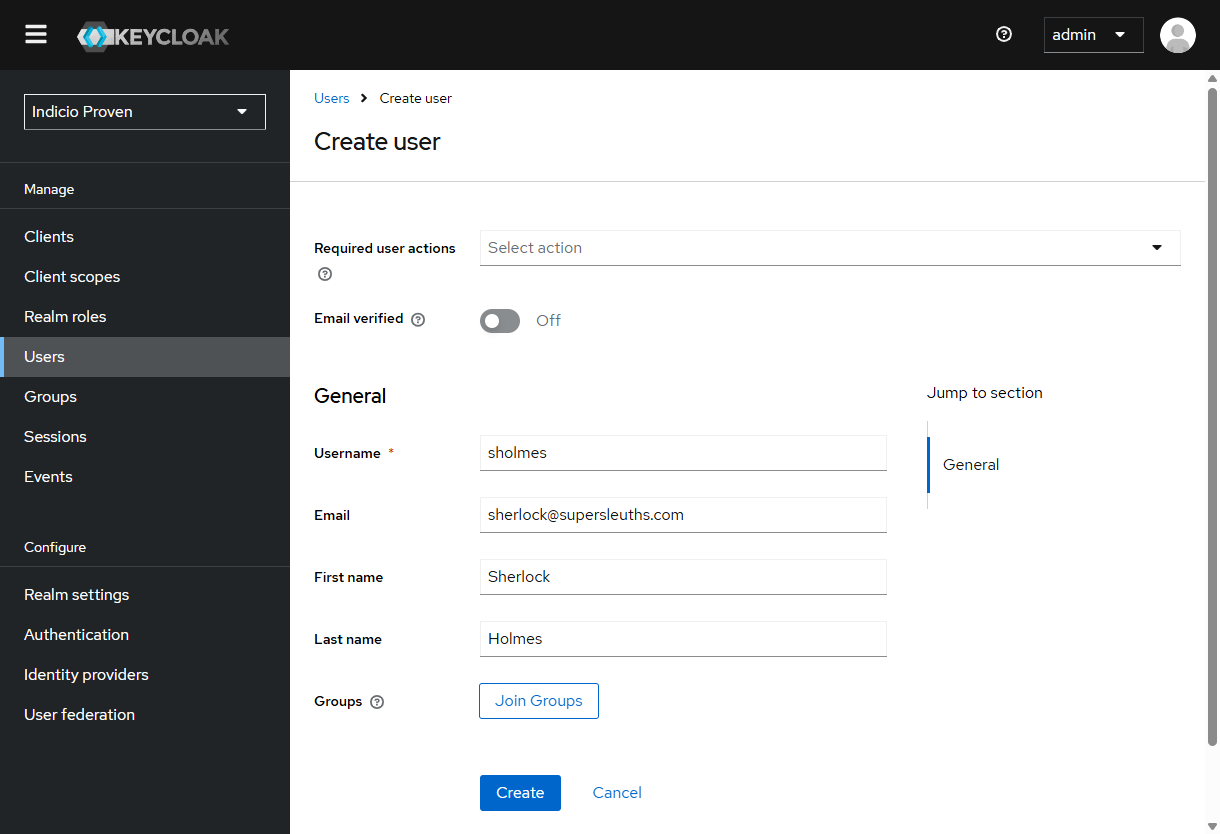
Before issuing a credential, you will need to create the “blueprint” (AKA class, schema, credential-type, etc.). See the following code example.
curl --location 'https://buckets4life.share.zrok.io/api/v1/oid4vci/credentials-supported' \
--header 'x-api-key: HuNsaIP9w0LsM5vqRhWprqLShgWLvb2yMAyuYUjWqd4=' \
--header 'Content-Type: application/json' \
--header 'Cookie: sessionId=s%3AIxantPaS5ZGMmrHZDetRQHQIVTRBiNBL.DAjBpQO8pxrjJdM4jQUYJU%2FlxzGAGIJcUzM%2FM7zltk0' \
--data '{
"format": "vc+sd-jwt",
"id": "IDCard",
"format_data": {
"vct": "ExampleIDCard",
"claims": {
"given_name": {
"mandatory": true,
"value_type": "string"
},
"family_name": {
"mandatory": true,
"value_type": "string"
},
"something_nested": {
"key1": {
"key2": {
"key3": {
"mandatory": true,
"value_type": "string"
}
}
}
},
"age_equal_or_over": {
"12": {
"mandatory": true,
"value_type": "boolean"
},
"14": {
"mandatory": true,
"value_type": "boolean"
},
"16": {
"mandatory": true,
"value_type": "boolean"
},
"18": {
"mandatory": true,
"value_type": "boolean"
},
"21": {
"mandatory": true,
"value_type": "boolean"
},
"65": {
"mandatory": true,
"value_type": "boolean"
}
}
}
},
"vc_additional_data": {
"sd_list": [
"/given_name",
"/family_name",
"/age_equal_or_over/12",
"/age_equal_or_over/14",
"/age_equal_or_over/16",
"/age_equal_or_over/18",
"/age_equal_or_over/21",
"/age_equal_or_over/65"
]
}
}'format {string}: The format of the credential. Will always be vc+sd-jwt for issuing SD-JWTs.
id {string}: The name of the credential (unique to Proven).
format_data.cryptographic_binding_methods_supported {object}: Not currently in use; should be ignored.
format_data.display {object}: Not currently in use; should be ignored.
format_data.vct {object}: String or url that identifies the type of SD-JWT.
format_data.claims {object}: An object with the body of your credential. The mandatory (optional) field signifies if the field is required to issue the credential. The value_type (optional) is the data_type of the field. It can accept the following types: string, number, and image media types such as image/jpeg as defined in IANA media type registry for images (). Other values may also be used.
vc_additional_data.sd_list {array}: Paths to values that can be asked for specifically and/or omitted. If the path to a value is not in the sd_list, then the value will be present each time that credential is presented.
supported_cred_id {string}: You will need this for the next step, so make sure to copy it.
After creating the credential supported, you will see a supported_cred_id. Make sure to copy it, as you will need it in the following step.
Now that you have your credential_supported record, you will be able to issue credentials using that credential_supported.
supported_cred_id {string}: This is the supported_cred_id you copied from the previous step.
credential_subject {object}: It should match your credential_supported.format_data.claims object from the previous step. However, instead of having an object with value_type or mandatory, you will have the key equal to the value.
In the response you will see an offer_uri. This can be either turned into a QR code or put into the SDK to accept the offer and receive the credential. If you hit the GET https://{{host}}/api/v1/oid4vci/exchanges endpoint, then you will be able to check on the status of your credential request.
Before you can present a credential, you will need to create the “blueprint” (AKA class, schema, credential-type, etc.). Use the following example to complete the step.
pres_def.purpose {string}: Enter a useful description of this presentation definition.
pres_def.id: This is a unique UUID for presentation definition.
pres_def.input_descriptors {array}: This is an array of credentials you will need for this presentation.
After creating the presentation definition, you will see a pres_def_id. Make sure to copy it, as you will need it in the following step.
Now that you have your presentation definition record, you will be able to present credentials using that presentation definition.
pres_def_id {string}: Copy the pres_def_id from the previous step.
Keep the rest of this request the same.
In the response, you will see a request_uri. This can be either turned into a QR code or put into the SDK to accept the presentation and send the credential. If you hit the GET https://{{host}}/api/v1/oid4vp/presentations endpoint, then you will be able to check on the status of your credential presentation.
This endpoint fetches a JSON-LD verification request record by using its verification_id.
The response body is an array of records. The following information is the data of each record:
Proven and the Holdr SDK provide the capability to issue, hold, and verify credentials in the mdoc/mDL format over a variety of protocols. The following documentation describes how to use Proven for the server portions of mdoc/mDL workflows.
There are currently four categories of APIs for working with mdoc/mDL credentials over OID4VC: Keys, Schemas, Issuance, and Verification. These categories of APIs should be approached sequentially, e.g. it doesn't work to use the verification APIs if you haven't configured keys.
Provision mDoc issuer key material so that you can securely issue mdoc and mDL credentials.
curl --location 'https://buckets4life.share.zrok.io/api/v1/oid4vci/setup/mdoc' \
--header 'x-api-key: HuNsaIP9w0LsM5vqRhWprqLShgWLvb2yMAyuYUjWqd4=' \
--header 'Content-Type: application/json' \
--header 'Cookie: sessionId=s%3AIxantPaS5ZGMmrHZDetRQHQIVTRBiNBL.DAjBpQO8pxrjJdM4jQUYJU%2FlxzGAGIJcUzM%2FM7zltk0' \
--data '{
"force": false
}'force {boolean}: Whether to force the creation of a new key or not. Use false for first-time initialization or in case you don't want to overwrite the key (if one exists). Use true to rotate the key.
key_id {string}: This string will allow you to identify the key that the system is using for mdoc, allowing you assess the state of the system (e.g., are we still using the same key as 6 months ago?). Useful to save. Sample: 8d3e8f18-5e7d-4f1a-a72b-1db2f1d0c001
cert_id {string}: This string will allow you to identify the certificate that the system is using to identify itself to other entities, allowing you to assess the state of the system (e.g. is this the endpoint or agent I think it is?). Useful to save. Sample: 6af84a3c-b6e9-4b1c-844a-6ce6a1f2d002
message {string}: Human readable text that describes the result of the operation (e.g., mDoc issuer keys provisioned successfully). Sample: mDoc issuer keys provisioned successfully.
Use this API to check whether the agent has been initialized with mdoc issuer key material and is ready to issue credentials.
No request body or parameters.
keys {array of objects}: The key(s) currently provisioned for mdoc issuance. Each object contains:
key_id {string}: The identifier of the provisioned key. Sample: 8d3e8f18-5e7d-4f1a-a72b-1db2f1d0c001
cert_id
Use this API to configure the system to issue credentials of a particular schema, i.e. set things up so you can issue mDLs, passports, national IDs, etc.
doctype {string} Required: The mdoc document type identifier (e.g., org.iso.18013.5.1.mDL).
label {string}: A human-readable name for this credential type (e.g., Mobile Driver's License).
description
agentRecord {object}: The record created in the agent.
supported_cred_id {string}: Unique identifier for this credential type in the agent. Sample: 9fd5ef9d-b8b8-4f52-b6a9-95b9ce4f6f8a
identifier
Optional query parameters:
doctype {string}: Filter results to a specific document type.
config_id {string}: Filter results to a specific configuration record.
Returns an array of configuration objects, each with the same fields as the dbConfig object in the POST response above.
Use this API to create a credential exchange and generate an offer that can be delivered to a holder's wallet.
supported_cred_id {string}: The ID of the registered credential type to issue, obtained from the Schema Setup step. Sample: 9fd5ef9d-b8b8-4f52-b6a9-95b9ce4f6f8a
credential_subject {object}: The claims to include in the credential. Keys should match the claims defined when the credential type was registered. For an mDL, common fields include family_name, given_name, birth_date, issue_date
offer {object}: The credential offer object, suitable for delivery to a holder's wallet.
credential_issuer {string}: The URL of the credential issuer. Sample: https://example/oid4vc/tenant/c286d1c7-c548-48d1-8580-76d3fe317bff
credentials
Verification is a multi-step process. First, you create a presentation definition that describes what claims you want to verify. Then, you use that definition to create a presentation request, which generates a URI that can be delivered to a holder's wallet (e.g., as a QR code). Finally, after the holder responds, you retrieve the presentation results.
Use this API to define what credentials and claims you want to request from a holder.
pres_def {object}: The presentation definition object, following the DIF Presentation Exchange specification.
id {string}: An optional identifier for the presentation definition. If omitted, the system will generate one.
purpose {string}: A human-readable string describing the purpose of the verification request.
input_descriptors {array of objects}: One or more descriptors specifying what credentials and claims are required.
pres_def_id {string}: The system-generated identifier for this presentation definition. Save this — you will need it to create a presentation request. Sample: 42c870ae-b605-4121-b5e3-1e6bb3a00c6f
pres_def {object}: The presentation definition as stored, including any system-generated fields such as id.
Retrieve all presentation definitions registered for your wallet.
No request body or parameters.
Returns an array of presentation definition objects, each with the same fields as the POST response for creating a presentation definition above.
pres_def_id {string} (path parameter, required): The identifier of the presentation definition to retrieve.
Returns a single presentation definition object with the same fields as the POST response for creating a presentation definition above.
pres_def_id {string} (path parameter, required): The identifier of the presentation definition to delete.
Only an HTTP status response code is returned.
Use this API to generate a presentation request from a previously created presentation definition. The response includes a URI that can be rendered as a QR code or delivered as a deep link for the holder's wallet to scan.
pres_def_id {string}: The identifier of the presentation definition to use, obtained from Step 1. Sample: 42c870ae-b605-4121-b5e3-1e6bb3a00c6f
vp_formats {object}: The verifiable presentation formats to accept. For mdoc verification, use "mso_mdoc": { "alg": ["ES256"] }.
request_uri {string}: A URL-encoded openid4vp:// URI. This is typically rendered as a QR code or deep link for the holder's wallet to scan or tap. Sample: openid4vp://?client_id=did%3Ajwk%3A...&request_uri=https%3A//example/oid4vc/tenant/.../oid4vp/request/43050ce4-bfb4-4454-b5de-9bbd1c564a85
request {object}: The presentation request record.
After the holder's wallet responds to the presentation request, use this API to retrieve all of the results.
Optional query parameters:
sort-field {string}: The field to sort by (default updated_at).
sort-direction {string}: Sort direction, ASC or DESC (default DESC).
params {object}: The pagination and filter parameters applied to the query.
rows {array of objects}: The presentation records. Key fields on each record include:
presentation_exchange_id {string}: Unique identifier for the presentation exchange.
After the holder's wallet responds to the presentation request, use this API to retrieve a specific result.
presentation_exchange_id {string} (path parameter, required): The identifier of the presentation exchange to retrieve.
Returns a single presentation record with the same fields as described in the list response above.
6af84a3c-b6e9-4b1c-844a-6ce6a1f2d002defaultCertificate {object}: The certificate currently designated as the default for mdoc issuance.
cert_id {string}: The identifier of the default certificate. Sample: 6af84a3c-b6e9-4b1c-844a-6ce6a1f2d002
key_id {string}: The identifier of the key associated with this certificate. Sample: 8d3e8f18-5e7d-4f1a-a72b-1db2f1d0c001
subject_dn {string}: The subject distinguished name of the certificate. Sample: CN=Proven mDoc Issuer
issuer_dn {string}: The issuer distinguished name of the certificate. Sample: CN=Proven mDoc Issuer
trustAnchors {array}: The trust anchors configured for this issuer. Empty if none have been configured.
ISO 18013-5 Mobile Driver's Licensedisplay {array of objects}: Display metadata for the credential type, used for rendering in wallets and verifier UIs.
verification_method {string}: The verification method to use when signing credentials of this type.
issuer_id {string}: The DID or identifier of the issuer for this credential type.
claims_schema {object}: An object defining the namespaces and claims this credential type supports.
vc_additional_data {object}: Additional data to include in the credential.
cryptographic_binding_methods_supported {array of strings}: Cryptographic binding methods supported for this credential type.
cryptographic_suites_supported {array of strings}: Cryptographic suites supported for this credential type.
proof_types_supported {object}: Proof types supported for this credential type.
org.iso.18013.5.1.mDLformat {string}: The credential format. Always mso_mdoc for mdoc credentials.
display {array of objects}: Display metadata as stored in the agent.
format_data {object}: The doctype and claims as stored in the agent.
dbConfig {object}: The configuration record stored in the Proven database.
config_id {string}: Unique identifier for this configuration record. Sample: c4d8f7f2-f8d0-4d0b-93d0-9f9f31a5c003
wallet_id {string}: The wallet this configuration is associated with. Sample: wallet-123
doctype {string}: The document type identifier as provided in the request.
supported_cred_id {string}: Matches the supported_cred_id in agentRecord.
format {string}: The credential format. Always mso_mdoc.
label {string}: The human-readable label as provided in the request.
description {string}: The human-readable description as provided in the request.
created_at {string}: ISO 8601 timestamp of when the record was created.
updated_at {string}: ISO 8601 timestamp of when the record was last updated.
expiry_dateissuing_countryissuing_authoritydocument_numberdriving_privilegesun_distinguishing_signportraitdid {string}: The DID to associate with the credential subject.
verification_method {string}: The verification method to use for signing this credential. If omitted, the system uses the verification method configured for the credential type.
pin {string}: An optional user PIN for the credential offer, adding an extra layer of security to the issuance flow.
label {string}: A human-readable label for this credential exchange.
connection_id {string}: The connection ID to associate with this credential exchange.
["org.iso.18013.5.1.mDL"]grants {object}: The grant types available for this offer. For mdoc/mDL issuance, this will contain a pre-authorized code grant.
urn:ietf:params:oauth:grant-type:pre-authorized_code {object}: The pre-authorized code grant.
pre-authorized_code {string}: The pre-authorized code the holder's wallet uses to retrieve the credential. Sample: iQ7DWmf2vjogMtQ_bdrDQg
user_pin_required {boolean}: Whether the holder is required to supply a PIN to redeem the offer.
credential_offer {string}: A URL-encoded openid-credential-offer:// URI. This is typically rendered as a QR code or deep link for the holder's wallet to scan or tap.
exchange {object}: The credential exchange record created by this request.
exchange_id {string}: Unique identifier for this exchange. Sample: 921786c9-dd65-473a-bebf-e5283d689c96
supported_cred_id {string}: The credential type ID used for this exchange, matching the value from the request.
credential_subject {object}: The claims as provided in the request.
verification_method {string}: The verification method that will be used to sign the credential. Sample: did:key:zDnaevgeiLuxFHYTHCHb1eAr489xPuCy3pDamtiGe5pWPvU41#zDnaevgeiLuxFHYTHCHb1eAr489xPuCy3pDamtiGe5pWPvU41
issuer_id {string}: The DID of the issuer. Sample: did:key:zDnaevgeiLuxFHYTHCHb1eAr489xPuCy3pDamtiGe5pWPvU41
state {string}: The current state of the exchange. Will be created immediately after issuance is initiated.
created_at {string}: ISO 8601 timestamp of when the exchange was created.
updated_at {string}: ISO 8601 timestamp of when the exchange was last updated.
id {string}: An identifier for this input descriptor. For mdoc, typically the doctype (e.g., org.iso.18013.5.1.mDL).
format {object}: Specifies the credential format. For mdoc verification, use "mso_mdoc": { "alg": ["ES256"] }.
constraints {object}: Defines the constraints on the requested claims.
limit_disclosure {string}: Set to "required" to ensure only the requested claims are disclosed.
fields {array of objects}: The specific claims to request. Each field has a path array using JSONPath notation. For mdoc claims, use the namespace-qualified syntax: $['org.iso.18013.5.1']['claim_name'].
wallet_idc286d1c7-c548-48d1-8580-76d3fe317bffcreated_at {string}: ISO 8601 timestamp of when the record was created.
updated_at {string}: ISO 8601 timestamp of when the record was last updated.
request_id {string}: Unique identifier for this request. Sample: 43050ce4-bfb4-4454-b5de-9bbd1c564a85pres_def_id {string}: The presentation definition used for this request.
vp_formats {object}: The verifiable presentation formats as provided in the request.
created_at {string}: ISO 8601 timestamp of when the request was created.
updated_at {string}: ISO 8601 timestamp of when the request was last updated.
presentation {object}: The presentation exchange record created by this request.
presentation_id {string}: Unique identifier for this presentation exchange. Use this to poll for results. Sample: 5e871b45-3821-4a94-8695-303517939afb
pres_def_id {string}: The presentation definition used.
request_id {string}: The request that initiated this presentation exchange.
state {string}: The current state of the presentation. Will be request-created immediately after the request is made.
created_at {string}: ISO 8601 timestamp of when the presentation exchange was created.
updated_at {string}: ISO 8601 timestamp of when the presentation exchange was last updated.
page-size {integer}: Number of results per page (default 20).
current-page {integer}: The page number to retrieve (default 1).
item-count {integer}: The total number of items.
state-filter {string}: Filter results to a specific state (e.g., done, request-created).
contact-id {string}: Filter results to a specific contact.
state {string}: The current state (e.g., request-created, done).
verified {boolean}: Whether the presented credentials were successfully verified.
role {string}: The role in the exchange (e.g., verifier).
presentation {object}: The presented credentials, if available.
created_at {string}: ISO 8601 timestamp of when the record was created.
updated_at {string}: ISO 8601 timestamp of when the record was last updated.
count {integer}: The total number of presentation records.
curl --location 'https://buckets4life.share.zrok.io/api/v1/oid4vci/status/mdoc' \
--header 'x-api-key: HuNsaIP9w0LsM5vqRhWprqLShgWLvb2yMAyuYUjWqd4='curl --location 'https://buckets4life.share.zrok.io/api/v1/oid4vci/credentials-supported/mdoc' \
--header 'x-api-key: HuNsaIP9w0LsM5vqRhWprqLShgWLvb2yMAyuYUjWqd4=' \
--header 'Content-Type: application/json' \
--header 'Cookie: sessionId=s%3AIxantPaS5ZGMmrHZDetRQHQIVTRBiNBL.DAjBpQO8pxrjJdM4jQUYJU%2FlxzGAGIJcUzM%2FM7zltk0' \
--data '{
"doctype": "org.iso.18013.5.1.mDL",
"label": "Mobile Driver'\''s License",
"description": "ISO 18013-5 Mobile Driver'\''s License"
}'
curl --location 'https://buckets4life.share.zrok.io/api/v1/oid4vci/credentials-supported/mdoc' \
--header 'x-api-key: HuNsaIP9w0LsM5vqRhWprqLShgWLvb2yMAyuYUjWqd4='curl --location 'https://buckets4life.share.zrok.io/api/v1/oid4vci/issue' \
--header 'x-api-key: HuNsaIP9w0LsM5vqRhWprqLShgWLvb2yMAyuYUjWqd4=' \
--header 'Content-Type: application/json' \
--header 'Cookie: sessionId=s%3AIxantPaS5ZGMmrHZDetRQHQIVTRBiNBL.DAjBpQO8pxrjJdM4jQUYJU%2FlxzGAGIJcUzM%2FM7zltk0' \
--data '{
"supported_cred_id": "9fd5ef9d-b8b8-4f52-b6a9-95b9ce4f6f8a",
"credential_subject": {
"family_name": "Doe",
"given_name": "Jane",
"birth_date": "1990-01-15",
"issue_date": "2026-03-10",
"expiry_date": "2031-03-10",
"issuing_country": "US",
"issuing_authority": "State DMV",
"document_number": "DL123456",
"driving_privileges": "A,B,C",
"un_distinguishing_sign": "USA",
"sex": "2",
"height": "170",
"eye_colour": "BLU",
"birth_place": "New York",
"resident_city": "Springfield",
"resident_state": "IL",
"resident_postal_code": "62701",
"resident_country": "US",
"nationality": "US",
"age_over_18": "true",
"portrait": ""
}
}'curl --location 'https://buckets4life.share.zrok.io/api/v1/oid4vp/presentation-definitions' \
--header 'x-api-key: HuNsaIP9w0LsM5vqRhWprqLShgWLvb2yMAyuYUjWqd4=' \
--header 'Content-Type: application/json' \
--header 'Cookie: sessionId=s%3AIxantPaS5ZGMmrHZDetRQHQIVTRBiNBL.DAjBpQO8pxrjJdM4jQUYJU%2FlxzGAGIJcUzM%2FM7zltk0' \
--data '{
"pres_def": {
"input_descriptors": [
{
"id": "org.iso.18013.5.1.mDL",
"format": {
"mso_mdoc": {
"alg": ["ES256"]
}
},
"constraints": {
"limit_disclosure": "required",
"fields": [
{
"path": ["$['\''org.iso.18013.5.1'\'']['\''given_name'\'']"]
},
{
"path": ["$['\''org.iso.18013.5.1'\'']['\''family_name'\'']"]
}
]
}
}
]
}
}'curl --location 'https://buckets4life.share.zrok.io/api/v1/oid4vp/presentation-definitions' \
--header 'x-api-key: HuNsaIP9w0LsM5vqRhWprqLShgWLvb2yMAyuYUjWqd4='curl --location 'https://buckets4life.share.zrok.io/api/v1/oid4vp/presentation-definitions/{pres_def_id}' \
--header 'x-api-key: HuNsaIP9w0LsM5vqRhWprqLShgWLvb2yMAyuYUjWqd4='curl --location --request DELETE 'https://buckets4life.share.zrok.io/api/v1/oid4vp/presentation-definitions/{pres_def_id}' \
--header 'x-api-key: HuNsaIP9w0LsM5vqRhWprqLShgWLvb2yMAyuYUjWqd4='curl --location 'https://buckets4life.share.zrok.io/api/v1/oid4vp/request' \
--header 'x-api-key: HuNsaIP9w0LsM5vqRhWprqLShgWLvb2yMAyuYUjWqd4=' \
--header 'Content-Type: application/json' \
--header 'Cookie: sessionId=s%3AIxantPaS5ZGMmrHZDetRQHQIVTRBiNBL.DAjBpQO8pxrjJdM4jQUYJU%2FlxzGAGIJcUzM%2FM7zltk0' \
--data '{
"pres_def_id": "42c870ae-b605-4121-b5e3-1e6bb3a00c6f",
"vp_formats": {
"mso_mdoc": {
"alg": ["ES256"]
}
}
}'curl --location 'https://buckets4life.share.zrok.io/api/v1/presentations' \
--header 'x-api-key: HuNsaIP9w0LsM5vqRhWprqLShgWLvb2yMAyuYUjWqd4='curl --location 'https://buckets4life.share.zrok.io/api/v1/presentations/{presentation_exchange_id}' \
--header 'x-api-key: HuNsaIP9w0LsM5vqRhWprqLShgWLvb2yMAyuYUjWqd4='format will be the credential type
id must not conflict with other IDs in input_descriptors
name will be a human-friendly name for you
purpose will also be a human-friendly field for you
pres_def.input_descriptors.constraints.limit_discolsure {boolean}:
required : This indicates that the Conformant Consumer MUST limit submitted fields to those listed in the fields array (if present). Conformant Consumers are not required to implement support for this value, but they MUST understand this value sufficiently to return nothing (or cease the interaction with the Verifier) if they do not implement it.
preferred: This indicates that the SHOULD limit submitted fields to those listed in the fields array (if present).
pres_def.input_descriptors.constraints.fields {array}: These are objects with the path to the values you would like to see when they are disclosed.
connection_id
string
e2aed3c4-c0a1-4711-902e-f0a9eba618da
Identifier that ties the used connection to the verification request record
contact_id
string
contact123
Optional contact ID string used for processing the request record by known contact. Used with invitation_id, has first priority
invitation_id
integer
123
Optional integer used to process the request record by a connection tied to the invitation_id. Used with contact_id, has second priority
context
array
[“...”, “...”]
List of contexts used for the verification record
attributes
array
[...]
List of attributes to be verified
wallet_id
string
407e6215-17c5-4c81-901e-d75d9cc1a75a
Identifier that ties this record to an existing wallet
label
string
Label for the verification request record
timeout
integer
10
Number of seconds the initial request waited for a completed request record
rule
string
“no rule”
Rules for the verification request
meta_data
object
null
Metadata for the verification request record
state
string
done
Current state of the verification request record
complete
boolean
true
This field does not indicate a verified request record, only that the request record has finished its process.
result
boolean
true
Indicates a verified request record. This field should be used alongside “complete” to determine a successful request record.
result_string
string
Verified
Custom string for helping to define the state of the request
result_data
array
[...]
Contains the verified attributes
presentation_exchange_id
array
[...]
Contains unique IDs for each proof request
error
string
“Controller Error! ….”
Error message caught while processing the request record
created_at
timestamp
2025-01-06T11:51:10.169Z
Date/time this record was created
updated_at
timestamp
2025-01-06T11:51:10.169Z
Date/time this record was last updated
curl --location 'https://buckets4life.
share.zrok.io/api/v1/oid4vci/issue' \
--header 'x-api-key:
HuNsaIP9w0LsM5vqRhWprqLShgWLvb2yMAyuYUj
Wqd4=' \
--header 'Content-Type: application/json' \
--header 'Cookie:
sessionId=s%3AIxantPaS5ZGMmrHZDetRQHQIV
TRBiNBL.
DAjBpQO8pxrjJdM4jQUYJU%2FlxzGAGIJcUzM%2
FM7zltk0' \
--data '{
"supported_cred_id":
"4e1a5734-629d-41ae-abc1-345732ce75
ab",
"credential_subject": {
"given_name": "Alice",
"family_name": "Smith",
"something_nested": {
"key1": {
"key2": {
"key3": "something
nested"
}
}
},
"source_document_type": "id_card",
"age_equal_or_over": {
"12": true,
"14": true,
"16": true,
"18": true,
"21": true,
"65": false
}
}
}'curl --location 'https://buckets4life.share.zrok.io/api/v1/oid4vp/presentation-definitions' \
--header 'x-api-key: HuNsaIP9w0LsM5vqRhWprqLShgWLvb2yMAyuYUjWqd4=' \
--header 'Content-Type: application/json' \
--header 'Cookie: sessionId=s%3AIxantPaS5ZGMmrHZDetRQHQIVTRBiNBL.DAjBpQO8pxrjJdM4jQUYJU%2FlxzGAGIJcUzM%2FM7zltk0' \
--data '{
"pres_def": {
"purpose": "Present basic profile info",
"id": "<<put uuid_v4 here>>",
"input_descriptors": [
{
"format": {
"vc+sd-jwt": {}
},
"id": "ID Card",
"name": "Profile",
"purpose": "Present basic profile info",
"constraints": {
"limit_disclosure": "required",
"fields": [
{
"path": [
"$.vct"
]
},
{
"path": [
"$.given_name"
]
},
{
"path": [
"$.family_name"
]
},
{
"path": [
"$.something_nested.key1.key2.key3"
]
}
]
}
}
]
}
}'curl --location 'https://buckets4life.share.zrok.io/api/v1/oid4vp/request' \
--header 'x-api-key: HuNsaIP9w0LsM5vqRhWprqLShgWLvb2yMAyuYUjWqd4=' \
--header 'Content-Type: application/json' \
--header 'Cookie: sessionId=s%3AIxantPaS5ZGMmrHZDetRQHQIVTRBiNBL.DAjBpQO8pxrjJdM4jQUYJU%2FlxzGAGIJcUzM%2FM7zltk0' \
--data '{
"pres_def_id": "51bcd5fb-a95a-4650-808f-d9ed91847d51",
"vp_formats": {
"vc+sd-jwt": {
"sd-jwt_alg_values": [
"ES256",
"ES384"
],
"kb-jwt_alg_values": [
"ES256",
"ES384"
]
}
}
}'/api/v1/verifications/json-ld/<verification_id> - GETField name
Expected type/ values
Examples
Notes
verification_id
integer
10
{
"verification_id": 1,
"connection_id": "e2aed3c4-c0a1-4711-902e-f0a9eba618da",
"contact_id": null,
"invitation_id": 1,
"context": [
"https://www.w3.org/2018/credentials#VerifiableCredential",
"https://www.w3.org/2018/credentials/v1",
"https://purl.imsglobal.org/spec/vc/ob/vocab.html#OpenBadgeCredential"
],
"attributes": [
"id",
"criteria"
],
"wallet_id": "407e6215-17c5-4c81-901e-d75d9cc1a75a",
"label": "your label here",
"timeout": 15,
"rule": "no rule",
"meta_data": null,
"state": "done",
"complete": true,
"result": false,
"result_string": "Not Verified",
"result_data": null,
"presentation_exchange_id": [
"52778677-a7be-4017-9b21-d146372f07e8"
],
"error": "",
"created_at": "2025-01-06T13:40:59.623Z",
"updated_at": "2025-01-06T13:41:02.640Z"
}
Primary identifier for the verification request record
The Indicio Holdr SDK (Software Development Kit) supports Android and iOS platforms and provides holder capabilities that are compatible with many Aries protocols. Consumption of the Holdr SDK will allow an application to have its own Aries Askar wallet for holding digital credentials that conform to the Anoncreds specification, communicate with ledgers through IndyVDR, and generate zero trust proofs for information verification through Anoncreds-RS.
Did Exchange 1.0
Out Of Band 1.1
Coordinate Mediation 1.0
Pickup 2.0
Issue Credential 2.0
Present Proof 2.0
Did:Peer:1
Did:Peer:2
Did:Key
Anoncreds
Sudo Typescript syntax is used to express the API. Any parameter that could be undefined is optional in Kotlin and React Native. Due to limitations with Swift code generation, not all Swift functions have default parameters when a value is optional and will need to have nil provided explicitly. A function using the await keyword is async in React Native and Swift and suspended in Kotlin.
Starts the agent and connects to the default mediator if a mediation configuration is provided.
Stops all even listeners and websockets and properly closes the wallet’s database files, so the agent can be used later.
Deletes the agent and all data associated with it, essentially resetting the wallet.
Sends a didExchange request to the agent associated with the provided out-of-band record.
Completes the didExchange handshake by sending a complete message to the agent associated with the provided didExchangeId.
Used when the auto-accept connection is disabled on the agent. This function is used to complete the started didExchange process once an out-of-band invitation has been processed, and a didExchange record is created but not auto-accepted.
Used to send a trust ping to another agent to ensure we can reach the agent.
Waits until the provided didExchangeId reaches a state of Done or until the provided timeout is reached.
Retrieves all didExchange records.
Finds all records that have tags matching the given query.
Retrieves the record with the provided ID or throws a RecordNotFoundError.
Finds the record with the given ID or returns null if not found.
Deletes the record with the given ID or throws RecordNotFoundError if it does not exist.
Finds all records associated with the given out-of-band ID.
Finds the record associated with the provided Did.
Finds the record whose invitation contained the provided Did.
Creates an out-of-band invitation and corresponding out-of-band record that is returned.
Parses a URL encoded invitation into an OutOfBandInvitationMessage.
Processes the provided invitation and potentially starts or completes didExchange protocol.
Processes an invitation where the invitation message is not present and the agent is implicitly invited.
Accepts the invitation of an existing out-of-band record. It is not commonly used.
Finds the out-of-band record with the corresponding invitation ID, or returns null.
Finds the out-of-band record that corresponds to the invitation with the given ID that we have created, or returns null.
Retrieves all of the out-of-band records held by the agent.
Retrieves all out-of-band records that match the provided query.
Retrieves the record with the provided ID or throws RecordNotFoundError.
Finds the record with the given ID or returns null.
Deletes the record with the given ID or throws RecordNotFoundError if no such record exists.
Finds all credentials whose schema ID matches the provided schema ID.
Sends a proposal to the connection with the associated didExchangeId that we want the specified credential from.
Accepts the offer associated with the provided credential exchange record.
Accepts the issue credential and saves it to the agent's wallet.
Finds the record with the given ID or returns null.
Finds all credentials whose exchange state matches the provided state.
Finds all records whose state matches the given state and came from the connection associated with the given didExchangeId.
Retrieves all of the credentialExchangeRecords.
Finds the credential exchange record that has matching threadId and didExchangeId (optional) or returns null.
Retrieves the credential exchange record that has matching threadId and didExchangeId (optional): otherwise it throws RecordNotFoundError.
Attempts to auto-accept the proof with the provided ID from the provided didExchange connection, it will throw ProvenError if the proof cannot be satisfied.
Accepts the given proof using the provided credential selections, it will throw ProvenError if the credential selection is invalid or insufficient.
Retrieves a mapping of proof requests to valid credentials for the request that require further selection. Throws RecordNotFoundError if the proof cannot be satisfied with the agent's current credentials.
Finds credentials that satisfy the proof request and automatically selects valid credentials if there are multiple options. Throws RecordNotFoundError if the proof cannot be satisfied with the agent's current credentials.
Retrieves the proof records for a given connection from the didExchange ID.
Starts or resumes the mediation to the default mediator. Called in agent.start by default.
Instructs the agent to attempt to pick up messages from the provided mediator record or the default mediator if not provided.
Finds the default mediator if one is set, otherwise returns null.
Finds the default mediator’s record. If the default mediator is found but not granted, this will throw ProvenError.
Sets the default mediator.
Requests mediation from the given didExchange connection.
Retrieves the mediation record with the provided didExchange ID or throws RecordNotFoundError.
Finds the mediation record with the given didExchange ID or returns null if not found.
Retrieves all of the meditation records.
Finds the didExchange record for the default mediator or returns null if not found
Attempts to complete the mediation request from the provided didExchange record in the given time. If it doesn’t complete, it will throw CancellatinException.
Retrieves the routing for this mediator. This is not available in React Native.
Sends a basic message to another connection.
Finds a basic message record by ID.
Retrieves all basic messages.
Finds all basic messages with matching comments.
Finds all basic messages from the recipient.
Finds all basic messages that match the role.
React Native events take a callback function and return a function to remove the callback.
The events that can have a handler registered are:
registerDidExchangeHandler
registerProofsHandler
registerCredentialsHandler
registerAgentHandler
registerBasicMessageHandler
registerRecordHandler
registerWebSocketHandler
Directly retrieve the event flow and use Kotlin's flow API using the events API. There is also a provided co-routine context on the events object.
The events that can be retrieved in Kotlin are the following:
getDidExchangeEvents
getAgentEvents
getCredentialEvents
getEventBusEvents (Record update events)
getMessageEvents (Events for all messages)
getProofEvents
getBasicMessageEvents
getTrustPingEvents
getWebSocketEvents
The following methods wrap events so you can easily listen to them without a third-party library or if you are using Objective-C:
onDidExchangeStateChanged
onCredentialStateChanged
onTrustPingEvent
onAgentEvent
onRecordEvent
onProofEvent
onWebsocketEvent
onBasicMessageEvent
Swift
await agent.start(
timeout: 10_000 // Optional -- time limit in MS to connect to mediator
)await agent.stop()await agent.delete()const didExchangeRecord = await agent.didExchange.acceptOutOfBandInvitation(
outOfBandRecord: OutOfBandRecord, // Record id (String) in React Native
autoAcceptConnection: Boolean | undefined,
label: String | undefined,
alias: String | undefined,
routingParam: Routing | undefined // Not available in React Native
)const didExchangeRecord = await agent.didExchange.acceptResponse(
didExchangeId: String
)const didExchangeRecord = await agent.didExchange(
didExchangeId: String,
outOfBandId: String,
routingParam: Routing | undefined // Not available in React Native
)const trustPingMessage = await agent.didExchange.sendPing(
exchangeId: String,
responseRequested: Boolean,
returnRouting: Boolean
)const didExchangeStateChangedEvent: DidExchangeStateChangedEvent? = await agent.didExchange.returnWhenIsConnected(
didExchangeId: String,
timeOutMs: Number | Long
)const records: Array<DidExchangeRecord> = await agent.didExchange.getAll()const records: Array<DidExchangeRecord> = await agent.didExchange.findAllByQuery(
query: Query // Record<String, String> in React Native. Malformed Query will throw
)const record = await agent.didExchange.getById(
didExchangeId: String
)const record: DidExchangeRecord? = await agent.didExchange.findById(
didExchangeId: String
)await agent.didExchange.deleteById(
didExchangeId: String
)const records: Array<DidExchangeRecord> = await agent.didExchange.getAllByOutOfBandId(
outOfBandId: String
)const record: DidExchangeRecord? = await agent.didExchange.findByDid(
did: String
)const record: DidExchangeRecord? = await agent.didExchange.findByInvitationDid(
did: String
)const record = await agent.outOfBand.createInvitation(
label: String | undefined,
alias: String | undefined,
goalCode: String | undefined,
goal: String | undefined,
handShake: Boolean | undefined,
messages: Array<BaseMessage> | undefined,
multiUseInvitation: Boolean | undefined,
autoAcceptConnection: Boolean | undefined,
routingParam: Routing | undefined, // Not available in React Native
appendedAttachment: Array<Attachment> | undefined
)const message = agent.outOfBand.parseInvitation(
invitationUrl: String
)const invitationResponse = await agent.outOfBand.receiveInvitation(
invitation: OutOfBandInvitationMessage,
label: String | undefined,
alias: String | undefined,
autoAcceptConnection: Boolean | undefined,
reuseConnection: Boolean | undefined,
routingParam: Routing | undefined, // Not available in React Native
acceptInvitationTimeOutMs = Number | Long | undefined
)const invitationResponse = await agent.outOfBand.receiveImplicitInvitation(
label: String | undefined,
alias: String | undefined,
autoAcceptConnection: Boolean | undefined,
reuseConnection: Boolean | undefined,
routingParam: Routing | undefined, // Not available in React Native
acceptInvitationTimeOutMs: Number | Long | null,
did: String,
handShakeProtocol: Array<String> | null
)const invitationResponse = await agent.outOfBand.acceptInvitation(
outOfBand: String,
autoAcceptConnection: Boolean,
reuseConnection: Boolean,
label: String,
alias: String | null,
routingParam: Routing | null,
timeOutMs: Number | undefined
)const record: OutOfBandRecord? = await agent.outOfBand.findByReceivedInvitationId(
receivedInvitationId: String
)const record: OutOfBandRecord? = await agent.outOfBand.findByCreatedInvitationId(
createdInvitationId: String
)const records: Array<OutOfBandRecord> = await agent.outOfBand.getAll()const records: Array<OutOfBandRecord> = await agent.outOfBand.getAllByQuery(
query: Query // Record<String, String> in React Native. Malformed Query will throw
)const record = await agent.outOfBand.getById(
outOfBandId: String
)const record: OutOfBandRecord? = await agent.outOfBand.findById(
outOfBandId: String
)await agent.outOfBand.deleteById(
outOfBandId: String
)const records: Array<CredentialRecord> = await agent.credentials.findAllCredentialsBySchemaId(
schemaId: String
)const records: Array<CredentialRecord> = await agent.credentials.findAllCredentialsBySchemaId(
schemaId: String
)const record = await agent.credentials.acceptOffer(
credentialExchangeId: String,
autoAcceptCredential: Boolean | undefined,
comment: String | null | undefined
)const record = agent.credentials.acceptCredential(
credentialExchangeId: String
)const record: CredentialExchangeRecord? = await agent.credentials.findByRecordId(
credentialExchangeId: String
)const records: Array<CredentialExchangeRecord> = await agent.credentials.findAllByState(
state: CredentialState
)const records: Array<CredentialExchangeRecord> = await agent.credentials.findAllByStateAndDidExchangeId(
state: CredentialState,
didExchangeId: String
)const records: Array<CredentialExchangeRecord> = await agent.credentials.getAll()const record = await agent.credentials.findByThreadIdAndDidExchangeId(
threadId: String,
didExchangeId: String | null
)const record = await agent.proofs.autoAcceptProof(
proofId: String,
exchangeId: String
)const record = await agent.proofs.acceptProof(
proofData: PresentationData
)const creds = await agent.proofs.getCredentialsForProofRequest(
proofId: String,
exchangeId: String,
nonRevoked: Boolean | undefined
)const creds = await agent.proofs.autoSelectCredentialsForProofRequest(
proofId: String,
exchangeId: String,
nonRevoked: Boolean | undefined
)const records: Array<ProofRecord> = await agent.proofs.getProofRequestsForConnection(
didExchangeId: String
)await agent.routing.initialize()await agent.routing.initiateMessagePickup(
mediator: MediationRecord | null | undefined // Record id is used in React Native
)const record: MediationRecord? = await agent.routing.findDefaultMediator()const record: MediationRecord? = await agent.routing.discoverMediation()const record = await agent.routing.setDefaultMediator(
mediation: MediationRecord | String // Provide the record or the record id. React native only uses Id
)const record = await agent.routing.requestMediation(
didExchange: DidExchangeRecord | String // Provide the record or the record id. React native only uses Id
)const record = await agent.routing.getByExchangeId(
exchangeId: String
)const record: MediationRecord? = await agent.routing.findByExchangeId(
exchangeId: String
)const records: Array<MediationRecord> = await agent.routing.getMediators()const record: DidExchangeRecord? = await agent.routing.findDefaultMediatorExchange()const record: MediationRecord? = await agent.routing.provision(
didExchangeRecord: DidExchangeRecord,
timeOutMs: Number | Long | undefined
)const routing = await agent.routing.getRouting(
mediatorId: String,
useDefaultMediator: Boolean | undefined
)const sentMessageRecord = await agent.basicMessages.send(
didExchangeId: String, // ID of target
content: String, // Message content to be sent
locale: String = "en", // L10nDecorator version (defaults to "en")
comment: String? // Comment on message
)const basicMessage = await agent.basicMessages.findById(
basicMessageRecordId: String // Record ID to be retrieved
)const basicMessages = await agent.basicMessages.getAll()const basicMessages = await agent.basicMessages.findByComment(
comment: String // Comment to search for
)const basicMessages = await agent.basicMessages.findByDidExchangeId(
didExchangeId: String // Exchange ID to look for
)const basicMessages = await agent.basicMessages.findByRole(
role: BasicMessageRole // Role to look for
)const remove = agent.events.registerDidExchangeHandler((event) => {
console.log("Got a didExchange event")
})
remove() // cancels the event callback/ May not be defined if there were issues with agent initialization
val didExchange: DidExchangeEvents? = agent.events.getDidExchangeEvents()
agent.events.scope.launch {
didExchange.events.onEach{
println("Got a didExchange event")
}.collect() // Make sure to call collect or events will not be processed
}
let removeListener = agent.events.onDidExchangeStateChanged { event in
// Handle DidExchangeStateChangedEvent here
}
// Remove listener when no longer needed
removeListener(nil)
Endpoints for managing presentations
Endpoints for managing status lists
Endpoints for managing settings
Field Type: String
Description: local-part "@" domain, or what an end user understands as an email address
Field Type: String
Description: The domain portion identifies the point to which the mail is delivered.
Field Type: Unix timestamp UTC
Description: Date/time email address was verified
Field Type: String
Description: The local-part portion is a domain dependent string. In addresses, it is simply interpreted on the particular host as a name of a particular mailbox.
Some attributes are part of the underlying ARIES Credential Protocol. For example the following values are associated with the credential
"schema_id": string, identifier of schema
"cred_def_id": string, identifier of credential definition, which includes the issuer's DID
{
"schema_name": "Email",
"schema_version": "1.0",
"attributes": [
"address",
"domain"
"verified_at",
"local_part",
]
}
Indicio Test: Q7CyqfHss9RPK4hjwyZT32:2:Email:1.0
Indicio Demo: 4rZRryzpji8LUwuvKRVdzU:2:Email:1.0
Indicio Live:

Field Type: String
Description: Customer's first and middle names
Field Type: M for male, F for female, or X for not specified
Description: Individual's sex.
Field Type: String
Description: Name of the credit score agency
Field Type: Unix timestamp UTC
Description: Date of experiation for id.
Field Type: String
Description: Previous employer's name of a customer
Field Type: Yes or No
Description: Indicate whether extended due diligence has been performed.
Field Type: Unix timestamp UTC
Description: Date of Birth
Field Type: String
Description: Rate of risk
Field Type: Yes or No
Description: Indicate whether standard due diligence has been performed.
Field Type: Alpha-Numeric
Description: Postal code of a customer address
Field Type: Yes or No
Description: Mark if an account is verified or not
Field Type: Integer
Description: Annual volume of a customer's income
Field Type: Integer
Description: Current amount of accounts balances
Field Type: String
Description: Current employer's name of a customer
Field Type: Unix timestamp UTC
Description: Credential's date of issuance
Field Type: String
Description: Type of an identity document
Field Type: String
Description: Customer address proving method
Field Type: Yes or No
Description: Mark if the previous employment of a customer is verified or not
Field Type: Unix timestamp UTC
Description: Date of the first working day
Field Type: Alpha-Numeric
Description: A number that must uniquely identify a particular document issued to a customer.
Field Type: Unix timestamp UTC
Description: Date of the first working day at the previous place of work
Field Type: Yes or No
Description: Mark if the current employment of a customer is verified or not
Field Type: String
Description: Family last name or surname
Field Type: Integer
Description: Customer's phone number
Field Type: String
Description: Customer's email
Field Type: String
Description: Customer state, province or region code
Field Type: Integer
Description: Customer credit score
Field Type: Yes or No
Description: Mark the status if blacklists checked or not
Field Type: Integer
Description: Average amount of accounts balances for 6 month
Field Type: String
Description: Customer's street address
Field Type: Yes or No
Description: Mark if customer address is verified or not
Field Type: String
Description: Customer income currency
Field Type: String
Description: Customer city name
Field Type: Yes or No
Description: Mark if customer income is verified or not
Field Type: String with encoded .jpg or .jp2 passport image
Description: A color photo of customer
Some attributes are part of the underlying ARIES Credential Protocol. For example the following values are associated with the credential
"schema_id": string, identifier of schema
"cred_def_id": string, identifier of credential definition, which includes the issuer's DID

{
"schema_name": "KYC",
"schema_version": "1.0",
"attributes": [
"given_names",
"gender_legal",
"credit_score_agency",
"government_id_expiration",
"employment_previous_employer",
"edd_performed",
"date_of_birth",
"risk_rating",
"sdd_performed",
"postal_code",
"accounts_verified",
"income_annual",
"accounts_sum_of_balances_current",
"employment_current_employer",
"credential_issued_date",
"government_id_type",
"proof_of_address_method",
"employment_previous_verified",
"employment_current_start_date",
"government_id_number",
"employment_previous_start_date",
"employment_current_verified",
"surnames",
"mobile_phone_number",
"email",
"state_province_region",
"credit_score",
"blacklists_checked",
"accounts_sum_of_balances_6_month_average",
"street_address",
"proof_of_address_verified",
"income_currency",
"city",
"income_verified",
"photograph"
]
}
Indicio Test: Q7CyqfHss9RPK4hjwyZT32:2:KYC:1.0
Indicio Demo: 4rZRryzpji8LUwuvKRVdzU:2:KYC:1.0
Indicio Live:Field Type: text
Description: Type of record being issued.
Examples: DRIVING LICENSE, LEARNING PERMIT, IDENTIFICATION CARD, or COMERRICAL DRIVER's LICENSE
Field Type: text
Description: Family last name or surname
Field Type: text
Description: First and middle names
Field Type: Unix timestamp UTC
Description: Date of Birth
Field Type: Unix timestamp UTC
Description: Date of issuance for Driver's License
Field Type: Unix timestamp UTC
Description: Date of experiation for Driver's License
Field Type: text
Description: The authorized agent orgnization that issues driver licenses and/or idnetification cards
Field Type: Alpha-Numeric
Description: An id that uniquely identifies the individual by the issuing authority
Field Type: numeric
Description: A number that must uniquely identify a particular document issued to an individual.
Field Type:
Description: A color photo of the individual
Field Type:
Description: The signature of the individual
Field Type: text
Description: Street address including apartment number of individual
Field Type: text
Description: City of individual
Field Type: text;
Description: State, province, or region code of individual
Field Type: Alpha-Numeric
Description: Postal code of address of individual
Field Type: text;
Description: Code of country of address of individual
Field Type: text; comma separated list with space
Description: Vehicle types the driver is authorized to operate
Example: A, D
Field Type: text; comma separated list with space
Description: Codes specifying additional privileges granted to the individual
Example: M, S
Field Type: text; comma separated list
Description: Codes used to indicate restrictions or conditions that apply to the individual. If no restrictions or conditions apply to the individual, "NONE" shall be indicated.
Example: corrective lenses, sunrise to sunset driving only
Field Type: M for male, F for female, or X for not specified
Description: Individual's sex
Field Type: numeric
Description: The individual's height in inches. It is recommended that if height_cm exists, that height_inches exist.
Example: 73
Field Type: numeric
Description: The individual's height in cm. It is recommended that if height_inches exists, that height_cm exist.
Example: 185
Field Type: text
Description: The individual's eye color
Example: brown
Field Type: text
Description: The individual's hair color
Example: brown
Field Type: text
Description: The individual's place of birth
Example: New York, USA
Field Type: Colon, semicolon list with spaces. Date is stored in Unix timestamp UTC.
Description: Category date of first issue
Example: D:unavail ; C:1633932000
Field Type: Colon, semicolon list with spaces. Date is stored in Unix timestamp UTC.
Description: Category date of expiry
Example: D:1633932000 ; C:1633932000
Field Type: numeric
Description: The individual's weight in pounds. It is recommended that if weight_kilograms exists, that weight_pounds exist.
Example: 185
Field Type: numeric
Description: The individual's height in cm. It is recommended that if weight_pounds exists, that weight_kilograms exist.
Example: 84
Field Type: text
Description: The individual's race
Field Type: Alpha-Numeric
Description: Letters and/or numbers that identifies when, where, and by whom the license / ID card was made.
Field Type: Use the appropriate two-character code
Description: The issuing jurisdiction. The may provide examples of issuing jurisidictions.
Field Type: text
Description: If the individual is an Organ Donor. ORGAN DONOR is to be explictly spelled out so there is no ambiguity to the individual their status, otherwise the field should be left blank.
Example: ORGAN DONOR
Field Type: text
Description: The word "VETERAN" is required.
Example: VETERAN
Field Type: text
Description: F = compliant. (Required for DHS Compliant licenses)
Example: F
Field Type: MMDDCCYY
Description: (Required for DHS Compliant licenses)
Example: 09302010
Field Type: Unix timestamp UTC
Description: Hazmat endorsement expiration date
Field Type: text
Description: (Required for DHS Compliant licenses)
Example: 1
Some attributes are part of the underlying ARIES Credential Protocol. For example the following values are associated with the credential
"schema_id": string, identifier of schema
"cred_def_id": string, identifier of credential definition, which includes the issuer's DID
{
"schema_name": "Drivers_License",
"schema_version": "1.0",
"attributes": [
"weight_kilograms",
"authority",
"veteran_indicator",
"postal_code",
"surname",
"state_province_region",
"weight_pounds",
"eye_color",
"date_of_birth",
"category_date_of_first_issue",
"endorsements",
"restrictions",
"compliance_type",
"vehicle_classifications",
"organ_donor",
"sex",
"height_cm",
"race",
"portrait",
"height_inches",
"signature",
"hair_color",
"street_address",
"country",
"category_date_of_expiry",
"document_discriminator",
"issuing_jurisdiction",
"given_names",
"hazmat_endorsement_expiration_date",
"limited_duration_document_indicator",
"date_of_issue",
"card_revision_date",
"place_of_birth",
"city",
"document_type_indicator",
"customer_identifier",
"date_of_expiration",
"audit_information"
]
}
Indicio Test: Q7CyqfHss9RPK4hjwyZT32:2:Drivers_License:1.0
Indicio Demo:
Indicio Live: Q3ruoz76i4mrtaqrEfvCt:2:Drivers_License:1.0
All “v1” APIs require an “x-api-key” header to be set on the request. The “x-api-key” is not just used for authorization; it’s also used to determine which wallet will complete the request.
Proven supports a multi-tenant environment by default, even if you only intend to use a single wallet for this installed agent. Each wallet is identified by a wallet ID. Because these wallet IDs are linked to the API key(s) you will create, you don’t have to pay close attention to the wallet ID when using the API.
Proven can support multiple instances and various configurations of decentralized identity software on a single machine. Each software installation is referred to as an agent, and each logical subdivision of the software is referred to as a wallet; in other words, one installation can be configured to act as several independent copies of decentralized identity software. This concept of having multiple software units running independently on the same machine is called multi-tenancy.
Proven manages multi-tenancy by associating each wallet with a user group and allowing the administrator to assign users to groups (and thereby wallets). Thus, each installation can have multiple wallets, multiple users per wallet, and multiple wallets per user.
Wallet authentication in Proven is handled via OpenID Connect, and the user's group is determined by the IAM service (Keycloak is the default for Proven). The IAM service provides the user's group and permissions, which Proven uses to determine the appropriate wallet for the user's operations.
To log in, navigate to http://your-domain-name.com/auth/login. You will be redirected from Proven to a Keycloak login page, where you will log in with the user “indicio” and password “adminadminadmin”. After successful authentication, you will be redirected back to Proven. Keycloak will pass an OpenID Connect token, which will log the user in automatically. You will then see the Proven dashboard with the user “indicio” logged in.
To manage wallets and their API keys, navigate to the Proven “Multi-tenancy” page. Click “Create Subwallet” to generate a new wallet.
To create an API key, select the wallet to which the new API key will belong from the drop-down menu and check the roles that the API key will have. After creation, store the API key and its ID securely (this is the only time that the API key will be available). To revoke an API key, use the API key ID and Wallet ID to indicate which API key will be revoked.
Proven-UI does not have any pages for managing users. To manage users, you must use the Keycloak admin console. The linking of users to wallets requires the group ID entered into Keycloak.
To add users to a new wallet, follow these steps:
Create a New Group in Keycloak:
Select the “Indicio Proven Realm”
Click on “Groups” in the left menu
Click on the “Create group” button and name the group. The group name must match the wallet name that was created
By following these steps, the new user group and its associated users will be created and associated with the specified wallet.
In addition to an administrative UI, Proven offers an API for the programmatic execution of agent operations. Its OpenAPI specification can be found at of the server you are working with.
Proven uses API keys to authenticate requests to the API and authorize the API user's access to the requested resource. Proven uses the API key to determine the user's group and permissions, which are used to determine the appropriate wallet for the user's operations.
To use API keys, you must set the following environment variable:
To create a new API key, you will need the base wallet API key. The base wallet API key is used to create wallets and their associated API keys. It can be found in the .env file as PROVEN_API_KEY.
Once you have the base wallet API key, you will need to be authorized before you can create new API keys.
Click the “Authorize” button at the top right of the page.
Enter the API key in the “Value” field.
Click the “Authorize” button.
Wallet API keys are used to authenticate requests to the Proven API. To create a new API key using Swagger, navigate to .
Create a new wallet if it is not already created.
Navigate to the API Keys tab and click the “Create API Key” button.
Enter the wallet_id for the wallet to which the API key will belong.
Click the “Create” button.
API keys are not stored by Proven; after the first creation of the key, there is no way to retrieve it. If the API key is lost, a new one must be created. Proven API requests must include the key in the request headers.
API keys have associated roles, which determine multitenancy privileges in the following manner:
super-admin: Can create and revoke API keys for any wallet with any set of roles
admin: Can create and revoke API keys in their wallet for any set of roles that are the same or a subset of its own
technician and other limited roles: Have no multitenancy privileges
User Requests API Key: The user requests to generate an API key.
Generate Random String: The API generates an opaque random string using a secure random source.
Present API Key: The API presents the random string (API key) to the user.
Store API Key Securely: The user stores the API key securely.
Internal: Accessible using the Base API Key
Wallet creation
API Key creation and revocation
External: Accessible through the use of wallet API Keys (which are created by the Base API Key for a particular wallet) or by a User in the Proven UI (which accesses information via the Proven WS API)
This endpoint creates a Basic Message record that handles sending messages to currently active connection(s) or future active connection(s) until the request record reaches a completed state.
Response Body Information:
This endpoint fetches all Basic Message records.
Request Body Information:
No request body
The response body is an array of records. The following information is the data of each record:
This endpoint fetches a Basic Message record by its ID.
Request Body Information:
No request body
This endpoint fetches all connections, and includes parameters for pagination purposes.
No request body
The response body has three sections:
Params: The pagination and sorting parameters
"sort": “DESC”
"pageSize": "10"
This endpoint fetches a connection record by its connection_id.
Request Body Information:
No request body
This endpoint saves a JSON-LD context file.
Credentials
This endpoint creates an Issuance request record that handles issuing credentials (JSON-LD) for currently active connection(s) or future active connection(s) until the request record reaches a completed state.
This endpoint fetches a credential (JSON-LD) Issuance request record by its request_id.
Request Body Information:
No request body
This endpoint creates an Issuance request record that handles issuing credentials (AnonCred) for currently active connection(s) or future active connection(s) until the request record reaches a completed state.
The response body is an array of records. The following information is the data of each record:
This endpoint fetches a credential Issuance record by its request_id.
Request Body Information:
No request body
This endpoint fetches all Credential records.
Request Body Information:
No request body
The response body is an array of records. The following information is the data of each record:
This endpoint fetches a Credential record by its credential_definition_id.
Request Body Information:
No Request body
This endpoint creates a new decentralized identifier (DID).
Request Body Information:
No request body
This endpoint sets a public decentralized identifier (DID).
Request URL Parameters Information:
Request Body Information:
No request body
Sample URLs:
This endpoint verifies multiple email addresses using the SMTP configurations.
This endpoint creates a new invitation of type OOB or CV1.
Invitation with connection reuse:
Invitation without connection reuse:
Invitation with multi-use:
This endpoint accepts an invitation of type CV1 or OOB.
This endpoint fetches all invitations, and includes parameters for pagination purposes.
Requests URL Parameters Information:
URL parameters should be hyphen-separated in case they ever interact with a system that needs to be search-engine-indexed.
Response Body Information:
The Response Body has three sections:
Params: The pagination and sorting parameters:
"sort": “DESC”
pageSize": "10"
This endpoint fetches a single invitation record by its invitation_id.
Request Body Information:
No Request Body
This endpoint updates an existing invitation record by using its invitation_id.
Request Body Information:
The following fields can be selectively provided:
This endpoint deletes an invitation record by providing its invitation_id.
This endpoint fetches all presentation records.
Request Body Information:
No Request Body
The response body is an array of records. The following information is the data of each record:
This endpoint fetches a presentation record by its presentation_exchange_id.
This endpoint fetches the Transaction Author Agreement (TAA) from the ledger configured in the Proven environment (.env) file.
Request Body Information:
No Request Body
This endpoint accepts the Transaction Author Agreement (TAA) using the provided TAA data.
This endpoint creates a Verification (AnonCred) request record that handles verifying credentials for currently active connection(s) or future active connection(s) until the request record reaches a completed state.
The response body is an array of records. The following information is the data of each record:
This endpoint allows you to retrieve an AnonCred verification request record by its ID.
This endpoint creates a Verification (JSON-LD) request record that handles verifying credentials for currently active connection(s) or future active connection(s) until the request record reaches a completed state.
The response body is an array of records. The following information is the data of each record:
This endpoint fetches a JSON-LD verification request record by using its verification_id.
The response body is an array of records. The following information is the data of each record:


Click on the new group in the list of groups
Click on the “Attributes” tab
Click on “Add attributes”
Enter "proven_group_id" as the key and the wallet name as the Value
Click the “Save” button
Add New Users to the Group:
Select the “Indicio Proven Realm”
Click on “Users” in the left menu
Select the user to add to the wallet
Click on the “Groups” tab
Click on the “Join Group” button
Select the group(s) (which correspond to wallets) that you would like to add the user to
Click the “Join” button
Log in to Proven:
The first user to log in to the new wallet must have the “super-admin” role to complete the linking of the user group to the wallet.
The super-admin user must simply log in to Proven to complete this operation.
The API key will be displayed in the table. Copy the API key and store it securely.
HMAC the String: The API HMACs the string with a secret.
Store HMACed Value: The API stores the HMACed value in the database.
Send API Request: The user sends an API request with the API key in the headers.
HMAC the Received Key: The API HMACs the received API key with the same secret.
Check User Role: The API checks the user's role.
Look Up HMACed Value: The API looks up the HMACed value in the database.
Return Metadata: The database returns metadata if the key is valid and not revoked.
Process Request: The API processes the request and returns the response to the user if the role is valid.
Return Error: The API returns an error if the role is invalid.
All other API endpoints
string
contact123
Optional contact ID string used for processing the request record by known contact. Used with invitation_id, has first priority
message
string
Hello world!
Message content
message_id
string
2ff097c3-5b65-4c25-a836-e2e3edb8195e
Unique identifier for exchange message
contact_id
string
199e022b-bb4c-4ae4-99fe-395b50ad4b66
Optional contact ID string used for processing the request record by known contact. Used with invitation_id, has first priority
invitation_id
integer
123
Optional integer used to process the request record by a connection tied to the invitation_id. Used with contact_id, has second priority
message
string
Hello World!
Message content
state
string
sent
Current state of Basic Message request record
sent_time
string
2024-12-30T13:17:40.107Z
Date/time the message was sent to connection (ACA-Py field)
locale
string
null
Not used at present
wallet_id
string
199e022b-bb4c-4ae4-99fe-395b50ad4b66
Identifier of the wallet used to process the request. The wallet used is determined by the x-api-key.
created_at
string
2024-12-30T13:17:40.108Z
Date of creation for the Basic Message record
updated_at
string
2024-12-30T13:17:40.108Z
Date the Basic Message record was last updated
message_id
string
2ff097c3-5b65-4c25-a836-e2e3edb8195e
Unique identifier for exchange message
contact_id
string
199e022b-bb4c-4ae4-99fe-395b50ad4b66
Optional contact ID string used for processing the request record by known contact. Used with invitation_id, has first priority
invitation_id
integer
123
Optional integer used to process the request record by a connection tied to the invitation_id. Used with contact_id, has second priority
message
string
Hello World!
Message content
state
string
sent
Current state of Basic Message request record
sent_time
string
2024-12-30T13:17:40.107Z
Date/time the message was sent to connection (ACA-Py field)
locale
string
null
Not used at present
wallet_id
string
199e022b-bb4c-4ae4-99fe-395b50ad4b66
Identifier of the wallet used to process the request. The wallet used is determined by the x-api-key.
created_at
string
2024-12-30T13:17:40.108Z
Date of creation for the Basic Message record
updated_at
string
2024-12-30T13:17:40.108Z
Date the Basic Message record was last updated
text
ASC
Optional, ASC or DESC
page-size
int
10
Optional, how many items should be returned in a page
current-page
int
2
Optional, the current page to retrieve
item-count
int
10
Optional, the total number of items
"currentPage": 1 "pageCount": 1
"itemCount": 1
Rows: The array of records
Each row in the rows array has the properties found in the table below.
Count: The number of items returned
“count”: 3
state
string
active
Invitation, init, request, response, active, error, deleted
my_did
string
TP1jLwshBSSUArz154iLg2
Decentralized identifier
alias
string
Proven
String for how this connection could be labeled in the receiving agent
request_id
string
5f2b5d38-b3ad-43af-9b50-98df250e600e
ACA-Py field
invitation_key
string
7FQqpV7jepn5pf5jmkYwuXgQXrN9QeDSUw2tE8vaWAf7
ACA-Py field tied to the invitation used to establish the connection
invitation_msg_id
string
afbc12b7-28fa-4936-bf11-748148a98ffc
ACA-Py field tied to the invitation
invitation_mode
string
once
once, multi
invitation_url
string
https://<domain>?oob=<base64 invitation>
Invitation_url used to establish the connection
invitation
object
{...}
Raw invitation data used by the receiving agent to connect
accept
string
auto
ACA-Py field/parameter
initiator
string
null
ACA-Py field
their_role
string
inviter
inviter, invitee
their_did
string
PhTeNogZWHmjCqiyPr8cds
Connecting wallet’s DID (sender or receiver, depending on who generated the invitation)
their_public_did
string
null
Connecting wallet’s Public DID (sender or receiver, depending on who generated the invitation)
their_label
string
Holdr+
Label used by this wallet to identify this connection
routing_state
string
null
ACA-Py field
inbound_connection_id
string
null
ACA-Py field
error_msg
string
null
Error message provided by ACA-Py during exchange
contact_id
string
0846c509-4a6e-4022-bebd-e2e9ff63b747
Identifier of the Contact tied to this connection
discover_features
array
[...]
List of available features for this connection
wallet_id
string
eea19d5b-cbfc-44a0-9406-a9bddcbe3994
Unique identifier of the wallet tied to this connection
created_at
timestamp
2024-12-30T10:37:30.734Z
Date/time of creation for the connection record
updated_at
timestamp
2024-12-30T10:37:31.686Z
Date/time the connection record was last updated
state
string
active
Invitation, init, request, response, active, error, deleted
my_did
string
TP1jLwshBSSUArz154iLg2
Decentralized identifier
alias
string
Proven
String for how this connection could be labeled in the receiving agent
request_id
string
5f2b5d38-b3ad-43af-9b50-98df250e600e
ACA-Py field
invitation_key
string
7FQqpV7jepn5pf5jmkYwuXgQXrN9QeDSUw2tE8vaWAf7
ACA-Py field tied to the invitation used to establish the connection
invitation_msg_id
string
afbc12b7-28fa-4936-bf11-748148a98ffc
ACA-Py field tied to the invitation
invitation_mode
string
once
once, multi
invitation_url
string
https://<domain>?oob=<base64 invitation>
Invitation_url used to establish the connection
invitation
object
{...}
Raw invitation data used by the receiving agent to connect
accept
string
auto
ACA-Py field/parameter
initiator
string
null
ACA-Py field
their_role
string
inviter
inviter, invitee
their_did
string
PhTeNogZWHmjCqiyPr8cds
Connecting wallet’s DID (sender or receiver, depending on who generated the invitation)
their_public_did
string
null
Connecting wallet’s Public DID (sender or receiver, depending on who generated the invitation)
their_label
string
Holdr+
Label used by this wallet to identify this connection
routing_state
string
null
ACA-Py field
inbound_connection_id
string
null
ACA-Py field
error_msg
string
null
Error message provided by ACA-Py during exchange
contact_id
string
0846c509-4a6e-4022-bebd-e2e9ff63b747
Identifier of the Contact this connection is tied to
discover_features
array
[...]
List of available features for this connection
wallet_id
string
eea19d5b-cbfc-44a0-9406-a9bddcbe3994
Unique identifier of the wallet this connection is tied to
created_at
timestamp
2024-12-30T10:37:30.734Z
Date/time of creation for the connection record
updated_at
timestamp
2024-12-30T10:37:31.686Z
Date/time the connection record was last updated
object
{...}
Object containing JSON-LD contexts
contact_id
text
contact123
Optional contact ID string used for processing the request record by known contact. Used with invitation_id, has first priority
context
array
https://purl.imsglobal.org/spec/ob/v3p0/context-3.0.3.json
Contexts of the credential
label
string
Drivers License
Credentials label
issuer_name
string
Proven
Name of the issuer
type
array
[...]
Types of the credential
attributes
array
[{“name”: “first_name”, “value”: “Alice”}]
The “name” accepts string data type only. The “value” accepts string, object, and array data types
timeout
integer
10
Number of seconds the initial request will wait for a completed record
rule
string
no rule
Rules enforced for this request (future feature)
did
string
did:indy:indicio:demo:JcBoFbZQo9yd3SWUc6Lvbt
Decentralized identifier used to sign the credential
proofType
string
Ed25519Signature2020
Type of proof to generate to sign the credential. Defaults to Ed25519Signature2018
connection_id
string
f7699aa9-beec-4e0c-868d-eb3766ad2f64
Connection used for this request, determined by invitation_id and contact_id
contact_id
text
contact123
Optional contact ID string used for processing the request record by known contact. Used with invitation_id, has first priority
invitation_id
integer
123
Optional integer used to process the request record by a connection tied to the invitation_id. Used with contact_id, has second priority
context
array
https://purl.imsglobal.org/spec/ob/v3p0/context-3.0.3.json
Contexts of the credential
label
string
Drivers License
Credentials label
type
array
[...]
Types of the credential
attributes
array
[{“name”: “first_name”, “value”: “Alice”}]
The “name” accepts string data type only. The “value” accepts string, object, and array data types
wallet_id
string
eea19d5b-cbfc-44a0-9406-a9bddcbe3994
Identifier that ties this record to an existing wallet
issuer_name
string
Proven
Name of the issuer
timeout
integer
10
Number of seconds the initial request will wait for a completed record
rule
string
“no rule”
Rules enforced for this request (future feature)
meta_data
object
{...}
Metadata for this credential
state
string
offer_sent
ACA-Py field - null means no issuance has been triggered yet, likely due to no available connection
complete
boolean
false
This field does not indicate successful issuance, only that the request record has finished its process.
result
boolean
false
Indicates successful issuance result. This field should be used alongside “complete” to determine successful request record.
result_string
string
“Pending”
Custom string for helping to define the state of the request
credential_exchange_id
array
[...]
Contains unique IDs for each issued credential
error
string
“Public DID not set.”
Error message caught while processing request record
issuer_did
string
did:indy:indicio:demo:JcBoFbZQo9yd3SWUc6Lvbt
Issuer’s decentralized identifier
proof_type
string
Ed25519Signature2020
Type of proof to generate to sign the credential - defaults to Ed25519Signature2018.
created_at
timestamp
2024-12-31T09:34:31.635Z
Date/time this record was created
updated_at
timestamp
2024-12-31T09:34:31.635Z
Date/time this record was last updated
connection_id
string
f7699aa9-beec-4e0c-868d-eb3766ad2f64
Connection used for this request, determined by invitation_id and contact_id
contact_id
text
contact123
Optional contact ID string used for processing the request record by known contact. Used with invitation_id, has first priority
invitation_id
integer
123
Optional integer used to process the request record by a connection tied to the invitation_id. Used with contact_id, has second priority
context
array
https://purl.imsglobal.org/spec/ob/v3p0/context-3.0.3.json
Contexts of the credential
label
string
Drivers License
Credentials label
type
array
[...]
Types of the credential
attributes
array
[{“name”: “first_name”, “value”: “Alice”}]
The “name” accepts string data type only. The “value” accepts string, object, and array data types.
wallet_id
string
eea19d5b-cbfc-44a0-9406-a9bddcbe3994
Identifier that ties this record to an existing wallet
issuer_name
string
Proven
Name of the issuer
timeout
integer
10
Number of seconds the initial request will wait for a completed record
rule
string
“no rule”
Rules enforced for this request (future feature)
meta_data
object
{...}
Metadata for this credential
state
string
offer_sent
Null means no issuance has been triggered yet, likely due to no available connection
complete
boolean
false
This field does not indicate successful issuance, only that the request record has finished its process.
result
boolean
false
Indicates successful issuance result. This field should be used alongside “complete” to determine successful request record.
result_string
string
“Pending”
Custom string for helping to define the state of the request
credential_exchange_id
array
[...]
Contains unique IDs for each issued credential.
error
string
“Public DID not set.”
Error message caught while processing request record
issuer_did
string
did:indy:indicio:demo:JcBoFbZQo9yd3SWUc6Lvbt
Issuer’s decentralized identifier
proof_type
string
Ed25519Signature2020
Type of proof to generate to sign the credential. Defaults to Ed25519Signature2018
created_at
timestamp
2024-12-31T09:34:31.635Z
Date/time this record was created
updated_at
timestamp
2024-12-31T09:34:31.635Z
Date/time this record was last updated
contact_id
text
contact123
Optional contact ID string used for processing the request record by known contact. Used with invitation_id, has first priority
schema_id
text
KT4LtL7HEMePqQSyKVof7g:2:Email:1.0
Credentials schema
attributes
array
[{“name”: “first_name”, “value”: “Alice”}]
List of schema attribute names and their values
timeout
integer
10
Number of seconds the initial request will wait for a completed record
rule
string
no rule
Rules enforced for this request (future feature)
connection_id
string
cdcff763-5616-4a43-90ee-b0a38e0f6646
Ties record to the connection used to complete the request
contact_id
text
contact123
Optional contact ID string used for processing the request record by known contact. Used with invitation_id, has first priority
invitation_id
integer
123
Optional integer used to process the request record by a connection tied to the invitation_id. Used with contact_id, has second priority
schema_id
text
KT4LtL7HEMePqQSyKVof7g:2:Email:1.0
Credentials schema
attributes
array
[{“name”: “first_name”, “value”: “Alice”}]
List of schema attribute names and their values
wallet_id
string
199e022b-bb4c-4ae4-99fe-395b50ad4b66
Identifier that ties this record to an existing wallet
timeout
integer
10
Number of seconds the initial request will wait for a completed record
rule
string
no rule
Rules enforced for this request (future feature)
meta_data
object
null
Metadata for this credential
state
string
offer_sent
Null means no issuance has been triggered yet, likely due to no available connection.
complete
boolean
false
This field does not indicate successful issuance, only that the request record has finished its process.
result
boolean
false
Indicates successful issuance result. This field should be used alongside “complete” to determine if you have a successful request record.
result_string
string
“Pending”
Custom string for helping to define the state of the request
credential_exchange_id
array
[...]
Contains unique IDs for each issued credential.
error
string
“Public DID not set.”
Error message caught while processing request record
created_at
timestamp
2024-12-31T09:34:31.635Z
Date/time this record was created
updated_at
timestamp
2024-12-31T09:34:31.635Z
Date/time this record was last updated
connection_id
string
cdcff763-5616-4a43-90ee-b0a38e0f6646
Identifier that ties this record to a connection
contact_id
text
contact123
Optional contact ID string used for processing the request record by known contact. Used with invitation_id, has first priority
invitation_id
integer
123
Optional integer used to process the request record by a connection tied to the invitation_id. Used with contact_id, has second priority
schema_id
text
KT4LtL7HEMePqQSyKVof7g:2:Email:1.0
Credentials schema
attributes
array
[{“name”: “first_name”, “value”: “Alice”}]
List of schema attribute names and their values
wallet_id
string
199e022b-bb4c-4ae4-99fe-395b50ad4b66
Identifier that ties this record to an existing wallet
timeout
integer
10
Number of seconds the initial request will wait for a completed record
rule
string
no rule
Rules enforced for this request (future feature)
meta_data
object
null
Metadata for this credential
state
string
offer_sent
Null means no issuance has been triggered yet, likely due to no available connection.
complete
boolean
false
This field does not indicate successful issuance, only that the request record has finished its process.
result
boolean
false
Indicates successful issuance result. This field should be used alongside “complete” to determine successful request record
result_string
string
“Pending”
Custom string for helping to define the state of the request
credential_exchange_id
array
[...]
Contains unique IDs for each issued credential
error
string
“Public DID not set.”
Error message caught while processing request record
created_at
timestamp
2024-12-31T09:34:31.635Z
Date/time this record was created
updated_at
timestamp
2024-12-31T09:34:31.635Z
Date/time this record was last updated
wallet_id
string
f20823bb-9079-4026-b9dc-a7f410af5141
Identifier that ties this record to an existing wallet
credential_id
string
null
Unique ID for held credentials
revocation_id
string
null
Identifier used for credential revocation
connection_id
string
cdcff763-5616-4a43-90ee-b0a38e0f6646
Unique identifier that ties a connection to this record
state
string
done
Current state of the credential
thread_id
string
a6ab28e8-1576-4174-8083-e52752327057
Thread identifier for the credential
parent_thread_id
string
null
Parent thread identifier for the credential
schema_id
string
KT4LtL7HEMePqQSyKVof7g:2:Email:1.0
Credentials schema
credential_definition_id
string
JCuYYsqY1X2QcYpVrSkQwL:3:CL:151:default
Credential definition generated via the schema_id
revoc_reg_id
string
null
Field used for credential revocation
revoked
boolean
null
Field used for credential revocation
attributes
object
{...}
Credentials attributes and their values
created_at
timestamp
2025-01-03T12:57:37.827Z
Date/time this record was created
updated_at
timestamp
2025-01-03T12:57:37.827Z
Date/time this record was last updated
wallet_id
string
f20823bb-9079-4026-b9dc-a7f410af5141
Identifier that ties this record to an existing wallet
credential_id
string
null
Unique ID for held credentials
revocation_id
string
null
Identifier used for credential revocation
connection_id
string
cdcff763-5616-4a43-90ee-b0a38e0f6646
Unique identifier that ties a connection to this record
state
string
done
Current state of the credential
thread_id
string
a6ab28e8-1576-4174-8083-e52752327057
Thread identifier for the credential
parent_thread_id
string
null
Parent thread identifier for the credential
schema_id
string
KT4LtL7HEMePqQSyKVof7g:2:Email:1.0
Credentials schema
credential_definition_id
string
JCuYYsqY1X2QcYpVrSkQwL:3:CL:151:default
Credential definition generated via the schema_id
revoc_reg_id
string
null
Field used for credential revocation
revoked
boolean
null
Field used for credential revocation
attributes
object
{...}
Credential’s attributes and their values
created_at
timestamp
2025-01-03T12:57:37.827Z
Date/time this record was created
updated_at
timestamp
2025-01-03T12:57:37.827Z
Date/time this record was last updated
verkey
string
6RCKgJhNz76u98RpzVYMrrXDEgPn3hZ5mvwyJnjvevP
DID’s verkey
posture
string
wallet_only
Posture of the DID
key_type
string
ed25519
Type of key used for the DID
method
string
sov
Method used for generating the DID
metadata
object
{...}
Metadata for the DID
verkey
string
HjfSSD6DDPfAME5Th5NTESEoToJgVWqUo7u81euPGX7K
DID’s verkey
posture
string
posted
Posture of the DID
key_type
string
ed25519
Type of key used for the DID
method
string
sov
Method used for generating the DID
metadata
object
{...}
Metadata for the DID
contact_id
text
blank
Optional contact string used for calls that require a known contact
handshake_protocol
text
https://didcomm.org/didexchange/1.1
Protocol used to generate the invitation
alias
text
Acme Issuer
String for how this connection could be labeled in the receiving agent. Technically optional, but probably a bad idea to leave empty
invitation_mode
text
Once
Multi, Once (or "Static," but for developers use only). TODO: Multi requires the use of a multi-use webhook in order for the other APIs to work.
accept
text
Auto
Auto, Manual
public
boolean
false
true or false
invitation_role
text
blank
Optional string describing this connection's role (such as "holder")
invitation_label
text
Create Account
Optional string for naming this invitation in the sending agent
invitation_status
text
blank
Optional; Active, Inactive, Deleted; this is not an ACA-Py field, but allows our controller to utilize invitations intelligently. Defaults to Active
invitation_description
text
blank
Optional string describing the purpose of this invitation
invitation_active_starting_at
timestamp
blank
Optional unix timestamp stating when the controller should begin recognizing this invitation as active. If not provided, set to the current time. Caution, the controller can be bypassed and does not strictly control ACA-Py.
invitation_active_ending_at
timestamp
blank
Optional unix timestamp stating when the controller should stop recognizing this invitation as active. Can be null (doesn't end). Caution, the controller can be bypassed and does not strictly control ACA-Py.
uses_allowed
int
blank
Optional number of uses the controller will allow this invitation. Caution, the controller can be bypassed and does not strictly control ACA-Py.
int
37
ID to keep track of this particular invitation
contact_id
text
“contact123”
Contact ID specified during the creation of this invitation
object
{...}
Invitation record data object
text
ASC
Optional, ASC or DESC
page-size
int
10
Optional, how many items should be returned in a page
current-page
int
2
Optional, the current page to retrieve
item-count
int
10
Optional, the total number of items
"currentPage": 1"pageCount": 1
"itemCount": 1
Rows: The array of invitations
Each row in the rows array has the properties found in the table below.
Count: The number of items returned:
“count”: 1
oob_id
text
db6da148-33ee-4108-96d9-f39bee835981
ID used to identify an Out of Band (OOB) connection
contact_id
text
contact123
Contact ID string
connection_id
text
db6da148-33ee-4108-96d9-f39bee835981
ID used to identify a CV1 connection
my_did
text
did:sov:<did>
Public DID (empty if invitation is not public)
alias
text
Acme Issuer
String for how this connection should be "named"
invitation_key
text
did:key:<...>
Invitation Key managed by agent
invitation_mode
text
Once
Multi, Once (or "Static," but for developers use only)
invitation_url
text
https://<domain>?oob=<base64 invitation>
Invitation URL (CV1 or OOB)
invitation_msg_id
text
afbc12b7-28fa-4936-bf11-748148a98ffc
Unique Identifier for invitation exchange
invitation
obj
{...}
Invitation data object
wallet_id
text
eea19d5b-cbfc-44a0-9406-a9bddcbe3994
Identifier for the wallet the invitation belongs to
accept
text
auto
auto, manual
their_role
text
sender
Role of agent that generated the invitation
their_label
text
Primary Wallet
Label of agent/wallet that generated the invitation
service_endpoint
text
https://hard-tiger-38.tun2.indiciotech.io
Endpoint used for serving the Invitation URL
domain
text
hard-tiger-38.tun2.indiciotech.io
Domain parsed from service_endpoint
path
text
/path
Path parsed from service_endpoint
workflow_status
text
active
active, inactive (managed by controller)
state
text
deleted
State of the invitation (managed by ACA-Py agent)
description
text
General purpose issuer
Optional string describing the purpose of this invitation
active_starting_at
timestamp
2024-12-30T10:36:52.443Z
Optional unix timestamp stating when the controller should begin recognizing this invitation as active. If not provided, set to the current time. Caution, the controller can be bypassed and does not strictly control ACA-Py.
active_ending_at
timestamp
null
Optional unix timestamp stating when the controller should stop recognizing this invitation as active. Can be null (doesn't end). Caution, the controller can be bypassed and does not strictly control ACA-Py.
uses_allowed
int
100
Optional number of uses the controller will allow for this invitation. Caution, the controller can be bypassed and does not strictly control ACA-Py. The null value signals an infinite use invitation.
uses_total
int
43
Number of times this invitation has been used
created_at
timestamp
"2024-12-30T10:36:52.466Z"
Date of creation for the invitation record (controller level)
updated_at
timestamp
"2024-12-30T10:36:52.466Z"
Date the invitation record was last updated (controller level)
oob_id
text
db6da148-33ee-4108-96d9-f39bee835981
ID used to identify an Out of Band (OOB) connection
contact_id
text
contact123
Contact ID string
connection_id
text
db6da148-33ee-4108-96d9-f39bee835981
ID used to identify a CV1 connection
my_did
text
did:sov:<did>
Public DID (empty if invitation is not public)
alias
text
Acme Issuer
String for how this connection should be "named"
invitation_key
text
did:key:<...>
Invitation Key managed by agent
invitation_mode
text
Once
Multi, Once (or "Static," but for developers use only)
invitation_url
text
https://<domain>?oob=<base64 invitation>
Invitation URL (CV1 or OOB)
invitation_msg_id
text
afbc12b7-28fa-4936-bf11-748148a98ffc
Unique Identifier for invitation exchange
invitation
obj
{...}
Invitation data object
wallet_id
text
eea19d5b-cbfc-44a0-9406-a9bddcbe3994
Identifier for the wallet the invitation belongs to
accept
text
auto
auto, manual
their_role
text
sender
Role of the agent that generated the invitation
their_label
text
Primary Wallet
Label of the agent/wallet that generated the invitation
service_endpoint
text
https://hard-tiger-38.tun2.indiciotech.io
Endpoint used for serving the Invitation URL
domain
text
hard-tiger-38.tun2.indiciotech.io
Domain parsed from service_endpoint
path
text
/path
Path parsed from service_endpoint
workflow_status
text
active
active, inactive (managed by controller)
state
text
deleted
State of the invitation (managed by ACA-Py agent)
description
text
General purpose issuer
Optional string describing the purpose of this invitation
active_starting_at
timestamp
2024-12-30T10:36:52.443Z
Optional unix timestamp stating when the controller should begin recognizing this invitation as active. If not provided, set to the current time. Caution, the controller can be bypassed and does not strictly control ACA-Py.
active_ending_at
timestamp
null
Optional unix timestamp stating when the controller should stop recognizing this invitation as active. Can be null (doesn't end). Caution, the controller can be bypassed and does not strictly control ACA-Py.
uses_allowed
int
100
Optional number of uses the controller will allow for this invitation. Caution, the controller can be bypassed and does not strictly control ACA-Py. The null value signals an infinite use invitation.
uses_total
int
43
Number of times this invitation has been used
created_at
timestamp
"2024-12-30T10:36:52.466Z"
Date of creation for the invitation record (controller level)
updated_at
timestamp
"2024-12-30T10:36:52.466Z"
Date the invitation record was last updated (controller level)
string
Updating invitation description via API
Invitation’s general use description
active_starting_at
timestamp
2024-12-30T10:36:52.466Z
Controls invitation’s workflow_status (active or inactive) (controller level only)
active_ending_at
string
2025-12-30T10:36:52.466Z
Controls invitation’s workflow_status (active or inactive) (controller level only)
uses_allowed
integer
20
Limits the usage of multi-use invitations. Single-use invitations default to 1 and cannot be updated (controller level only).
oob_id
text
db6da148-33ee-4108-96d9-f39bee835981
ID used to identify an Out of Band (OOB) connection
contact_id
text
contact123
Contact ID string
connection_id
text
db6da148-33ee-4108-96d9-f39bee835981
ID used to identify a CV1 connection
my_did
text
did:sov:<did>
Public DID (empty if invitation is not public)
alias
text
Acme Issuer
String for how this connection should be "named" or referred to, especially in the UI
invitation_key
text
did:key:<...>
Invitation Key managed by agent
invitation_mode
text
Once
Multi, Once (or "Static," but for developers use only)
invitation_url
text
https://<domain>?oob=<base64 invitation>
Invitation URL (CV1 or OOB)
invitation_msg_id
text
afbc12b7-28fa-4936-bf11-748148a98ffc
Unique Identifier for invitation exchange
invitation
obj
{...}
Invitation data object
wallet_id
text
eea19d5b-cbfc-44a0-9406-a9bddcbe3994
Identifier for the wallet the invitation belongs to
accept
text
auto
auto, manual
their_role
text
sender
Role of agent that generated the invitation
their_label
text
Primary Wallet
Label of agent/wallet that generated the invitation
service_endpoint
text
https://hard-tiger-38.tun2.indiciotech.io
Endpoint used for serving the Invitation URL
domain
text
hard-tiger-38.tun2.indiciotech.io
Domain parsed from service_endpoint
path
text
/path
Path parsed from service_endpoint
workflow_status
text
active
active, inactive (managed by controller)
state
text
deleted
State of the invitation (managed by ACA-Py agent)
description
text
General purpose issuer
Optional string describing the purpose of this invitation
active_starting_at
timestamp
2024-12-30T10:36:52.443Z
Optional unix timestamp stating when the controller should begin recognizing this invitation as active. If not provided, set to the current time. Caution, the controller can be bypassed and does not strictly control ACA-Py.
active_ending_at
timestamp
null
Optional unix timestamp stating when the controller should stop recognizing this invitation as active. Can be null (does not end). Caution, the controller can be bypassed and does not strictly control ACA-Py.
uses_allowed
int
100
Optional number of uses the controller will allow for this invitation. Caution, the controller can be bypassed and does not strictly control ACA-Py. The null value signals an infinite use invitation.
uses_total
int
43
Number of times this invitation has been used
created_at
timestamp
"2024-12-30T10:36:52.466Z"
Date of creation for the invitation record (controller level)
updated_at
timestamp
"2024-12-30T10:36:52.466Z"
Date the invitation record was last updated (controller level)
wallet_id
string
f20823bb-9079-4026-b9dc-a7f410af5141
Identifier that ties this record to an existing wallet
trace
boolean
false
Not used at present
connection_id
string
cdcff763-5616-4a43-90ee-b0a38e0f6646
Unique identifier used for tying a connection to the presentation record
role
string
verifier
Role of the presentation
verified
boolean
true
Indicates a verified presentation
presentation_created_at
timestamp
2025-01-06T10:16:26.561Z
ACA-Py field
presentation_updated_at
timestamp
2025-01-06T10:16:26.561Z
ACA-Py field
presentation_request_dict
object
{...}
ACA-Py field
initiator
string
self
Initiator of the presentation
presentation_request
object
{...}
Request object of the presentation
state
string
request-sent
Current state of the presentation
thread_id
string
85e6c895-be08-4c1d-be5d-91ccd902b62c
Thread identifier for the presentation
auto_present
boolean
false
Parameter for automatically presenting the presentation
presentation
object
null
Main presentation data
contact_label
string
Alice Smith
Contact label for the presentation
contact_id
string
contact123
Identifier that ties the presentation to a contact
created_at
timestamp
2025-01-06T10:16:26.647Z
Date/time this record was created
updated_at
timestamp
2025-01-06T10:16:26.647Z
Date/time this record was last updated
wallet_id
string
f20823bb-9079-4026-b9dc-a7f410af5141
Identifier that ties this record to an existing wallet
trace
boolean
false
Not used at present
connection_id
string
cdcff763-5616-4a43-90ee-b0a38e0f6646
Unique identifier used for tying a connection to the presentation record
role
string
verifier
Role of the presentation
verified
boolean
true
Indicates a verified presentation
presentation_created_at
timestamp
2025-01-06T10:16:26.561Z
ACA-Py field
presentation_updated_at
timestamp
2025-01-06T10:16:26.561Z
ACA-Py field
presentation_request_dict
object
{...}
ACA-Py field
initiator
string
self
Initiator of the presentation
presentation_request
object
{...}
Request object of the presentation
state
string
request-sent
Current state of the presentation
thread_id
string
85e6c895-be08-4c1d-be5d-91ccd902b62c
Thread identifier for the presentation
auto_present
boolean
false
Parameter for automatically presenting the presentation
presentation
object
null
Main presentation data
contact_label
string
Alice Smith
Contact label for the presentation
contact_id
string
contact123
Identifier that ties the presentation to a contact
created_at
timestamp
2025-01-06T10:16:26.647Z
Date/time this record was created
updated_at
timestamp
2025-01-06T10:16:26.647Z
Date/time this record was last updated
object
{...}
Main TAA data
taa_required
boolean
true
Indicates a required TAA
taa_accepted
object
{...}
Includes data about the accepted TAA (mechanism, time)
string
“Indicio Transaction Author Agreement….”
Transaction Author Agreement
version
string
1.3
Version of the Transaction Author Agreement
object
{...}
Main TAA data
taa_required
boolean
true
Indicates a required TAA
taa_accepted
object
{...}
Includes data about the accepted TAA (mechanism, time)
string
contact123
Optional contact ID string used for processing the request record by known contact. Used with invitation_id, has first priority
schemas
array
[{...}, {...}]
Contains schema IDs and their attributes
timeout
integer
10
Number of seconds the initial request will wait for a completed record before responding
rule
string
“no rule”
Rules for this verification request
connection_id
string
e2aed3c4-c0a1-4711-902e-f0a9eba618da
Identifier that ties the used connection to the verification request record
contact_id
string
contact123
Optional contact ID string used for processing the request record by known contact. Used with invitation_id, has first priority
invitation_id
integer
123
Optional integer used to process the request record by a connection tied to the invitation_id. Used with contact_id, has second priority
schema_id
string
null
Schema used for the verification request
schema_attributes
object
{...}
Contains the schema attributes and their restrictions, if any are provided
wallet_id
string
407e6215-17c5-4c81-901e-d75d9cc1a75a
Identifier that ties this record to an existing wallet
timeout
integer
10
Number of seconds the initial request waited for a completed request record
rule
string
“no rule”
Rules for the verification request
meta_data
object
null
Metadata for the verification request record
state
string
done
Current state of the verification
complete
boolean
true
This field does not indicate a verified presentation, only that the request record has finished its process.
result
boolean
true
Indicates a verified presentation. This field should be used alongside “complete” to determine a successful request record.
result_string
string
Verified
Custom string for helping to define the state of the request
result_data
array
[...]
Contains the verified attributes
presentation_exchange_id
array
[...]
Contains unique IDs for each proof request
error
string
“Public DID not set.”
Error message caught while processing the request record
created_at
timestamp
2025-01-06T11:51:10.169Z
Date/time this record was created
updated_at
timestamp
2025-01-06T11:51:10.169Z
Date/time this record was last updated
connection_id
string
e2aed3c4-c0a1-4711-902e-f0a9eba618da
Identifier that ties the used connection to the verification request record
contact_id
string
contact123
Optional contact ID string used for processing the request record by known contact. Used with invitation_id, has first priority
invitation_id
integer
123
Optional integer used to process the request record by a connection tied to the invitation_id. Used with contact_id, has second priority
schema_id
string
null
Schema used for the verification request
schema_attributes
object
{...}
Contains the schema attributes and their restrictions, if any are provided
wallet_id
string
407e6215-17c5-4c81-901e-d75d9cc1a75a
Identifier that ties this record to an existing wallet
timeout
integer
10
Number of seconds the initial request waited for a completed request record
rule
string
“no rule”
Rules for the verification request
meta_data
object
null
Metadata for the verification request record
state
string
done
Current state of the verification
complete
boolean
true
This field does not indicate a verified presentation, only that the request record has finished its process.
result
boolean
true
Indicates a verified presentation. This field should be used alongside “complete” to determine a successful request record.
result_string
string
Verified
Custom string for helping to define the state of the request
result_data
array
[...]
Contains the verified attributes
presentation_exchange_id
array
[...]
Contains unique IDs for each proof request
error
string
“Public DID not set.”
Error message caught while processing the request record
created_at
timestamp
2025-01-06T11:51:10.169Z
Date/time this record was created
updated_at
timestamp
2025-01-06T11:51:10.169Z
Date/time this record was last updated
string
contact123
Optional contact ID string used for processing the request record by known contact. Used with invitation_id, has first priority
definitions
array
[{...}, {...}]
Definitions for the verification request. Contains context, attributes, and label
timeout
integer
10
Number of seconds the initial request will wait for a completed record before responding
rule
string
“no rule”
Rules for the verification request
connection_id
string
e2aed3c4-c0a1-4711-902e-f0a9eba618da
Identifier that ties the used connection to the verification request record
contact_id
string
contact123
Optional contact ID string used for processing the request record by known contact. Used with invitation_id, has first priority
invitation_id
integer
123
Optional integer used to process the request record by a connection tied to the invitation_id. Used with contact_id, has second priority
context
array
[“...”, “...”]
List of contexts used for this verification record
attributes
array
[...]
List of attributes to be verified
wallet_id
string
407e6215-17c5-4c81-901e-d75d9cc1a75a
Identifier that ties this record to an existing wallet
label
string
Label for the verification request record
timeout
integer
10
Number of seconds the initial request waited for a completed request record
rule
string
“no rule”
Rules for the verification request
meta_data
object
null
Metadata for the verification request record
state
string
done
Current state of the verification request record
complete
boolean
true
This field does not indicate a verified request record, only that the request record has finished its process.
result
boolean
true
Indicates a verified request record. This field should be used alongside “complete” to determine a successful request record.
result_string
string
Verified
Custom string for helping to define the state of the request
result_data
array
[...]
Contains the verified attributes
presentation_exchange_id
array
[...]
Contains unique IDs for each proof request
error
string
“Controller Error! ….”
Error message caught while processing the request record
created_at
timestamp
2025-01-06T11:51:10.169Z
Date/time this record was created
updated_at
timestamp
2025-01-06T11:51:10.169Z
Date/time this record was last updated
connection_id
string
e2aed3c4-c0a1-4711-902e-f0a9eba618da
Identifier that ties the used connection to the verification request record
contact_id
string
contact123
Optional contact ID string used for processing the request record by known contact. Used with invitation_id, has first priority
invitation_id
integer
123
Optional integer used to process the request record by a connection tied to the invitation_id. Used with contact_id, has second priority
context
array
[“...”, “...”]
List of contexts used for the verification record
attributes
array
[...]
List of attributes to be verified
wallet_id
string
407e6215-17c5-4c81-901e-d75d9cc1a75a
Identifier that ties this record to an existing wallet
label
string
Label for the verification request record
timeout
integer
10
Number of seconds the initial request waited for a completed request record
rule
string
“no rule”
Rules for the verification request
meta_data
object
null
Metadata for the verification request record
state
string
done
Current state of the verification request record
complete
boolean
true
This field does not indicate a verified request record, only that the request record has finished its process.
result
boolean
true
Indicates a verified request record. This field should be used alongside “complete” to determine a successful request record.
result_string
string
Verified
Custom string for helping to define the state of the request
result_data
array
[...]
Contains the verified attributes
presentation_exchange_id
array
[...]
Contains unique IDs for each proof request
error
string
“Controller Error! ….”
Error message caught while processing the request record
created_at
timestamp
2025-01-06T11:51:10.169Z
Date/time this record was created
updated_at
timestamp
2025-01-06T11:51:10.169Z
Date/time this record was last updated
Variable
Explanation
PROVEN_API_KEY
The base API key needed for management of wallets and API keys
/api/v1/messages - POSTField name
Expected type/values
Examples
Notes
invitation_id
integer
123
Optional integer used to process the request record by a connection tied to the invitation_id. Used with contact_id, has second priority
Field name
Expected type/values
Examples
Notes
success
string
Message was sent!
Success message
{ "success": "Message was sent!" }/api/v1/messages - GETField name
Expected type/values
Examples
Notes
id
integer
123
Primary identifier for record
[
{
"id": 1,
"message_id": "",
"contact_id": "199e022b-bb4c-4ae4-99fe-395b50ad4b66",
"invitation_id": 1,
"message": "Multiple Contact Hello World!",
"state": "sent",
"sent_time": "2024-12-30T13:17:40.107Z",
"locale": "",
"wallet_id": "eea19d5b-cbfc-44a0-9406-a9bddcbe3994",
"created_at": "2024-12-30T13:17:40.108Z",
"updated_at": "2024-12-30T13:17:40.648Z"
}
]/api/v1/messages/<id> - GETField name
Expected type/values
Examples
Notes
id
integer
123
Primary identifier for record
{
"id": 1,
"message_id": "",
"contact_id": "199e022b-bb4c-4ae4-99fe-395b50ad4b66",
"invitation_id": 1,
"message": "Multiple Contact Hello World!",
"state": "sent",
"sent_time": "2024-12-30T13:17:40.107Z",
"locale": "",
"wallet_id": "eea19d5b-cbfc-44a0-9406-a9bddcbe3994",
"created_at": "2024-12-30T13:17:40.108Z",
"updated_at": "2024-12-30T13:17:40.648Z"
}/api/v1/connections - GETField name
Expected type/values
Examples
Notes
sort-field
text
contact_id
Optional, any of the field names listed in the "Create invitation" POST body plus invitation_id
https://your-domain-name.com/api/v1/connections?sort-field=contact_id&sort-direction=ASC&page-size=10¤t-page=2Field name
Expected type/values
Examples
Notes
connection_id
string
d61b698f-2eb4-438d-bec0-a7f88bcb47f0
{
"params": {
"sort": [
[
[
"updated_at",
"DESC"
]
]
],
"pageSize": "2",
"currentPage": 2,
"pageCount": 2,
"itemCount": 3
},
"rows": [
{
"connection_id": "65eb5586-e519-441d-a05c-c3c697ecd97a",
"state": "active",
"my_did": "TP1jLwshBSSUArz154iLg2",
"alias": "Proven",
"request_id": "5f2b5d38-b3ad-43af-9b50-98df250e600e",
"invitation_key": "7FQqpV7jepn5pf5jmkYwuXgQXrN9QeDSUw2tE8vaWAf7",
"invitation_msg_id": "afbc12b7-28fa-4936-bf11-748148a98ffc",
"invitation_mode": "once",
"invitation_url": "https://hard-tiger-38.tun2.indiciotech.io?oob=eyJAdHlwZSI6ICJodHRwczovL2RpZGNvbW0ub3JnL291dC1vZi1iYW5kLzEuMS9pbnZpdGF0aW9uIiwgIkBpZCI6ICJhZmJjMTJiNy0yOGZhLTQ5MzYtYmYxMS03NDgxNDhhOThmZmMiLCAibGFiZWwiOiAiUHJpbWFyeVdhbGxldCIsICJoYW5kc2hha2VfcHJvdG9jb2xzIjogWyJodHRwczovL2RpZGNvbW0ub3JnL2RpZGV4Y2hhbmdlLzEuMCJdLCAic2VydmljZXMiOiBbeyJpZCI6ICIjaW5saW5lIiwgInR5cGUiOiAiZGlkLWNvbW11bmljYXRpb24iLCAicmVjaXBpZW50S2V5cyI6IFsiZGlkOmtleTp6Nk1ra2hmdFFqTkF6TkdZdzl2U1RLV25rZEVRTVJkenBYVG9Bd3dwNFF0YlJQU1YjejZNa2toZnRRak5Bek5HWXc5dlNUS1dua2RFUU1SZHpwWFRvQXd3cDRRdGJSUFNWIl0sICJzZXJ2aWNlRW5kcG9pbnQiOiAiaHR0cHM6Ly9oYXJkLXRpZ2VyLTM4LnR1bjIuaW5kaWNpb3RlY2guaW8ifV19",
"invitation": {
"@type": "https://didcomm.org/out-of-band/1.1/invitation",
"@id": "afbc12b7-28fa-4936-bf11-748148a98ffc",
"label": "PrimaryWallet",
"handshake_protocols": [
"https://didcomm.org/didexchange/1.0"
],
"services": [
{
"id": "#inline",
"type": "did-communication",
"recipientKeys": [
"did:key:z6MkkhftQjNAzNGYw9vSTKWnkdEQMRdzpXToAwwp4QtbRPSV#z6MkkhftQjNAzNGYw9vSTKWnkdEQMRdzpXToAwwp4QtbRPSV"
],
"serviceEndpoint": "https://hard-tiger-38.tun2.indiciotech.io"
}
]
},
"accept": "auto",
"initiator": null,
"their_role": "inviter",
"their_did": "PhTeNogZWHmjCqiyPr8cds",
"their_public_did": null,
"their_label": "PrimaryWallet",
"routing_state": null,
"inbound_connection_id": null,
"error_msg": null,
"contact_id": "0846c509-4a6e-4022-bebd-e2e9ff63b747",
"transaction_role": null,
"discovered_features": [...],
"wallet_id": "eea19d5b-cbfc-44a0-9406-a9bddcbe3994",
"created_at": "2024-12-30T10:37:30.734Z",
"updated_at": "2024-12-30T10:37:31.686Z"
}
],
"count": 3
}/api/v1/connections/<connection_id> - GETField name
Expected type/values
Examples
Notes
connection_id
string
d61b698f-2eb4-438d-bec0-a7f88bcb47f0
{
"connection_id": "65eb5586-e519-441d-a05c-c3c697ecd97a",
"state": "active",
"my_did": "TP1jLwshBSSUArz154iLg2",
"alias": "Proven",
"request_id": "5f2b5d38-b3ad-43af-9b50-98df250e600e",
"invitation_key": "7FQqpV7jepn5pf5jmkYwuXgQXrN9QeDSUw2tE8vaWAf7",
"invitation_msg_id": "afbc12b7-28fa-4936-bf11-748148a98ffc",
"invitation_mode": "once",
"invitation_url": "https://hard-tiger-38.tun2.indiciotech.io?oob=eyJAdHlwZSI6ICJodHRwczovL2RpZGNvbW0ub3JnL291dC1vZi1iYW5kLzEuMS9pbnZpdGF0aW9uIiwgIkBpZCI6ICJhZmJjMTJiNy0yOGZhLTQ5MzYtYmYxMS03NDgxNDhhOThmZmMiLCAibGFiZWwiOiAiUHJpbWFyeVdhbGxldCIsICJoYW5kc2hha2VfcHJvdG9jb2xzIjogWyJodHRwczovL2RpZGNvbW0ub3JnL2RpZGV4Y2hhbmdlLzEuMCJdLCAic2VydmljZXMiOiBbeyJpZCI6ICIjaW5saW5lIiwgInR5cGUiOiAiZGlkLWNvbW11bmljYXRpb24iLCAicmVjaXBpZW50S2V5cyI6IFsiZGlkOmtleTp6Nk1ra2hmdFFqTkF6TkdZdzl2U1RLV25rZEVRTVJkenBYVG9Bd3dwNFF0YlJQU1YjejZNa2toZnRRak5Bek5HWXc5dlNUS1dua2RFUU1SZHpwWFRvQXd3cDRRdGJSUFNWIl0sICJzZXJ2aWNlRW5kcG9pbnQiOiAiaHR0cHM6Ly9oYXJkLXRpZ2VyLTM4LnR1bjIuaW5kaWNpb3RlY2guaW8ifV19",
"invitation": {
"@type": "https://didcomm.org/out-of-band/1.1/invitation",
"@id": "afbc12b7-28fa-4936-bf11-748148a98ffc",
"label": "PrimaryWallet",
"handshake_protocols": [
"https://didcomm.org/didexchange/1.0"
],
"services": [
{
"id": "#inline",
"type": "did-communication",
"recipientKeys": [ "did:key:z6MkkhftQjNAzNGYw9vSTKWnkdEQMRdzpXToAwwp4QtbRPSV#z6MkkhftQjNAzNGYw9vSTKWnkdEQMRdzpXToAwwp4QtbRPSV"
],
"serviceEndpoint": "https://hard-tiger-38.tun2.indiciotech.io"
}
]
},
"accept": "auto",
"initiator": null,
"their_role": "inviter",
"their_did": "PhTeNogZWHmjCqiyPr8cds",
"their_public_did": null,
"their_label": "PrimaryWallet",
"routing_state": null,
"inbound_connection_id": null,
"error_msg": null,
"contact_id": "0846c509-4a6e-4022-bebd-e2e9ff63b747",
"transaction_role": null,
"discovered_features": [...],
"wallet_id": "eea19d5b-cbfc-44a0-9406-a9bddcbe3994",
"created_at": "2024-12-30T10:37:30.734Z",
"updated_at": "2024-12-30T10:37:31.686Z"
}/api/v1/context - POSTField name
Expected type/values
Examples
Notes
context_file_id
string
test.json
File name of the JSON-LD context file to save
{
"context_file_id": "test.json",
"file": {
"@context": {
"GenericCredential": {
"@id": "https://example.com/indicio#GenericCredential",
"@context": {
"name": "http://schema.org/name",
"givenName": "http://schema.org/givenName",
"familyName": "http://schema.org/familyName",
"identifier": "https://example.com/indicio#identifier",
"date": {
"@id": "http://schema.org/date",
"@type": "http://www.w3.org/2001/XMLSchema#date"
},
"description": "http://schema.org/description"
}
}
}
}
}Field name
Expected type/values
Examples
Notes
success
string
Context file was posted
Success message
{ "success": "Context file was posted" }/api/v1/credentials/json-ld - POSTField name
Expected type/values
Examples
Notes
invitation_id
integer
123
Optional integer used to process the request record by a connection tied to the invitation_id. Used with contact_id, has second priority
Field name
Expected type/values
Examples
Notes
request_id
integer
1
[
{
"request_id": 1,
"connection_id": "f7699aa9-beec-4e0c-868d-eb3766ad2f64",
"contact_id": "",
"invitation_id": 1,
"context": [
"https://purl.imsglobal.org/spec/ob/v3p0/context-3.0.3.json"
],
"label": "マルチテナント検証_003",
"type": [
"OpenBadgeCredential"
],
"attributes": [...],
"wallet_id": "eea19d5b-cbfc-44a0-9406-a9bddcbe3994",
"issuer_name": "PrimaryWallet",
"timeout": 0,
"rule": "no rule",
"meta_data": null,
"state": null,
"complete": false,
"result": false,
"result_string": "Pending",
"credential_exchange_id": [
"fca9d9cb-d93c-4383-bcb3-71454aa5d62c"
],
"error": "",
"issuer_did": "did:sov:JHQQDXd1MophrGnygoj3L4",
"proof_type": "Ed25519Signature2018",
"created_at": "2024-12-31T09:34:31.635Z",
"updated_at": "2024-12-31T09:34:33.095Z"
}
]/api/v1/credentials/json-ld/<request_id> - GETField name
Expected type/values
Examples
Notes
request_id
integer
1
[
{
"request_id": 1,
"connection_id": "f7699aa9-beec-4e0c-868d-eb3766ad2f64",
"contact_id": "",
"invitation_id": 1,
"context": [
"https://purl.imsglobal.org/spec/ob/v3p0/context-3.0.3.json"
],
"label": "マルチテナント検証_003",
"type": [
"OpenBadgeCredential"
],
"attributes": [...],
"wallet_id": "eea19d5b-cbfc-44a0-9406-a9bddcbe3994",
"issuer_name": "PrimaryWallet",
"timeout": 0,
"rule": "no rule",
"meta_data": null,
"state": null,
"complete": false,
"result": false,
"result_string": "Pending",
"credential_exchange_id": [
"fca9d9cb-d93c-4383-bcb3-71454aa5d62c"
],
"error": "",
"issuer_did": "did:sov:JHQQDXd1MophrGnygoj3L4",
"proof_type": "Ed25519Signature2018",
"created_at": "2024-12-31T09:34:31.635Z",
"updated_at": "2024-12-31T09:34:33.095Z"
}
]/api/v1/credentials - POSTField name
Expected type/values
Examples
Notes
invitation_id
integer
123
Optional integer used to process the request record by a connection tied to the invitation_id. Used with contact_id, has second priority
Field name
Expected type/values
Examples
Notes
request_id
integer
123
[
{
"request_id": 1,
"connection_id": "cdcff763-5616-4a43-90ee-b0a38e0f6646",
"contact_id": "",
"invitation_id": 1,
"schema_id": "KT4LtL7HEMePqQSyKVof7g:2:Email:1.0",
"attributes": [
{
"name": "local_part",
"value": "alice"
},
{
"name": "domain",
"value": "example.com"
},
{
"name": "address",
"value": "alice@example.com"
},
{
"name": "verified_at",
"value": "1670296277"
}
],
"wallet_id": "f20823bb-9079-4026-b9dc-a7f410af5141",
"timeout": 1,
"rule": "no rule",
"meta_data": null,
"state": null,
"complete": false,
"result": false,
"result_string": "Pending",
"credential_exchange_id": [
"5d00c38f-cc6a-4f0c-9dd2-3813c0dd8134"
],
"error": "",
"created_at": "2025-01-03T12:57:35.090Z",
"updated_at": "2025-01-03T12:57:37.842Z"
}
]/api/v1/credential-records/<request_id> - GETField name
Expected type/values
Examples
Notes
request_id
integer
123
{
"request_id": 1,
"connection_id": "cdcff763-5616-4a43-90ee-b0a38e0f6646",
"contact_id": "",
"invitation_id": 1,
"schema_id": "KT4LtL7HEMePqQSyKVof7g:2:Email:1.0",
"attributes": [
{
"name": "local_part",
"value": "alice"
},
{
"name": "domain",
"value": "example.com"
},
{
"name": "address",
"value": "alice@example.com"
},
{
"name": "verified_at",
"value": "1670296277"
}
],
"wallet_id": "f20823bb-9079-4026-b9dc-a7f410af5141",
"timeout": 1,
"rule": "no rule",
"meta_data": null,
"state": null,
"complete": false,
"result": false,
"result_string": "Pending",
"credential_exchange_id": [
"5d00c38f-cc6a-4f0c-9dd2-3813c0dd8134"
],
"error": "",
"created_at": "2025-01-03T12:57:35.090Z",
"updated_at": "2025-01-03T12:57:37.842Z"
}/api/v1/credentials - GETField name
Expected type/values
Examples
Notes
credential_exchange_id
string
5d00c38f-cc6a-4f0c-9dd2-3813c0dd8134
Primary identifier for the credential record
[
{
"credential_exchange_id": "5d00c38f-cc6a-4f0c-9dd2-3813c0dd8134",
"wallet_id": "f20823bb-9079-4026-b9dc-a7f410af5141",
"credential_id": null,
"revocation_id": null,
"connection_id": "cdcff763-5616-4a43-90ee-b0a38e0f6646",
"state": "done",
"thread_id": "a6ab28e8-1576-4174-8083-e52752327057",
"parent_thread_id": null,
"schema_id": "KT4LtL7HEMePqQSyKVof7g:2:Email:1.0",
"credential_definition_id": "JCuYYsqY1X2QcYpVrSkQwL:3:CL:151:default",
"revoc_reg_id": null,
"revoked": null,
"created_at": "2025-01-03T12:57:37.827Z",
"updated_at": "2025-01-03T13:05:35.231Z",
"attributes": null
}
]/api/v1/credentials/<credential_definition_id> - GETField name
Expected type/values
Examples
Notes
credential_exchange_id
string
5d00c38f-cc6a-4f0c-9dd2-3813c0dd8134
Primary identifier for the credential record
{
"credential_exchange_id": "5d00c38f-cc6a-4f0c-9dd2-3813c0dd8134",
"wallet_id": "f20823bb-9079-4026-b9dc-a7f410af5141",
"credential_id": null,
"revocation_id": null,
"connection_id": "cdcff763-5616-4a43-90ee-b0a38e0f6646",
"state": "done",
"thread_id": "a6ab28e8-1576-4174-8083-e52752327057",
"parent_thread_id": null,
"schema_id": "KT4LtL7HEMePqQSyKVof7g:2:Email:1.0",
"credential_definition_id": "JCuYYsqY1X2QcYpVrSkQwL:3:CL:151:default",
"revoc_reg_id": null,
"revoked": null,
"created_at": "2025-01-03T12:57:37.827Z",
"updated_at": "2025-01-03T13:05:35.231Z",
"attributes": null
}/api/v1/create-did - POSTField name
Expected type/
values
Examples
Notes
did
string
AwUCmb3ahPhiYVaik3wD7
Decentralized identifier
{
"did": "AwUCmb3ahPhiYVaik3wD7",
"verkey": "6RCKgJhNz76u98RpzVYMrrXDEgPn3hZ5mvwyJnjvevP",
"posture": "wallet_only",
"key_type": "ed25519",
"method": "sov",
"metadata": {}
}/api/v1/set-public-did - POSTField name
Expected type/ values
Examples
Notes
DID
text
XhvSpiDsLVmStHa19VC4hJ
DID set as public
https://your-domain-name.com/api/v1/set-public-did?DID=WSPiMexQfuVrR9wMQbg5F7Field name
Expected type/ values
Examples
Notes
did
string
XhvSpiDsLVmStHa19VC4hJ
DID set as public
{
"did": "XhvSpiDsLVmStHa19VC4hJ",
"verkey": "HjfSSD6DDPfAME5Th5NTESEoToJgVWqUo7u81euPGX7K",
"posture": "posted",
"key_type": "ed25519",
"method": "sov",
"metadata": {
"posted": true
}
}/api/v1/emails/verify - POSTField name
Expected type/values
Examples
Notes
emails
array
[ {“email”: “alice@example.com”} ]
List of emails to verify
Field name
Expected type/values
Examples
Notes
success
string
“All emails sent successfully”
Success message
{
"success": "All emails sent successfully!"
}/api/v1/invitations - POSTField name
Expected type/values
Examples
Notes
invitation_type
text
OOB
CV1 or OOB (Connections v. 1 or Out of Band)
{
"contact_id": "contact123",
"handshake_protocol": "https://didcomm.org/didexchange/1.1",
"invitation_type": "OOB",
"invitation_mode": "once",
"public": true,
"accept": "auto",
"alias": "API invitation with connection reuse"
"invitation_role": "Holder",
"invitation_label": "API Invite",
"invitation_description": "Invitation created through API",
"invitation_status": "active",
"invitation_active_starting_at": null,
"invitation_active_ending_at": null,
"invitation_uses_allowed": null
}{
"contact_id": "contact123",
"handshake_protocol": "https://didcomm.org/didexchange/1.1",
"invitation_type": "OOB",
"invitation_mode": "once",
"public": false,
"accept": "auto",
"alias": "API invitation without connection reuse"
"invitation_role": "Holder",
"invitation_label": "API Invite",
"invitation_description": "Invitation created through API",
"invitation_status": "active",
"invitation_active_starting_at": null,
"invitation_active_ending_at": null,
"invitation_uses_allowed": null
}{
"contact_id": "contact123",
"handshake_protocol": "https://didcomm.org/didexchange/1.1",
"invitation_type": "OOB",
"invitation_mode": "multi",
"public": false,
"accept": "auto",
"alias": "API invitation with multi-use"
"invitation_role": "Holder",
"invitation_label": "API Invite",
"invitation_description": "Invitation created through API",
"invitation_status": "active",
"invitation_active_starting_at": null,
"invitation_active_ending_at": null,
"invitation_uses_allowed": null
}Field name
Expected type/values
Examples
Notes
invitation_url
text
https://proven.mediator.indiciotech.io?oob...
Invitation URL (currently formatted for either connections v. 1 or OOB)
{
"invitation_url": "https://proven.mediator.indiciotech.io?c_i=...",
"invitation_id": 37,
"contact_id": "49"
}/api/v1/invitations/accept - POSTField name
Expected type/values
Examples
Notes
invitation_url
text
https://proven.mediator.indiciotech.io?oob...
Properly encoded connections v. 1 or OOB invitation
{
"invitation_url": "https://proven.mediator.indiciotech.io?c_i...",
}Field name
Expected type/values
Examples
Notes
success
boolean
true
Signals successful invitation acceptance
{
"success": true,
"invitation_record": {
"state": "deleted",
"created_at": "2024-12-30T10:37:30.751037Z",
"updated_at": "2024-12-30T10:37:30.751037Z",
"trace": false,
"oob_id": "2f5ce0d7-dfd4-4aef-871f-eb0a522a2f52",
"invi_msg_id": "afbc12b7-28fa-4936-bf11-748148a98ffc",
"invitation": {...},
"connection_id": "65eb5586-e519-441d-a05c-c3c697ecd97a",
"role": "receiver",
"multi_use": false
}
}/api/v1/invitations - GETField name
Expected type/values
Examples
Notes
sort-field
text
contact_id
Optional, any of the field names listed in the "Create invitation" POST body plus invitation_id
https://your-domain-name.com/api/v1/invitations?sort-field=contact_id&sort-direction=ASC&page-size=10¤t-page=2https://your-domain-name.com/api/v1/invitations?page-size=50¤t-page=5Field name
Expected type/values
Examples
Notes
invitation_id
int
4325
{
"params": {
"sort": [
[
[
"updated_at",
"DESC"
]
]
],
"pageSize": "10",
"currentPage": 1,
"pageCount": 1,
"itemCount": 1
},
"rows": [
{
"invitation_id": 1,
"oob_id": "c2e4e2d2-eb01-4065-94e3-6d4c0e17d537",
"contact_id": "199e022b-bb4c-4ae4-99fe-395b50ad4b66",
"connection_id": "f7699aa9-beec-4e0c-868d-eb3766ad2f64",
"my_did": "",
"alias": "Proven",
"invitation_key": "did:key:z6MkkhftQjNAzNGYw9vSTKWnkdEQMRdzpXToAwwp4QtbRPSV#z6MkkhftQjNAzNGYw9vSTKWnkdEQMRdzpXToAwwp4QtbRPSV",
"invitation_mode": "once",
"invitation_url": "https://hard-tiger-38.tun2.indiciotech.io?oob=eyJAdHlwZSI6ICJodHRwczovL2RpZGNvbW0ub3JnL291dC1vZi1iYW5kLzEuMS9pbnZpdGF0aW9uIiwgIkBpZCI6ICJhZmJjMTJiNy0yOGZhLTQ5MzYtYmYxMS03NDgxNDhhOThmZmMiLCAibGFiZWwiOiAiUHJpbWFyeVdhbGxldCIsICJoYW5kc2hha2VfcHJvdG9jb2xzIjogWyJodHRwczovL2RpZGNvbW0ub3JnL2RpZGV4Y2hhbmdlLzEuMCJdLCAic2VydmljZXMiOiBbeyJpZCI6ICIjaW5saW5lIiwgInR5cGUiOiAiZGlkLWNvbW11bmljYXRpb24iLCAicmVjaXBpZW50S2V5cyI6IFsiZGlkOmtleTp6Nk1ra2hmdFFqTkF6TkdZdzl2U1RLV25rZEVRTVJkenBYVG9Bd3dwNFF0YlJQU1YjejZNa2toZnRRak5Bek5HWXc5dlNUS1dua2RFUU1SZHpwWFRvQXd3cDRRdGJSUFNWIl0sICJzZXJ2aWNlRW5kcG9pbnQiOiAiaHR0cHM6Ly9oYXJkLXRpZ2VyLTM4LnR1bjIuaW5kaWNpb3RlY2guaW8ifV19",
"invitation_msg_id": "afbc12b7-28fa-4936-bf11-748148a98ffc",
"invitation": {...},
"wallet_id": "eea19d5b-cbfc-44a0-9406-a9bddcbe3994",
"accept": "auto",
"their_role": "sender",
"their_label": "PrimaryWallet",
"service_endpoint": "https://hard-tiger-38.tun2.indiciotech.io",
"domain": "hard-tiger-38.tun2.indiciotech.io",
"path": "",
"workflow_status": "inactive",
"state": "deleted",
"description": "",
"active_starting_at": "2024-12-30T10:36:52.443Z",
"active_ending_at": n/api/v1/invitations/<invitation_id> - GETField name
Expected type/values
Examples
Notes
invitation_id
int
4325
{
"invitation_id": 1,
"oob_id": "c2e4e2d2-eb01-4065-94e3-6d4c0e17d537",
"contact_id": "199e022b-bb4c-4ae4-99fe-395b50ad4b66",
"connection_id": "f7699aa9-beec-4e0c-868d-eb3766ad2f64",
"my_did": "",
"alias": "Proven",
"invitation_key": "did:key:z6MkkhftQjNAzNGYw9vSTKWnkdEQMRdzpXToAwwp4QtbRPSV#z6MkkhftQjNAzNGYw9vSTKWnkdEQMRdzpXToAwwp4QtbRPSV",
"invitation_mode": "once",
"invitation_url": "https://hard-tiger-38.tun2.indiciotech.io?oob=eyJAdHlwZSI6ICJodHRwczovL2RpZGNvbW0ub3JnL291dC1vZi1iYW5kLzEuMS9pbnZpdGF0aW9uIiwgIkBpZCI6ICJhZmJjMTJiNy0yOGZhLTQ5MzYtYmYxMS03NDgxNDhhOThmZmMiLCAibGFiZWwiOiAiUHJpbWFyeVdhbGxldCIsICJoYW5kc2hha2VfcHJvdG9jb2xzIjogWyJodHRwczovL2RpZGNvbW0ub3JnL2RpZGV4Y2hhbmdlLzEuMCJdLCAic2VydmljZXMiOiBbeyJpZCI6ICIjaW5saW5lIiwgInR5cGUiOiAiZGlkLWNvbW11bmljYXRpb24iLCAicmVjaXBpZW50S2V5cyI6IFsiZGlkOmtleTp6Nk1ra2hmdFFqTkF6TkdZdzl2U1RLV25rZEVRTVJkenBYVG9Bd3dwNFF0YlJQU1YjejZNa2toZnRRak5Bek5HWXc5dlNUS1dua2RFUU1SZHpwWFRvQXd3cDRRdGJSUFNWIl0sICJzZXJ2aWNlRW5kcG9pbnQiOiAiaHR0cHM6Ly9oYXJkLXRpZ2VyLTM4LnR1bjIuaW5kaWNpb3RlY2guaW8ifV19",
"invitation_msg_id": "afbc12b7-28fa-4936-bf11-748148a98ffc",
"invitation": {
"@type": "https://didcomm.org/out-of-band/1.1/invitation",
"@id": "afbc12b7-28fa-4936-bf11-748148a98ffc",
"label": "PrimaryWallet",
"handshake_protocols": [
"https://didcomm.org/didexchange/1.0"
],
"services": [
{
"id": "#inline",
"type": "did-communication",
"recipientKeys": [
"did:key:z6MkkhftQjNAzNGYw9vSTKWnkdEQMRdzpXToAwwp4QtbRPSV#z6MkkhftQjNAzNGYw9vSTKWnkdEQMRdzpXToAwwp4QtbRPSV"
],
"serviceEndpoint": "https://hard-tiger-38.tun2.indiciotech.io"
}
]
},
"wallet_id": "eea19d5b-cbfc-44a0-9406-a9bddcbe3994",
"accept": "auto",
"their_role": "sender",
"their_label": "PrimaryWallet",
"service_endpoint": "https://hard-tiger-38.tun2.indiciotech.io",
"domain": "hard-tiger-38.tun2.indiciotech.io",
"path": "",
"workflow_status": "inactive",
"state": "deleted",
"description": "",
"active_starting_at": "2024-12-30T10:36:52.443Z",
"active_ending_at": null,
"uses_allowed": 1,
"uses_total": 1,
"created_at": "2024-12-30T10:36:52.466Z",
"updated_at": "2024-12-30T10:37:31.732Z"
}/api/v1/invitations/<invitation_id> - PUTField name
Expected type/values
Examples
Notes
workflow_status
string
inactive
Controls usage and availability of invitation (controller level only)
Field name
Expected type/values
Examples
Notes
invitation_id
int
4325
{
"invitation_id": 1,
"oob_id": "c2e4e2d2-eb01-4065-94e3-6d4c0e17d537",
"contact_id": "199e022b-bb4c-4ae4-99fe-395b50ad4b66",
"connection_id": "f7699aa9-beec-4e0c-868d-eb3766ad2f64",
"my_did": "",
"alias": "Proven",
"invitation_key": "did:key:z6MkkhftQjNAzNGYw9vSTKWnkdEQMRdzpXToAwwp4QtbRPSV#z6MkkhftQjNAzNGYw9vSTKWnkdEQMRdzpXToAwwp4QtbRPSV",
"invitation_mode": "once",
"invitation_url": "https://hard-tiger-38.tun2.indiciotech.io?oob=eyJAdHlwZSI6ICJodHRwczovL2RpZGNvbW0ub3JnL291dC1vZi1iYW5kLzEuMS9pbnZpdGF0aW9uIiwgIkBpZCI6ICJhZmJjMTJiNy0yOGZhLTQ5MzYtYmYxMS03NDgxNDhhOThmZmMiLCAibGFiZWwiOiAiUHJpbWFyeVdhbGxldCIsICJoYW5kc2hha2VfcHJvdG9jb2xzIjogWyJodHRwczovL2RpZGNvbW0ub3JnL2RpZGV4Y2hhbmdlLzEuMCJdLCAic2VydmljZXMiOiBbeyJpZCI6ICIjaW5saW5lIiwgInR5cGUiOiAiZGlkLWNvbW11bmljYXRpb24iLCAicmVjaXBpZW50S2V5cyI6IFsiZGlkOmtleTp6Nk1ra2hmdFFqTkF6TkdZdzl2U1RLV25rZEVRTVJkenBYVG9Bd3dwNFF0YlJQU1YjejZNa2toZnRRak5Bek5HWXc5dlNUS1dua2RFUU1SZHpwWFRvQXd3cDRRdGJSUFNWIl0sICJzZXJ2aWNlRW5kcG9pbnQiOiAiaHR0cHM6Ly9oYXJkLXRpZ2VyLTM4LnR1bjIuaW5kaWNpb3RlY2guaW8ifV19",
"invitation_msg_id": "afbc12b7-28fa-4936-bf11-748148a98ffc",
"invitation": {
"@type": "https://didcomm.org/out-of-band/1.1/invitation",
"@id": "afbc12b7-28fa-4936-bf11-748148a98ffc",
"label": "PrimaryWallet",
"handshake_protocols": [
"https://didcomm.org/didexchange/1.0"
],
"services": [
{
"id": "#inline",
"type": "did-communication",
"recipientKeys": [
"did:key:z6MkkhftQjNAzNGYw9vSTKWnkdEQMRdzpXToAwwp4QtbRPSV#z6MkkhftQjNAzNGYw9vSTKWnkdEQMRdzpXToAwwp4QtbRPSV"
],
"serviceEndpoint": "https://hard-tiger-38.tun2.indiciotech.io"
}
]
},
"wallet_id": "eea19d5b-cbfc-44a0-9406-a9bddcbe3994",
"accept": "auto",
"their_role": "sender",
"their_label": "PrimaryWallet",
"service_endpoint": "https://hard-tiger-38.tun2.indiciotech.io",
"domain": "hard-tiger-38.tun2.indiciotech.io",
"path": "",
"workflow_status": "inactive",
"state": "deleted",
"description": "Updating invitation description via API",
"active_starting_at": "2024-12-30T10:36:52.443Z",
"active_ending_at": null,
"uses_allowed": 1,
"uses_total": 1,
"created_at": "2024-12-30T10:36:52.466Z",
"updated_at": "2024-12-30T10:37:31.732Z"
}/api/v1/invitations/<invitation_id> - DELETEField name
Expected type/values
Examples
Notes
success
string
“Invitation 2 was deleted successfully!”
Success message
{
"success": "Invitation 2 was deleted successfully!"
}/api/v1/presentations - GETField name
Expected type/values
Examples
Notes
presentation_exchange_id
string
349c7662-6837-4274-b213-355dab5d92f2
[
{
"presentation_exchange_id": "349c7662-6837-4274-b213-355dab5d92f2",
"wallet_id": "f20823bb-9079-4026-b9dc-a7f410af5141",
"trace": false,
"connection_id": "cdcff763-5616-4a43-90ee-b0a38e0f6646",
"role": "verifier",
"verified": false,
"presentation_created_at": "2025-01-06T10:16:26.561Z",
"presentation_updated_at": "2025-01-06T10:16:26.561Z",
"presentation_request_dict": {
"@type": "https://didcomm.org/present-proof/2.0/request-presentation",
"@id": "85e6c895-be08-4c1d-be5d-91ccd902b62c",
"comment": "Requesting Presentation v2.0",
"will_confirm": true,
"formats": [
{
"attach_id": "indy",
"format": "hlindy/proof-req@v2.0"
}
],
"request_presentations~attach": [
{
"@id": "indy",
"mime-type": "application/json",
"data": {
"base64": "eyJuYW1lIjogIlByb29mIFJlcXVlc3QgdjIiLCAibm9uY2UiOiAiMTQ0MTI3ODcxMzAxMjI1NTU3MTQzNTcyMjUxODkxNjk4MDIyMTE1OTM4MTA1MTY1MjI3MTQ0MjAyMzYyNDM0OTI0MTMxMTA4MjAyNTYyMDMxMzQzNDY1ODEwODIyOTc4ODIxMCIsICJyZXF1ZXN0ZWRfcHJlZGljYXRlcyI6IHt9LCAicmVxdWVzdGVkX2F0dHJpYnV0ZXMiOiB7IjljOGM5YTVlLTg4YzctNGIxNy05ODk4LTExYzVhMTZiNzRjNiI6IHsibmFtZXMiOiBbInZlcmlmaWVkX2F0IiwgImxvY2FsX3BhcnQiLCAiYWRkcmVzcyIsICJkb21haW4iXSwgInJlc3RyaWN0aW9ucyI6IFt7InNjaGVtYV9pZCI6ICJLVDRMdEw3SEVNZVBxUVN5S1ZvZjdnOjI6RW1haWw6MS4wIn1dfX0sICJ2ZXJzaW9uIjogIjEuMCJ9"
}
}
]
},
"initiator": "self",
"presentation_request": {
"name": "Proof Request v2",
"nonce": "1441278713012255571435722518916980221159381051652271442023624349241311082025620313434658108229788210",
"requested_predicates": {},
"requested_attributes": {
"9c8c9a5e-88c7-4b17-9898-11c5a16b74c6": {
"names": [
"verified_at",
"local_part",
"address",
"domain"
],
"restrictions": [
{
"schema_id": "KT4LtL7HEMePqQSyKVof7g:2:Email:1.0"
}
]
}
},
"version": "1.0"
},
"state": "request-sent",
"thread_id": "85e6c895-be08-4c1d-be5d-91ccd902b62c",
"auto_present": false,
"presentation": null,
"contact_label": "Alice Smith",
"contact_id": "90c98aa3-5ef4-4f1a-8107-05cc0b08ed8b",
"created_at": "2025-01-06T10:16:26.647Z",
"updated_at": "2025-01-06T10:16:26.647Z"
}
]/api/v1/presentations/<presentation_exchange_id> - GETField name
Expected type/values
Examples
Notes
presentation_exchange_id
string
349c7662-6837-4274-b213-355dab5d92f2
{
"presentation_exchange_id": "349c7662-6837-4274-b213-355dab5d92f2",
"wallet_id": "f20823bb-9079-4026-b9dc-a7f410af5141",
"trace": false,
"connection_id": "cdcff763-5616-4a43-90ee-b0a38e0f6646",
"role": "verifier",
"verified": false,
"presentation_created_at": "2025-01-06T10:16:26.561Z",
"presentation_updated_at": "2025-01-06T10:16:26.561Z",
"presentation_request_dict": {
"@type": "https://didcomm.org/present-proof/2.0/request-presentation",
"@id": "85e6c895-be08-4c1d-be5d-91ccd902b62c",
"comment": "Requesting Presentation v2.0",
"will_confirm": true,
"formats": [
{
"attach_id": "indy",
"format": "hlindy/proof-req@v2.0"
}
],
"request_presentations~attach": [
{
"@id": "indy",
"mime-type": "application/json",
"data": {
"base64": "eyJuYW1lIjogIlByb29mIFJlcXVlc3QgdjIiLCAibm9uY2UiOiAiMTQ0MTI3ODcxMzAxMjI1NTU3MTQzNTcyMjUxODkxNjk4MDIyMTE1OTM4MTA1MTY1MjI3MTQ0MjAyMzYyNDM0OTI0MTMxMTA4MjAyNTYyMDMxMzQzNDY1ODEwODIyOTc4ODIxMCIsICJyZXF1ZXN0ZWRfcHJlZGljYXRlcyI6IHt9LCAicmVxdWVzdGVkX2F0dHJpYnV0ZXMiOiB7IjljOGM5YTVlLTg4YzctNGIxNy05ODk4LTExYzVhMTZiNzRjNiI6IHsibmFtZXMiOiBbInZlcmlmaWVkX2F0IiwgImxvY2FsX3BhcnQiLCAiYWRkcmVzcyIsICJkb21haW4iXSwgInJlc3RyaWN0aW9ucyI6IFt7InNjaGVtYV9pZCI6ICJLVDRMdEw3SEVNZVBxUVN5S1ZvZjdnOjI6RW1haWw6MS4wIn1dfX0sICJ2ZXJzaW9uIjogIjEuMCJ9"
}
}
]
},
"initiator": "self",
"presentation_request": {
"name": "Proof Request v2",
"nonce": "1441278713012255571435722518916980221159381051652271442023624349241311082025620313434658108229788210",
"requested_predicates": {},
"requested_attributes": {
"9c8c9a5e-88c7-4b17-9898-11c5a16b74c6": {
"names": [
"verified_at",
"local_part",
"address",
"domain"
],
"restrictions": [
{
"schema_id": "KT4LtL7HEMePqQSyKVof7g:2:Email:1.0"
}
]
}
},
"version": "1.0"
},
"state": "request-sent",
"thread_id": "85e6c895-be08-4c1d-be5d-91ccd902b62c",
"auto_present": false,
"presentation": null,
"contact_label": "Alice Smith",
"contact_id": "90c98aa3-5ef4-4f1a-8107-05cc0b08ed8b",
"created_at": "2025-01-06T10:16:26.647Z",
"updated_at": "2025-01-06T10:16:26.647Z"
}/api/v1/fetch-taa - POSTField name
Expected type/values
Examples
Notes
aml_record
object
{...}
(Acceptance Mechanism List) Recognized by the network for use in the TAA
{
"aml_record": {
"aml": {...},
"amlContext": "...",
"version": "1.0"
},
"taa_record": {
"digest": "...",
"ratification_ts": ...,
"text": "...",
"version": "1.3"
},
"taa_required": true,
"taa_accepted": null
}/api/v1/accept-taa - POSTField name
Expected type/values
Examples
Notes
mechanism
string
“on_file”
Mechanism used for the TAA
Field name
Expected type/values
Examples
Notes
aml_record
object
{...}
(Acceptance Mechanism List) Recognized by the network for use in the TAA
{
"aml_record": {
"aml": {...},
"amlContext": "...",
"version": "1.0"
},
"taa_record": {
"digest": "...",
"ratification_ts": ...,
"text": "...",
"version": "1.3"
},
"taa_required": true,
"taa_accepted": {...}/api/v1/verifications - POSTField name
Expected type/values
Examples
Notes
invitation_id
integer
123
Optional integer used to process the request record by a connection tied to the invitation_id. Used with contact_id, has second priority
{
"invitation_id": 1,
"contact_id": "",
"schemas": [
{
"schema_id": "Bo6yctq8hivGZWyaZcneJf:2:User:1.0",
"schema_attributes": [
"Username"
]
}
],
"timeout": "15",
"rule": "no rule"
}{
"invitation_id": 1,
"contact_id": "123",
"schemas": [
{
"schema_attributes": {
"domain": {
"restrictions": [
{
"schema_id": "KT4LtL7HEMePqQSyKVof7g:2:Email:1.0"
}
]
},
"address": {
"restrictions": [
{}
]
},
"age": {
"restrictions": []
},
"race": {}
}
}
],
"timeout": "15",
"rule": "no rule"
}Field name
Expected type/values
Examples
Notes
verification_id
integer
10
[
{
"verification_id": 1,
"connection_id": "e2aed3c4-c0a1-4711-902e-f0a9eba618da",
"contact_id": "",
"invitation_id": 1,
"schema_id": null,
"schema_attributes": {
"Username": {
"restrictions": [
{
"schema_id": "Bo6yctq8hivGZWyaZcneJf:2:User:1.0"
}
]
}
},
"wallet_id": "407e6215-17c5-4c81-901e-d75d9cc1a75a",
"timeout": 15,
"rule": "no rule",
"meta_data": null,
"state": "done",
"complete": true,
"result": true,
"result_string": "Verified",
"result_data": [
{
"name": "Username",
"value": "AliceSmith"
}
],
"presentation_exchange_id": [
"02ac589b-5463-4b0f-97a0-211221aaa54e"
],
"error": "",
"created_at": "2025-01-06T11:51:10.169Z",
"updated_at": "2025-01-06T11:51:13.765Z"
}
]/api/v1/verifications/<verification_id> - GETField name
Expected type/values
Examples
Notes
verification_id
integer
10
{
"verification_id": 1,
"connection_id": "e2aed3c4-c0a1-4711-902e-f0a9eba618da",
"contact_id": "",
"invitation_id": 1,
"schema_id": null,
"schema_attributes": {
"Username": {
"restrictions": [
{
"schema_id": "Bo6yctq8hivGZWyaZcneJf:2:User:1.0"
}
]
}
},
"wallet_id": "407e6215-17c5-4c81-901e-d75d9cc1a75a",
"timeout": 15,
"rule": "no rule",
"meta_data": null,
"state": "done",
"complete": true,
"result": true,
"result_string": "Verified",
"result_data": [
{
"name": "Username",
"value": "AliceSmith"
}
],
"presentation_exchange_id": [
"02ac589b-5463-4b0f-97a0-211221aaa54e"
],
"error": "",
"created_at": "2025-01-06T11:51:10.169Z",
"updated_at": "2025-01-06T11:51:13.765Z"
}/api/v1/verifications/json-ld - POSTField name
Expected type/values
Examples
Notes
invitation_id
integer
123
Optional integer used to process the request record by a connection tied to the invitation_id. Used with contact_id, has second priority
Field name
Expected type/values
Examples
Notes
verification_id
integer
10
[
{
"verification_id": 1,
"connection_id": "e2aed3c4-c0a1-4711-902e-f0a9eba618da",
"contact_id": "",
"invitation_id": 1,
"context": [
"https://www.w3.org/2018/credentials#VerifiableCredential",
"https://www.w3.org/2018/credentials/v1",
"https://purl.imsglobal.org/spec/vc/ob/vocab.html#OpenBadgeCredential"
],
"attributes": [
"id",
"criteria"
],
"wallet_id": "407e6215-17c5-4c81-901e-d75d9cc1a75a",
"label": "your label here",
"timeout": 15,
"rule": "no rule",
"meta_data": null,
"state": "done",
"complete": true,
"result": false,
"result_string": "Not Verified",
"result_data": null,
"presentation_exchange_id": [
"52778677-a7be-4017-9b21-d146372f07e8"
],
"error": "",
"created_at": "2025-01-06T13:40:59.623Z",
"updated_at": "2025-01-06T13:41:02.640Z"
}
]/api/v1/verifications/json-ld/<verification_id> - GETField name
Expected type/values
Examples
Notes
verification_id
integer
10
{
"verification_id": 1,
"connection_id": "e2aed3c4-c0a1-4711-902e-f0a9eba618da",
"contact_id": null,
"invitation_id": 1,
"context": [
"https://www.w3.org/2018/credentials#VerifiableCredential",
"https://www.w3.org/2018/credentials/v1",
"https://purl.imsglobal.org/spec/vc/ob/vocab.html#OpenBadgeCredential"
],
"attributes": [
"id",
"criteria"
],
"wallet_id": "407e6215-17c5-4c81-901e-d75d9cc1a75a",
"label": "your label here",
"timeout": 15,
"rule": "no rule",
"meta_data": null,
"state": "done",
"complete": true,
"result": false,
"result_string": "Not Verified",
"result_data": null,
"presentation_exchange_id": [
"52778677-a7be-4017-9b21-d146372f07e8"
],
"error": "",
"created_at": "2025-01-06T13:40:59.623Z",
"updated_at": "2025-01-06T13:41:02.640Z"
}
contact_id
sort-direction
Unique and primary identifier for the connection
Unique and primary identifier for the connection
file
Records primary key
Records primary key
Issuance request record primary key
Issuance request record primary key
invitation_id
invitation_record
sort-direction
Integer used as the primary identifier for this record
Integer used as the primary identifier for this record
description
Integer used as the primary identifier for this record
Primary identifier used for the presentation record
Primary identifier used for the presentation record
taa_record
text
taa_record
contact_id
Primary identifier for the verification request record
Primary identifier for the verification request record
contact_id
Primary identifier for the verification request record
Primary identifier for the verification request record
Endpoints for managing verifications
Endpoints for managing the Transaction Author Agreement (TAA)
Endpoints for creating and managing Open ID for verifiable presentations
Endpoints for creating and managing Open ID for verifiable credential issuance
Field Type: Alpha-Numeric
Description: Postal code of address of employer
Field Type:
Description:
Field Type: Alpha-Numeric
Description: Postal code of address of employment
Field Type: String
Description: Name of the country of employment
Field Type: String
Description: Employment address
Field Type: String
Description: Employment state, province, or region code
Field Type: String
Description: First and middle names of the employee
Field Type: String
Description: City of employer
Field Type: String
Description: Employer's address
Field Type: String
Description: Employment city
Field Type: Unix timestamp UTC
Description: Date of the first working day
Field Type: String
Description: Family last name or surname
Field Type: String
Description: Name of employer's country
Field Type: String
Description: Employer's state, province or region code
Field Type: String
Description: Employer's name
Field Type: String
Description: Employment role
Field Type: String
Description: Employment role description
Some attributes are part of the underlying ARIES Credential Protocol. For example the following values are associated with the credential
"schema_id": string, identifier of schema
"cred_def_id": string, identifier of credential definition, which includes the issuer's DID
Field Type: Alpha-Numeric
Description: An id that uniquely identifies an institution
Field Type: String
Field Type: Unix timestamp UTC
Description: Unix Timestamp representing the date the account was established.
Field Type: String
Description: Username is a sequence of characters that identifies a user
Field Type: Alpha-Numeric
Description: An id that uniquely identifies an account
Field Type: String
Description: User's first and middle names
Field Type: Unix timestamp UTC
Description: Credential's date of issuance
Field Type: Unix timestamp UTC
Description: User's date of birth
Field Type: String
Description: Institution's name
Field Type: String
Description: User's family last name or surname
Field Type: Integer
Description: User's phone number
Field Type: String
Description: User's email
Some attributes are part of the underlying ARIES Credential Protocol. For example the following values are associated with the credential
"schema_id": string, identifier of schema
"cred_def_id": string, identifier of credential definition, which includes the issuer's DID
{
"schema_name": "Employment",
"schema_version": "1.0",
"attributes": [
"employer_postal_code",
"employment_type",
"employment_postal_code",
"employment_country",
"employment_address",
"employment_region",
"employee_given_names",
"employer_city",
"employer_address",
"employment_city",
"employment_start_date",
"employee_surnames",
"employer_country",
"employer_region",
"employer_name",
"employment_role",
"employment_role_description"
]
}
Indicio Test: Q7CyqfHss9RPK4hjwyZT32:2:Employment:1.0
Indicio Demo: 4rZRryzpji8LUwuvKRVdzU:2:Employment:1.0
Indicio Live:

{
"schema_name": "Banking_Account",
"schema_version": "1.0",
"attributes": [
"institution_id",
"account_access_type",
"account_established_date",
"username",
"account_id",
"given_names",
"credential_issued_date",
"date_of_birth",
"institution_name",
"surnames",
"phone_number",
"email"
]
}
Indicio Test: Q7CyqfHss9RPK4hjwyZT32:2:Banking_Account:1.0
Indicio Demo: 4rZRryzpji8LUwuvKRVdzU:2:Banking_Account:1.0
Indicio Live:

This endpoint retrieves all messages.
A list of messages
Unauthorized.
No content
Internal Server Error
Internal server errorGET /api/v1/messages HTTP/1.1
Host: proven-4-2-test.proven.indicio.tech
x-api-key: YOUR_API_KEY
Accept: */*
[
{
"id": 1,
"message_id": "f51902a4-b771-4c1c-8f28-05396c19d3d5",
"contact_id": "8dba10d6-00d5-4f3a-ac8f-834211c9cbb9",
"invitation_id": null,
"message": "Hello Proven",
"state": "new",
"sent_time": "2025-06-26T21:53:46.397Z",
"locale": "en",
"wallet_id": "6b4ae41c-9c8a-49fd-9efa-fa0436d40b5c",
"created_at": "2025-06-26T21:53:47.282Z",
"updated_at": "2025-06-26T21:53:47.282Z"
},
{
"id": 2,
"message_id": "",
"contact_id": "8dba10d6-00d5-4f3a-ac8f-834211c9cbb9",
"invitation_id": 1,
"message": "Hello User",
"state": "sent",
"sent_time": "2025-06-26T21:54:49.309Z",
"locale": "",
"wallet_id": "6b4ae41c-9c8a-49fd-9efa-fa0436d40b5c",
"created_at": "2025-06-26T21:54:49.311Z",
"updated_at": "2025-06-26T21:54:49.848Z"
}
]This endpoint allows you to send a basic message.
The ID of the invitation.
1The ID of the contact.
The message content.
your message hereMessage sent successfully
Bad request. Invalid parameters.
stringUnauthorized.
No content
Internal Server Error
Internal server errorPOST /api/v1/messages HTTP/1.1
Host: proven-4-2-test.proven.indicio.tech
x-api-key: YOUR_API_KEY
Content-Type: application/json
Accept: */*
Content-Length: 65
{
"invitation_id": 1,
"contact_id": "",
"message": "your message here"
}{
"success": "Message was sent!"
}This endpoint retrieves a message by its ID.
The ID of the message to retrieve.
A message object
The ID of the invitation.
The ID of the contact.
The message content.
Unauthorized.
No content
Message not found
Basic message record not foundInternal Server Error
Internal server errorGET /api/v1/messages/{id} HTTP/1.1
Host: proven-4-2-test.proven.indicio.tech
x-api-key: YOUR_API_KEY
Accept: */*
{
"id": 1,
"message_id": "f51902a4-b771-4c1c-8f28-05396c19d3d5",
"contact_id": "8dba10d6-00d5-4f3a-ac8f-834211c9cbb9",
"invitation_id": null,
"message": "Hello Proven",
"state": "new",
"sent_time": "2025-06-26T21:53:46.397Z",
"locale": "en",
"wallet_id": "6b4ae41c-9c8a-49fd-9efa-fa0436d40b5c",
"created_at": "2025-06-26T21:53:47.282Z",
"updated_at": "2025-06-26T21:53:47.282Z"
}This endpoint creates a new Decentralized Identifier (DID) using the provided API key.
DID created successfully
The created DID.
95LAyQitNh5kVaayCFC9S2The verification key for the DID.
5QFrR2F9H84nF1T6bBiiahWCiDWrxTnHNtF78u7HPCY4The posture of the DID.
wallet_onlyThe type of key used for the DID.
ed25519DID method.
sovAdditional metadata for the DID.
Unauthorized.
No content
Internal Server Error
Internal server errorPOST /api/v1/create-did HTTP/1.1
Host: proven-4-2-test.proven.indicio.tech
x-api-key: YOUR_API_KEY
Accept: */*
{
"did": {
"did": "95LAyQitNh5kVaayCFC9S2",
"verkey": "5QFrR2F9H84nF1T6bBiiahWCiDWrxTnHNtF78u7HPCY4",
"posture": "wallet_only",
"key_type": "ed25519",
"method": "sov",
"metadata": {}
}
}This endpoint sets a public Decentralized Identifier (DID) using the provided API key and DID.
The DID to be set as public.
DID set as public successfully
The public DID.
Bad Request
stringUnauthorized.
No content
Internal Server Error
Internal server errorPOST /api/v1/set-public-did?DID=text HTTP/1.1
Host: proven-4-2-test.proven.indicio.tech
x-api-key: YOUR_API_KEY
Accept: */*
{
"did": "Efgh86CGr29yoQKXHQraHD",
"verkey": "8T3KFeLkGk34nDQC1bLwYo2JLXDE6x8qz4z4TrVkaHoU",
"posture": "posted",
"key_type": "ed25519",
"method": "sov",
"metadata": {
"posted": true,
"endpoint": "https://example/agent"
}
}This endpoint creates a new Decentralized Identifier (DID) using the provided API key.
DID created successfully
The created DID.
Unauthorized.
No content
The TAA must be signed before calling this endpoint
The TAA must be signed before calling this endpointInternal Server Error
Internal server errorPOST /api/v1/did/indy HTTP/1.1
Host: proven-4-2-test.proven.indicio.tech
x-api-key: YOUR_API_KEY
Accept: */*
{
"did": "did:indy:indicio:test:JKdq87RF5kEsfv7b8BAdqs"
}This endpoint retrieves a governance file by its filename.
The filename of the governance file to retrieve.
Governance file retrieved successfully
Governance file not found
Governance file not foundInternal Server Error
Internal server errorGET /governance/files/{filename} HTTP/1.1
Host: proven-4-2-test.proven.indicio.tech
x-api-key: YOUR_API_KEY
Accept: */*
{}This endpoint retrieves all JSON-LD context files for the authenticated wallet.
A list of JSON-LD context files for the wallet
Unauthorized
No content
Internal Server Error
GET /api/v1/context HTTP/1.1
Host: proven-4-2-test.proven.indicio.tech
x-api-key: YOUR_API_KEY
Accept: */*
[
{
"id": 1,
"context_file_id": "test.json",
"file": {
"@context": {
"GenericCredential": {
"@id": "https://example.com/indicio#GenericCredential",
"@context": {
"name": "http://schema.org/name",
"familyName": "http://schema.org/familyName",
"givenName": "http://schema.org/givenName",
"identifier": "https://example.com/indicio#identifier",
"date": {
"@id": "http://schema.org/date",
"@type": "http://www.w3.org/2001/XMLSchema#date"
},
"description": "http://schema.org/description"
}
}
}
},
"wallet_id": "e3356f7c-37a2-4e38-a9fc-ba2288dc04a2",
"created_at": "2025-07-10T03:11:52.623Z",
"updated_at": "2025-07-10T03:11:52.623Z"
}
]This endpoint saves a JSON-LD context file for a specific wallet.
The filename of the JSON-LD context file to save.
test.jsonThe JSON-LD context.
{"GenericCredential":{"@id":"https://example.com/indicio#GenericCredential","@context":{"name":"http://schema.org/name","familyName":"http://schema.org/familyName","givenName":"http://schema.org/givenName","identifier":"https://example.com/indicio#identifier","date":{"@id":"http://schema.org/date","@type":"http://www.w3.org/2001/XMLSchema#date"},"description":"http://schema.org/description"}}}Context saved successfully
Bad Request
No content
Unauthorized
No content
Internal Server Error
No content
POST /api/v1/context HTTP/1.1
Host: proven-4-2-test.proven.indicio.tech
x-api-key: YOUR_API_KEY
Content-Type: application/json
Accept: */*
Content-Length: 448
{
"context_file_id": "test.json",
"file": {
"@context": {
"GenericCredential": {
"@id": "https://example.com/indicio#GenericCredential",
"@context": {
"name": "http://schema.org/name",
"familyName": "http://schema.org/familyName",
"givenName": "http://schema.org/givenName",
"identifier": "https://example.com/indicio#identifier",
"date": {
"@id": "http://schema.org/date",
"@type": "http://www.w3.org/2001/XMLSchema#date"
},
"description": "http://schema.org/description"
}
}
}
}
}{
"id": 1,
"context_file_id": "test.json",
"file": {
"@context": {
"GenericCredential": {
"@id": "https://example.com/indicio#GenericCredential",
"@context": {
"name": "http://schema.org/name",
"familyName": "http://schema.org/familyName",
"givenName": "http://schema.org/givenName",
"identifier": "https://example.com/indicio#identifier",
"date": {
"@id": "http://schema.org/date",
"@type": "http://www.w3.org/2001/XMLSchema#date"
},
"description": "http://schema.org/description"
}
}
}
},
"wallet_id": "e3356f7c-37a2-4e38-a9fc-ba2288dc04a2",
"created_at": "2025-07-10T03:11:52.623Z",
"updated_at": "2025-07-10T03:11:52.623Z"
}This endpoint retrieves a JSON-LD context file by its ID for the authenticated wallet.
The ID of the JSON-LD context file to retrieve.
JSON-LD context file retrieved successfully
Unauthorized
No content
Context file not found
No content
Internal Server Error
No content
GET /api/v1/context/{context_file_id} HTTP/1.1
Host: proven-4-2-test.proven.indicio.tech
x-api-key: YOUR_API_KEY
Accept: */*
{
"id": 1,
"context_file_id": "test.json",
"file": {
"@context": {
"GenericCredential": {
"@id": "https://example.com/indicio#GenericCredential",
"@context": {
"name": "http://schema.org/name",
"familyName": "http://schema.org/familyName",
"givenName": "http://schema.org/givenName",
"identifier": "https://example.com/indicio#identifier",
"date": {
"@id": "http://schema.org/date",
"@type": "http://www.w3.org/2001/XMLSchema#date"
},
"description": "http://schema.org/description"
}
}
}
},
"wallet_id": "e3356f7c-37a2-4e38-a9fc-ba2288dc04a2",
"created_at": "2025-07-10T03:11:52.623Z",
"updated_at": "2025-07-10T03:11:52.623Z"
}This endpoint retrieves all JSON-LD context files from all wallets (static route).
A list of all JSON-LD context files
Internal Server Error
GET /context HTTP/1.1
Host: proven-4-2-test.proven.indicio.tech
x-api-key: YOUR_API_KEY
Accept: */*
[
{
"id": 1,
"context_file_id": "test.json",
"file": {
"@context": {
"GenericCredential": {
"@id": "https://example.com/indicio#GenericCredential",
"@context": {
"name": "http://schema.org/name",
"familyName": "http://schema.org/familyName",
"givenName": "http://schema.org/givenName",
"identifier": "https://example.com/indicio#identifier",
"date": {
"@id": "http://schema.org/date",
"@type": "http://www.w3.org/2001/XMLSchema#date"
},
"description": "http://schema.org/description"
}
}
}
},
"wallet_id": "e3356f7c-37a2-4e38-a9fc-ba2288dc04a2",
"created_at": "2025-07-10T03:11:52.623Z",
"updated_at": "2025-07-10T03:11:52.623Z"
}
]This endpoint retrieves all webhook target URLs.
A list of webhook target URLs
Unauthorized.
No content
Internal Server Error
Internal server errorGET /api/v1/settings/webhook-target-urls HTTP/1.1
Host: proven-4-2-test.proven.indicio.tech
x-api-key: YOUR_API_KEY
Accept: */*
[
"http://example.com/webhook"
]This endpoint allows you to set webhook target URLs.
http://example.com/webhookWebhook target URLs set successfully
Bad request. Invalid parameters.
Invalid URL format: http://invalid-urlUnauthorized.
No content
Internal Server Error
Internal server errorPUT /api/v1/settings/webhook-target-urls HTTP/1.1
Host: proven-4-2-test.proven.indicio.tech
x-api-key: YOUR_API_KEY
Content-Type: application/json
Accept: */*
Content-Length: 39
{
"urls": [
"http://example.com/webhook"
]
}[
"http://example.com/webhook"
]Retrieve the current PII settings for the wallet.
PII settings retrieved successfully
86400falseUnauthorized.
No content
Internal Server Error
Internal server errorGET /api/v1/settings/pii HTTP/1.1
Host: proven-4-2-test.proven.indicio.tech
x-api-key: YOUR_API_KEY
Accept: */*
{
"piiRetentionSeconds": 86400,
"piiRemoveOnApiAccess": false
}Configure PII (Personally Identifiable Information) settings including retention period and removal on API access.
Number of seconds to retain PII data after a workflow completes. Use 0 to disable automatic removal.
86400Whether to remove PII data after it has been accessed via API
falsePII settings updated successfully
86400falseBad request. Invalid parameters.
Invalid request format.Unauthorized.
No content
Internal Server Error
Internal server errorPOST /api/v1/settings/pii HTTP/1.1
Host: proven-4-2-test.proven.indicio.tech
x-api-key: YOUR_API_KEY
Content-Type: application/json
Accept: */*
Content-Length: 58
{
"piiRetentionSeconds": 86400,
"piiRemoveOnApiAccess": false
}{
"piiRetentionSeconds": 86400,
"piiRemoveOnApiAccess": false
}Manually trigger the removal of all stored PII data for this wallet.
PII removal completed
Total number of final state credentials checked
Number of credentials cleared
Number of credentials failed to clear
Total number of final state presentations checked
Number of presentations cleared
Number of presentations failed to clear
Unauthorized.
No content
Internal Server Error
Internal server errorPOST /api/v1/settings/pii/remove-all HTTP/1.1
Host: proven-4-2-test.proven.indicio.tech
x-api-key: YOUR_API_KEY
Accept: */*
{
"credentialsTotal": 1,
"credentialsCleared": 1,
"credentialFailures": 1,
"presentationsTotal": 1,
"presentationsCleared": 1,
"presentationFailures": 1
}This endpoint retrieves all connections.
The field to sort by (default updated_at).
The direction to sort (ASC or DESC, default DESC).
The number of connections per page (default 20).
The current page number (default 1).
The total number of items.
If provided, returns only connections with this state.
If provided, returns only connections for this contact_id.
A list of connections
Unauthorized.
No content
Internal Server Error
Internal server errorGET /api/v1/connections HTTP/1.1
Host: proven-4-2-test.proven.indicio.tech
x-api-key: YOUR_API_KEY
Accept: */*
{
"params": {
"sort": [
[
[
"updated_at",
"DESC"
]
]
],
"pageSize": "1",
"currentPage": 1,
"pageCount": 1,
"itemCount": 1,
"stateFilter": null,
"contactIdFilter": null
},
"rows": [
{
"connection_id": "bd8d1663-38ac-46c8-9314-7d26bf731c88",
"state": "active",
"my_did": "did:peer:4zQmaa3MtBR8sPBAzZqVmwYqpjCzm4vAEh7FPMutFq71uHNN:zX4i2p2FcjJFFGYQy3UXZd5LCnUP9t7NenynBWQnmt13wxpMsSkaqGk8rFFk63RFhrCGwgYXpb4UJukfdmWyxcKJwEMSJt2akPvrAfZ3YQ2iAQ5GUgoLsADHbcZBNpPXS2JXH7zNFeq7s1gtSiVfs1otPiSX5PxKkT7czheF9TwszcVGTvAfAGocN2UHKNF2qi77YDsmmkarjDWngKqrzfW7dumgzXyawj7Ne9eRXsAVjCm2QoqU3M5mbTysFziW5GEJwJvAHHjq9nBTgwf3SzTLqGvL86yCnmxMb4zFtKzfi369b9hzVXRiKAoPeeqtvGGQVcSESWQumdfKKgLWFhCuEJowoDpw15WFVmkgiSFsAx14CX4fuq2tUVMmmcpDgH5A6J5qWQYiqPjTNTsm7Cu7jUWDEmvS93G1LcmtM8fno5wGH2Yw5A3qtFywgXs8KeBptpzgLYo37yLe6xxh1g1Z2pn2FGrVWm6AZxgwwyDSDFQGpgbEy2ZP5jmunh3eUgrJPex9aLGUSBrtHyq5g2aN424J3Vg5zbDQ9woAmzaZ97mg3rGWkvcShpiW1gHBXVsvwHXt161xsEq6VL4VhApyy9LCjJHzr25zgDyv8MgzJ",
"alias": "API Invitation",
"request_id": "c9babf88-e26d-47e7-b1f8-34645e3385b1",
"invitation_key": "G9nZtxjCA8FqrUmtyRegi5LrXpxYrsEKoyfBi4kbH5fx",
"invitation_msg_id": "ce6b9040-09ff-4eab-80c0-c6cb934596ca",
"invitation_mode": "once",
"invitation_url": "https://example.com/agent?oob=eyJAdHlwZSI6ICJodHRwczovL2RpZGNvbW0ub3JnL291dC1vZi1iYW5kLzEuMS9pbnZpdGF0aW9uIiwgIkBpZCI6ICJjZTZiOTA0MC0wOWZmLTRlYWItODBjMC1jNmNiOTM0NTk2Y2EiLCAibGFiZWwiOiAiT09CIiwgImhhbmRzaGFrZV9wcm90b2NvbHMiOiBbImh0dHBzOi8vZGlkY29tbS5vCmcvZGlkZXhjaGFuZ2UvMS4xIl0sICJzZXJ2aWNlcyI6IFt7ImlkIjogIiNpbmxpbmUiLCAidHlwZSI6ICJkaWQtY29tbXVuaWNhdGlvbiIsICJyZWNpcGllbnRLZXlzIjogWyJkaWQ6a2V5Ono2TWt1YzNjVkN5ZFZma0p4eWNiZXpjWFpBdHJNUUVRR2tVZ1Z2YTdZTGljQ0pUTCN6Nk1rdWMzY1ZDeWRWZmtKeHljYmV6Y1haQXRyTVFFUUdrVWdWemE3WUxpY0NKVEwiXSwgInNlcnZpY2VFbmRwb2ludCI6ICJodHRwczovL3NpbW9uZGV2Mi56cm9rLmRldi5pbmRpY2lvdGVjaC5pby9hZ2VudCJ9XX0",
"invitation": {
"@type": "https://didcomm.org/out-of-band/1.1/invitation",
"@id": "ce6b9040-09ff-4eab-80c0-c6cb934596ca",
"label": "OOB",
"handshake_protocols": [
"https://didcomm.org/didexchange/1.1"
],
"services": [
{
"id": "#inline",
"type": "did-communication",
"recipientKeys": [
"did:key:z6Mkuc3cVCydVfkJxycbezcXZAtrMQEQGkUgVza7YLicCJTL#z6Mkuc3cVCydVfkJxycbezcXZAtrMQEQGkUgVza7YLicCJTL"
],
"serviceEndpoint": "https://example.com/agent"
}
]
},
"accept": "auto",
"initiator": null,
"their_role": "invitee",
"their_did": "did:peer:1zQmVbupaSwiuhgBVGERqxhGqfy5pQGDd73bLQLrtiat7ygR",
"their_public_did": null,
"their_label": "Sim Ios",
"routing_state": null,
"inbound_connection_id": null,
"error_msg": null,
"contact_id": "4fbbe345-f38c-45b1-8d9b-c33e64ee0518",
"transaction_role": null,
"discovered_features": [
{
"pid": "https://didcomm.org/coordinate-mediation/1.0",
"roles": [
"RECIPIENT",
"MEDIATOR"
]
},
{
"pid": "https://didcomm.org/didexchange/1.1",
"roles": [
"requester",
"responder"
]
},
{
"pid": "https://didcomm.org/did-rotate/1.0",
"roles": [
"rotating_party",
"observing_party"
]
},
{
"pid": "https://didcomm.org/revocation_notification/1.0",
"roles": [
"holder"
]
},
{
"pid": "https://didcomm.org/revocation_notification/2.0",
"roles": [
"holder"
]
},
{
"pid": "https://didcomm.org/issue-credential/2.0",
"roles": [
"holder",
"issuer"
]
},
{
"pid": "https://didcomm.org/discover-features/1.0",
"roles": [
"requester",
"responder"
]
},
{
"pid": "https://didcomm.org/discover-features/2.0",
"roles": [
"requester",
"responder"
]
},
{
"pid": "https://didcomm.org/present-proof/2.0",
"roles": [
"prover",
"verifier"
]
},
{
"pid": "https://didcomm.org/messagepickup/1.0",
"roles": [
"message_holder",
"recipient",
"batch_sender",
"batch_recipient"
]
},
{
"pid": "https://didcomm.org/messagepickup/2.0",
"roles": [
"mediator",
"recipient"
]
},
{
"pid": "https://didcomm.org/basicmessage/1.0",
"roles": [
"sender",
"receiver"
]
},
{
"pid": "https://didcomm.org/out-of-band/1.1",
"roles": [
"sender",
"receiver"
]
}
],
"wallet_id": "70b6a0d2-628a-4de6-af96-144100f74878",
"created_at": "2025-07-08T20:51:18.856Z",
"updated_at": "2025-07-08T21:00:21.741Z"
}
],
"count": 1
}This endpoint retrieves a connection by its id.
The connection id of the connection to retrieve.
Connection record retrieved successfully
Unauthorized.
No content
Connection not found
Connection record not foundInternal Server Error
Internal server errorGET /api/v1/connections/{connection_id} HTTP/1.1
Host: proven-4-2-test.proven.indicio.tech
x-api-key: YOUR_API_KEY
Accept: */*
{
"connection_id": "bd8d1663-38ac-46c8-9314-7d26bf731c88",
"state": "active",
"my_did": "did:peer:4zQmaa3MtBR8sPBAzZqVmwYqpjCzm4vAEh7FPMutFq71uHNN:zX4i2p2FcjJFFGYQy3UXZd5LCnUP9t7NenynBWQnmt13wxpMsSkaqGk8rFFk63RFhrCGwgYXpb4UJukfdmWyxcKJwEMSJt2akPvrAfZ3YQ2iAQ5GUgoLsADHbcZBNpPXS2JXH7zNFeq7s1gtSiVfs1otPiSX5PxKkT7czheF9TwszcVGTvAfAGocN2UHKNF2qi77YDsmmkarjDWngKqrzfW7dumgzXyawj7Ne9eRXsAVjCm2QoqU3M5mbTysFziW5GEJwJvAHHjq9nBTgwf3SzTLqGvL86yCnmxMb4zFtKzfi369b9hzVXRiKAoPeeqtvGGQVcSESWQumdfKKgLWFhCuEJowoDpw15WFVmkgiSFsAx14CX4fuq2tUVMmmcpDgH5A6J5qWQYiqPjTNTsm7Cu7jUWDEmvS93G1LcmtM8fno5wGH2Yw5A3qtFywgXs8KeBptpzgLYo37yLe6xxh1g1Z2pn2FGrVWm6AZxgwwyDSDFQGpgbEy2ZP5jmunh3eUgrJPex9aLGUSBrtHyq5g2aN424J3Vg5zbDQ9woAmzaZ97mg3rGWkvcShpiW1gHBXVsvwHXt161xsEq6VL4VhApyy9LCjJHzr25zgDyv8MgzJ",
"alias": "API Invitation",
"request_id": "c9babf88-e26d-47e7-b1f8-34645e3385b1",
"invitation_key": "G9nZtxjCA8FqrUmtyRegi5LrXpxYrsEKoyfBi4kbH5fx",
"invitation_msg_id": "ce6b9040-09ff-4eab-80c0-c6cb934596ca",
"invitation_mode": "once",
"invitation_url": "https://example.com/agent?oob=eyJAdHlwZSI6ICJodHRwczovL2RpZGNvbW0ub3JnL291dC1vZi1iYW5kLzEuMS9pbnZpdGF0aW9uIiwgIkBpZCI6ICJjZTZiOTA0MC0wOWZmLTRlYWItODBjMC1jNmNiOTM0NTk2Y2EiLCAibGFiZWwiOiAiT09CIiwgImhhbmRzaGFrZV9wcm90b2NvbHMiOiBbImh0dHBzOi8vZGlkY29tbS5vCmcvZGlkZXhjaGFuZ2UvMS4xIl0sICJzZXJ2aWNlcyI6IFt7ImlkIjogIiNpbmxpbmUiLCAidHlwZSI6ICJkaWQtY29tbXVuaWNhdGlvbiIsICJyZWNpcGllbnRLZXlzIjogWyJkaWQ6a2V5Ono2TWt1YzNjVkN5ZFZma0p4eWNiZXpjWFpBdHJNUUVRR2tVZ1Z2YTdZTGljQ0pUTCN6Nk1rdWMzY1ZDeWRWZmtKeHljYmV6Y1haQXRyTVFFUUdrVWdWemE3WUxpY0NKVEwiXSwgInNlcnZpY2VFbmRwb2ludCI6ICJodHRwczovL3NpbW9uZGV2Mi56cm9rLmRldi5pbmRpY2lvdGVjaC5pby9hZ2VudCJ9XX0",
"invitation": {
"@type": "https://didcomm.org/out-of-band/1.1/invitation",
"@id": "ce6b9040-09ff-4eab-80c0-c6cb934596ca",
"label": "OOB",
"handshake_protocols": [
"https://didcomm.org/didexchange/1.1"
],
"services": [
{
"id": "#inline",
"type": "did-communication",
"recipientKeys": [
"did:key:z6Mkuc3cVCydVfkJxycbezcXZAtrMQEQGkUgVza7YLicCJTL#z6Mkuc3cVCydVfkJxycbezcXZAtrMQEQGkUgVza7YLicCJTL"
],
"serviceEndpoint": "https://example.com/agent"
}
],
"accept": "auto",
"initiator": null,
"their_role": "invitee",
"their_did": "did:peer:1zQmVbupaSwiuhgBVGERqxhGqfy5pQGDd73bLQLrtiat7ygR",
"their_public_did": null,
"their_label": "Sim Ios",
"routing_state": null,
"inbound_connection_id": null,
"error_msg": null,
"contact_id": "4fbbe345-f38c-45b1-8d9b-c33e64ee0518",
"transaction_role": null,
"discovered_features": [
{
"pid": "https://didcomm.org/coordinate-mediation/1.0",
"roles": [
"RECIPIENT",
"MEDIATOR"
]
},
{
"pid": "https://didcomm.org/didexchange/1.1",
"roles": [
"requester",
"responder"
]
},
{
"pid": "https://didcomm.org/did-rotate/1.0",
"roles": [
"rotating_party",
"observing_party"
]
},
{
"pid": "https://didcomm.org/revocation_notification/1.0",
"roles": [
"holder"
]
},
{
"pid": "https://didcomm.org/revocation_notification/2.0",
"roles": [
"holder"
]
},
{
"pid": "https://didcomm.org/issue-credential/2.0",
"roles": [
"holder",
"issuer"
]
},
{
"pid": "https://didcomm.org/discover-features/1.0",
"roles": [
"requester",
"responder"
]
},
{
"pid": "https://didcomm.org/discover-features/2.0",
"roles": [
"requester",
"responder"
]
},
{
"pid": "https://didcomm.org/present-proof/2.0",
"roles": [
"prover",
"verifier"
]
},
{
"pid": "https://didcomm.org/messagepickup/1.0",
"roles": [
"message_holder",
"recipient",
"batch_sender",
"batch_recipient"
]
},
{
"pid": "https://didcomm.org/messagepickup/2.0",
"roles": [
"mediator",
"recipient"
]
},
{
"pid": "https://didcomm.org/basicmessage/1.0",
"roles": [
"sender",
"receiver"
]
},
{
"pid": "https://didcomm.org/out-of-band/1.1",
"roles": [
"sender",
"receiver"
]
}
],
"wallet_id": "70b6a0d2-628a-4de6-af96-144100f74878",
"created_at": "2025-07-08T20:51:18.856Z",
"updated_at": "2025-07-08T21:00:21.741Z"
}
}This endpoint retrieves all invitations associated with the provided API key.
The field to sort by (default updated_at).
The direction to sort (ASC or DESC, default DESC).
The number of invitations per page (default 20).
The current page number (default 1).
The total number of items.
If provided, returns only invitations with this state.
If provided, returns only invitations for this contact_id.
A list of invitations
Unauthorized.
No content
Internal Server Error
Internal server errorGET /api/v1/invitations HTTP/1.1
Host: proven-4-2-test.proven.indicio.tech
x-api-key: YOUR_API_KEY
Accept: */*
{
"params": {
"sort": [
[
[
"updated_at",
"DESC"
]
]
],
"pageSize": 2,
"currentPage": 1,
"pageCount": 1,
"itemCount": 1,
"stateFilter": null,
"contactIdFilter": null
},
"rows": [
{
"invitation_id": 1,
"oob_id": "ef62b35f-ebd1-4760-89cd-1b33e6506f22",
"contact_id": null,
"connection_id": "853dbc66-4daa-45a8-8a6b-3cb81639c108",
"my_did": "",
"alias": "Documentation-Example",
"invitation_key": "did:key:z6MkpazU4EBMZJSUC7ud8qK1Ta6L1Lkj1xTCQ79RLqVTLwQ3#z6MkpazU4EBMZJSUC7ud8qK1Ta6L1Lkj1xTCQ79RLqVTLwQ3",
"invitation_mode": "multi",
"invitation_url": "https://example/agent?oob=eyJAdHlwZSI6ICJodHRwczovL2RpZGNvbW0ub3JnL291dC1vZi1iYW5kLzEuMS9pbnZpdGF0aW9uIiwgIkBpZCI6ICI5MGRhNGU1YS0yNzQxLTRlZmUtYWY2ZC0yMTVkMTZhODQyOGEiLCAibGFiZWwiOiAiUHJvdmVuIiwgImhhbmRzaGFrZV9wcm90b2NvbHMiOiBbImh0dHBzOi8vZGlkY29tbS5vcmcvZGlkZXhjaGFuZ2UvMS4xIl0sICJzZXJ2aWNlcyI6IFt7ImlkIjogIiNpbmxpbmUiLCAidHlwZSI6ICJkaWQtY29tbXVuaWNhdGlvbiIsICJyZWNpcGllbnRLZXlzIjogWyJkaWQ6a2V5Ono2TWtwYXpVNEVCTVpKU1VDN3VkOHFLMVRhNkwxTGtqMXhUQ1E3OVJMcVZUTHdRMyN6Nk1rcGF6VTRFQk1aSlNVQzd1ZDhxSzFUYTZMMUxrajF4VENRNzlSTHFWVEx3UTMiXSwgInNlcnZpY2VFbmRwb2ludCI6ICJodHRwczovL2J1Y2tldHM0bGlmZS5zaGFyZS56cm9rLmlvL2FnZW50In1dfQ",
"invitation_msg_id": "90da4e5a-2741-4efe-af6d-215d16a8428a",
"invitation": {
"@type": "https://didcomm.org/out-of-band/1.1/invitation",
"@id": "90da4e5a-2741-4efe-af6d-215d16a8428a",
"label": "Proven",
"handshake_protocols": [
"https://didcomm.org/didexchange/1.1"
],
"services": [
{
"id": "#inline",
"type": "did-communication",
"recipientKeys": [
"did:key:z6MkpazU4EBMZJSUC7ud8qK1Ta6L1Lkj1xTCQ79RLqVTLwQ3#z6MkpazU4EBMZJSUC7ud8qK1Ta6L1Lkj1xTCQ79RLqVTLwQ3"
],
"serviceEndpoint": "https://example/agent"
}
]
},
"wallet_id": "6b4ae41c-9c8a-49fd-9efa-fa0436d40b5c",
"accept": "auto",
"their_role": "sender",
"their_label": "Proven",
"service_endpoint": "https://example/agent",
"domain": "example",
"path": "agent",
"workflow_status": "active",
"state": "done",
"description": "",
"active_starting_at": "2025-06-26T21:49:44.196Z",
"active_ending_at": null,
"uses_allowed": null,
"uses_total": 2,
"created_at": "2025-06-26T21:49:44.252Z",
"updated_at": "2025-06-26T22:29:00.649Z"
}
],
"count": 1
}This endpoint creates a new invitation of type OOB.
The type of the invitation (OOB).
OOBThe ID of the contact.
undefinedThe handshake protocol for OOB invitations.
undefinedThe alias for the invitation.
undefinedThe mode of the invitation.
undefinedThe accept criteria for the invitation.
trueWhether the invitation is public.
falseThe role of the invitation.
undefinedThe label of the invitation.
undefinedThe status of the invitation.
undefinedThe description of the invitation.
undefinedThe purpose of the invitation (optional unique identifier - if provided, must be unique per wallet).
undefinedThe start time of the invitation's active period.
undefinedThe end time of the invitation's active period.
undefinedThe number of uses allowed for the invitation.
undefinedInvitation created successfully
https://fresh-fox-61.tun2.indiciotech.io?oob=eyJAdHlwZSI6ICJodHRwczovL2RpZGNvbW0ub3JnL291dC1vZi1iYW5kLzEuMS9pbnZpdGF0aW9uIiwgIkBpZCI6ICIzMzAyMDMyZC05MTA4LTQ4YzMtYmM3ZC1mZjZiNzU1ZDcyMmQiLCAibGFiZWwiOiAiT09CIiwgImhhbmRzaGFrZV9wcm90b2NvbHMiOiBbImh0dHBzOi8vZGlkY29tbS5vcmcvZGlkZXhjaGFuZ2UvMS4xIl0sICJzZXJ2aWNlcyI6IFsiZGlkOnNvdjo5NUxBeVFpdE5oNWtWYWF5Q0ZDOVMyIl191Bad Request
{"value":"Purpose must be a string","summary":"Purpose field is not a string"}Unauthorized.
No content
Internal Server Error
Internal server errorPOST /api/v1/invitations HTTP/1.1
Host: proven-4-2-test.proven.indicio.tech
x-api-key: YOUR_API_KEY
Content-Type: application/json
Accept: */*
Content-Length: 422
{
"contact_id": "",
"alias": "API Invitation",
"invitation_type": "OOB",
"handshake_protocol": "https://didcomm.org/didexchange/1.1",
"invitation_mode": "once",
"accept": "auto",
"public": false,
"invitation_role": "Holder",
"invitation_label": "OOB",
"invitation_status": "active",
"invitation_description": "Invitation created through API",
"purpose": "",
"invitation_active_starting_at": null,
"invitation_active_ending_at": null,
"uses_allowed": 1
}{
"invitation_url": "https://fresh-fox-61.tun2.indiciotech.io?oob=eyJAdHlwZSI6ICJodHRwczovL2RpZGNvbW0ub3JnL291dC1vZi1iYW5kLzEuMS9pbnZpdGF0aW9uIiwgIkBpZCI6ICIzMzAyMDMyZC05MTA4LTQ4YzMtYmM3ZC1mZjZiNzU1ZDcyMmQiLCAibGFiZWwiOiAiT09CIiwgImhhbmRzaGFrZV9wcm90b2NvbHMiOiBbImh0dHBzOi8vZGlkY29tbS5vcmcvZGlkZXhjaGFuZ2UvMS4xIl0sICJzZXJ2aWNlcyI6IFsiZGlkOnNvdjo5NUxBeVFpdE5oNWtWYWF5Q0ZDOVMyIl19",
"invitation_id": 1,
"contact_id": ""
}This endpoint accepts an invitation of type OOB.
The URL of the invitation to be accepted.
undefinedExample: https://example.com/invitation?oob=abc123Invitation accepted successfully
Bad Request
stringUnauthorized.
No content
Internal Server Error
Internal server errorPOST /api/v1/invitations/accept HTTP/1.1
Host: proven-4-2-test.proven.indicio.tech
x-api-key: YOUR_API_KEY
Content-Type: application/json
Accept: */*
Content-Length: 62
{
"invitation_url": "https://example.com/invitation?oob=abc123"
}{
"success": true,
"invitation_record": {
"state": "deleted",
"created_at": "2025-06-26T22:28:53.800275Z",
"updated_at": "2025-06-26T22:28:53.800275Z",
"trace": false,
"oob_id": "d8311180-d94f-4480-8f28-dd9dd9257c0c",
"invi_msg_id": "90da4e5a-2741-4efe-af6d-215d16a8428a",
"invitation": {
"@type": "https://didcomm.org/out-of-band/1.1/invitation",
"@id": "90da4e5a-2741-4efe-af6d-215d16a8428a",
"label": "Proven",
"handshake_protocols": [
"https://didcomm.org/didexchange/1.1"
],
"services": [
{
"id": "#inline",
"type": "did-communication",
"recipientKeys": [
"did:key:z6MkpazU4EBMZJSUC7ud8qK1Ta6L1Lkj1xTCQ79RLqVTLwQ3#z6MkpazU4EBMZJSUC7ud8qK1Ta6L1Lkj1xTCQ79RLqVTLwQ3"
],
"serviceEndpoint": "https://example/agent"
}
]
},
"connection_id": "29821f73-9db4-45d5-aee9-bd5c8bc2213a",
"role": "receiver",
"multi_use": false
}
}This endpoint retrieves a specific invitation by its ID.
The ID of the invitation.
1Invitation retrieved successfully
The retrieved invitation credential record.
Unauthorized.
No content
Invitation not found
Invitation record not foundInternal Server Error
Internal server errorGET /api/v1/invitations/{invitation_id} HTTP/1.1
Host: proven-4-2-test.proven.indicio.tech
x-api-key: YOUR_API_KEY
Accept: */*
{
"invitation_id": 1,
"oob_id": "ef62b35f-ebd1-4760-89cd-1b33e6506f22",
"contact_id": null,
"connection_id": "853dbc66-4daa-45a8-8a6b-3cb81639c108",
"my_did": "",
"alias": "Documentation-Example",
"invitation_key": "did:key:z6MkpazU4EBMZJSUC7ud8qK1Ta6L1Lkj1xTCQ79RLqVTLwQ3#z6MkpazU4EBMZJSUC7ud8qK1Ta6L1Lkj1xTCQ79RLqVTLwQ3",
"invitation_mode": "multi",
"invitation_url": "https://example/agent?oob=eyJAdHlwZSI6ICJodHRwczovL2RpZGNvbW0ub3JnL291dC1vZi1iYW5kLzEuMS9pbnZpdGF0aW9uIiwgIkBpZCI6ICI5MGRhNGU1YS0yNzQxLTRlZmUtYWY2ZC0yMTVkMTZhODQyOGEiLCAibGFiZWwiOiAiUHJvdmVuIiwgImhhbmRzaGFrZV9wcm90b2NvbHMiOiBbImh0dHBzOi8vZGlkY29tbS5vcmcvZGlkZXhjaGFuZ2UvMS4xIl0sICJzZXJ2aWNlcyI6IFt7ImlkIjogIiNpbmxpbmUiLCAidHlwZSI6ICJkaWQtY29tbXVuaWNhdGlvbiIsICJyZWNpcGllbnRLZXlzIjogWyJkaWQ6a2V5Ono2TWtwYXpVNEVCTVpKU1VDN3VkOHFLMVRhNkwxTGtqMXhUQ1E3OVJMcVZUTHdRMyN6Nk1rcGF6VTRFQk1aSlNVQzd1ZDhxSzFUYTZMMUxrajF4VENRNzlSTHFWVEx3UTMiXSwgInNlcnZpY2VFbmRwb2ludCI6ICJodHRwczovL2J1Y2tldHM0bGlmZS5zaGFyZS56cm9rLmlvL2FnZW50In1dfQ",
"invitation_msg_id": "90da4e5a-2741-4efe-af6d-215d16a8428a",
"invitation": {
"@type": "https://didcomm.org/out-of-band/1.1/invitation",
"@id": "90da4e5a-2741-4efe-af6d-215d16a8428a",
"label": "Proven",
"handshake_protocols": [
"https://didcomm.org/didexchange/1.1"
],
"services": [
{
"id": "#inline",
"type": "did-communication",
"recipientKeys": [
"did:key:z6MkpazU4EBMZJSUC7ud8qK1Ta6L1Lkj1xTCQ79RLqVTLwQ3#z6MkpazU4EBMZJSUC7ud8qK1Ta6L1Lkj1xTCQ79RLqVTLwQ3"
],
"serviceEndpoint": "https://example/agent"
}
]
},
"wallet_id": "6b4ae41c-9c8a-49fd-9efa-fa0436d40b5c",
"accept": "auto",
"their_role": "sender",
"their_label": "Proven",
"service_endpoint": "https://example/agent",
"domain": "example",
"path": "agent",
"workflow_status": "active",
"state": "done",
"description": "",
"active_starting_at": "2025-06-26T21:49:44.196Z",
"active_ending_at": null,
"uses_allowed": null,
"uses_total": 2,
"created_at": "2025-06-26T21:49:44.252Z",
"updated_at": "2025-06-26T22:29:00.649Z"
}This endpoint updates an existing invitation.
The ID of the invitation to update.
The workflow status of the invitation.
activeThe description of the invitation.
This is an updated invitation.The purpose of the invitation (unique identifier).
verification-demo-2025The start time of the invitation.
2023-01-01T00:00:00ZThe end time of the invitation.
2030-12-31T23:59:59ZThe number of uses allowed for the invitation.
1Invitation updated successfully
The updated invitation record.
Bad request. Invalid parameters.
stringInvitation record not found
Invitation record not foundInternal server error
Internal server errorPUT /api/v1/invitations/{invitation_id} HTTP/1.1
Host: proven-4-2-test.proven.indicio.tech
x-api-key: YOUR_API_KEY
Content-Type: application/json
Accept: */*
Content-Length: 213
{
"workflow_status": "active",
"description": "This is an updated invitation.",
"purpose": "verification-demo-2025",
"active_starting_at": "2023-01-01T00:00:00Z",
"active_ending_at": "2030-12-31T23:59:59Z",
"uses_allowed": 1
}{
"invitation_id": 1,
"oob_id": "ef62b35f-ebd1-4760-89cd-1b33e6506f22",
"contact_id": null,
"connection_id": "853dbc66-4daa-45a8-8a6b-3cb81639c108",
"my_did": "",
"alias": "Documentation-Example",
"invitation_key": "did:key:z6MkpazU4EBMZJSUC7ud8qK1Ta6L1Lkj1xTCQ79RLqVTLwQ3#z6MkpazU4EBMZJSUC7ud8qK1Ta6L1Lkj1xTCQ79RLqVTLwQ3",
"invitation_mode": "multi",
"invitation_url": "https://example/agent?oob=eyJAdHlwZSI6ICJodHRwczovL2RpZGNvbW0ub3JnL291dC1vZi1iYW5kLzEuMS9pbnZpdGF0aW9uIiwgIkBpZCI6ICI5MGRhNGU1YS0yNzQxLTRlZmUtYWY2ZC0yMTVkMTZhODQyOGEiLCAibGFiZWwiOiAiUHJvdmVuIiwgImhhbmRzaGFrZV9wcm90b2NvbHMiOiBbImh0dHBzOi8vZGlkY29tbS5vcmcvZGlkZXhjaGFuZ2UvMS4xIl0sICJzZXJ2aWNlcyI6IFt7ImlkIjogIiNpbmxpbmUiLCAidHlwZSI6ICJkaWQtY29tbXVuaWNhdGlvbiIsICJyZWNpcGllbnRLZXlzIjogWyJkaWQ6a2V5Ono2TWtwYXpVNEVCTVpKU1VDN3VkOHFLMVRhNkwxTGtqMXhUQ1E3OVJMcVZUTHdRMyN6Nk1rcGF6VTRFQk1aSlNVQzd1ZDhxSzFUYTZMMUxrajF4VENRNzlSTHFWVEx3UTMiXSwgInNlcnZpY2VFbmRwb2ludCI6ICJodHRwczovL2J1Y2tldHM0bGlmZS5zaGFyZS56cm9rLmlvL2FnZW50In1dfQ",
"invitation_msg_id": "90da4e5a-2741-4efe-af6d-215d16a8428a",
"invitation": {
"@type": "https://didcomm.org/out-of-band/1.1/invitation",
"@id": "90da4e5a-2741-4efe-af6d-215d16a8428a",
"label": "Proven",
"handshake_protocols": [
"https://didcomm.org/didexchange/1.1"
],
"services": [
{
"id": "#inline",
"type": "did-communication",
"recipientKeys": [
"did:key:z6MkpazU4EBMZJSUC7ud8qK1Ta6L1Lkj1xTCQ79RLqVTLwQ3#z6MkpazU4EBMZJSUC7ud8qK1Ta6L1Lkj1xTCQ79RLqVTLwQ3"
],
"serviceEndpoint": "https://example/agent"
}
]
},
"wallet_id": "6b4ae41c-9c8a-49fd-9efa-fa0436d40b5c",
"accept": "auto",
"their_role": "sender",
"their_label": "Proven",
"service_endpoint": "https://example/agent",
"domain": "example",
"path": "agent",
"workflow_status": "active",
"state": "done",
"description": "This is an updated invitation.",
"active_starting_at": "2023-01-01T00:00:00.000Z",
"active_ending_at": "2023-12-31T23:59:59.000Z",
"uses_allowed": 500,
"uses_total": 2,
"created_at": "2025-06-26T21:49:44.252Z",
"updated_at": "2025-06-26T22:42:13.411Z"
}This endpoint deletes an existing invitation.
The ID of the invitation to delete.
Invitation deleted successfully
Invitation was deleted successfully!Bad request. Invalid parameters.
stringInvitation record not found
Invitation record not foundInternal server error
Internal server errorDELETE /api/v1/invitations/{invitation_id} HTTP/1.1
Host: proven-4-2-test.proven.indicio.tech
x-api-key: YOUR_API_KEY
Accept: */*
{
"success": "Invitation was deleted successfully!"
}Retrieves a specific invitation by its purpose identifier.
The purpose identifier of the invitation.
demo-1Invitation retrieved successfully
The retrieved invitation credential record.
Bad request. Invalid parameters.
Invalid purpose parameter!Unauthorized.
No content
Invitation not found
Invitation record not foundInternal Server Error
Internal server errorGET /api/v1/invitations/purpose/{purpose} HTTP/1.1
Host: proven-4-2-test.proven.indicio.tech
x-api-key: YOUR_API_KEY
Accept: */*
{
"invitation_id": 1,
"oob_id": "ef62b35f-ebd1-4760-89cd-1b33e6506f22",
"contact_id": null,
"connection_id": "853dbc66-4daa-45a8-8a6b-3cb81639c108",
"my_did": "",
"alias": "Documentation-Example",
"invitation_key": "did:key:z6MkpazU4EBMZJSUC7ud8qK1Ta6L1Lkj1xTCQ79RLqVTLwQ3#z6MkpazU4EBMZJSUC7ud8qK1Ta6L1Lkj1xTCQ79RLqVTLwQ3",
"invitation_mode": "multi",
"invitation_url": "https://example/agent?oob=eyJAdHlwZSI6ICJodHRwczovL2RpZGNvbW0ub3JnL291dC1vZi1iYW5kLzEuMS9pbnZpdGF0aW9uIiwgIkBpZCI6ICI5MGRhNGU1YS0yNzQxLTRlZmUtYWY2ZC0yMTVkMTZhODQyOGEiLCAibGFiZWwiOiAiUHJvdmVuIiwgImhhbmRzaGFrZV9wcm90b2NvbHMiOiBbImh0dHBzOi8vZGlkY29tbS5vcmcvZGlkZXhjaGFuZ2UvMS4xIl0sICJzZXJ2aWNlcyI6IFt7ImlkIjogIiNpbmxpbmUiLCAidHlwZSI6ICJkaWQtY29tbXVuaWNhdGlvbiIsICJyZWNpcGllbnRLZXlzIjogWyJkaWQ6a2V5Ono2TWtwYXpVNEVCTVpKU1VDN3VkOHFLMVRhNkwxTGtqMXhUQ1E3OVJMcVZUTHdRMyN6Nk1rcGF6VTRFQk1aSlNVQzd1ZDhxSzFUYTZMMUxrajF4VENRNzlSTHFWVEx3UTMiXSwgInNlcnZpY2VFbmRwb2ludCI6ICJodHRwczovL2J1Y2tldHM0bGlmZS5zaGFyZS56cm9rLmlvL2FnZW50In1dfQ",
"invitation_msg_id": "90da4e5a-2741-4efe-af6d-215d16a8428a",
"invitation": {
"@type": "https://didcomm.org/out-of-band/1.1/invitation",
"@id": "90da4e5a-2741-4efe-af6d-215d16a8428a",
"label": "Proven",
"handshake_protocols": [
"https://didcomm.org/didexchange/1.1"
],
"services": [
{
"id": "#inline",
"type": "did-communication",
"recipientKeys": [
"did:key:z6MkpazU4EBMZJSUC7ud8qK1Ta6L1Lkj1xTCQ79RLqVTLwQ3#z6MkpazU4EBMZJSUC7ud8qK1Ta6L1Lkj1xTCQ79RLqVTLwQ3"
],
"serviceEndpoint": "https://example/agent"
}
]
},
"wallet_id": "6b4ae41c-9c8a-49fd-9efa-fa0436d40b5c",
"accept": "auto",
"their_role": "sender",
"their_label": "Proven",
"service_endpoint": "https://example/agent",
"domain": "example",
"path": "agent",
"workflow_status": "active",
"state": "done",
"description": "",
"purpose": "demo-1",
"active_starting_at": "2025-06-26T21:49:44.196Z",
"active_ending_at": null,
"uses_allowed": null,
"uses_total": 2,
"created_at": "2025-06-26T21:49:44.252Z",
"updated_at": "2025-06-26T22:29:00.649Z"
}This endpoint allows you to create a new subwallet by providing a wallet name and an optional label.
The name of the subwallet to be created.
mySubwalletAn optional label for the subwallet.
My Subwallet LabelSubwallet created successfully
The ID of the created subwallet.
1A token for the created subwallet.
abcdef123456Subwallet creation failed due to missing wallet name.
Error message indicating the reason for failure.
Subwallet creation failed. Subwallet name is required.Unauthorized.
No content
Internal server error while creating subwallet.
Error creating subwalletPOST /api/subwallet/create HTTP/1.1
Host: proven-4-2-test.proven.indicio.tech
x-api-key: YOUR_API_KEY
Content-Type: application/json
Accept: */*
Content-Length: 58
{
"wallet_name": "mySubwallet",
"label": "My Subwallet Label"
}{
"wallet_id": 1,
"token": "abcdef123456"
}This endpoint allows you to retrieve all subwallets created under this base admin.
Retrieved subwallets successfully
The ID of the retrieved subwallet.
1A token for the retrieved subwallet.
abcdef123456A label for the retrieved subwallet.
MySubwalletUnauthorized.
No content
Internal server error while retrieving subwallets.
There was a problem retrieving subwalletsGET /api/subwallets HTTP/1.1
Host: proven-4-2-test.proven.indicio.tech
x-api-key: YOUR_API_KEY
Accept: */*
[
{
"wallet_id": 1,
"token": "abcdef123456",
"label": "MySubwallet"
}
]This endpoint allows you to retrieve a subwallet by its wallet_id
The ID of the subwallet
A subwallet record
The ID of the retrieved subwallet.
1A token for the retrieved subwallet.
abcdef123456A label for the retrieved subwallet.
MySubwalletUnauthorized.
No content
Subwallet record not found
Subwallet record not foundInternal server error while retrieving a subwallet.
There was a problem retrieving subwalletGET /api/subwallets/{wallet_id} HTTP/1.1
Host: proven-4-2-test.proven.indicio.tech
x-api-key: YOUR_API_KEY
Accept: */*
{
"wallet_id": 1,
"token": "abcdef123456",
"label": "MySubwallet"
}Generates a new API key and stores its HMAC in the database. API key names must be unique per wallet.
The ID of the wallet for which the API key is being created.
A descriptive label for the API key.
The roles associated with the API key.
Optional ISO-8601 timestamp when the API key expires. Omit or set to null for no expiration.
API key successfully created.
The generated API key.
The ID of the stored HMACed API key.
The saved label for the API key.
Status message.
The selected expiration timestamp, if provided.
Bad request. Missing or invalid parameters.
Error message.
Unauthorized.
No content
Internal server error.
Error message.
POST /api/apikey/create HTTP/1.1
Host: proven-4-2-test.proven.indicio.tech
x-api-key: YOUR_API_KEY
Content-Type: application/json
Accept: */*
Content-Length: 102
{
"wallet_id": "wallet123",
"name": "CI worker",
"roles": [
"admin"
],
"expires_at": "2026-01-01T00:00:00.000Z"
}{
"api_key": "abcdef123456",
"key_id": "key123",
"name": "CI worker",
"status": "API key successfully created.",
"expires_at": "2026-01-01T00:00:00.000Z"
}This endpoint revokes an API key by deleting it for the specified wallet and name.
The ID of the wallet associated with the API key.
wallet123The name of the API key to be revoked.
CI workerAPI key successfully revoked
Status message indicating the API key was successfully revoked.
Bad request. Missing or invalid parameters.
Error message indicating what went wrong.
Unauthorized.
No content
API key record not found
API key record not foundInternal server error
Internal server errorPOST /api/apikey/revoke HTTP/1.1
Host: proven-4-2-test.proven.indicio.tech
x-api-key: YOUR_API_KEY
Content-Type: application/json
Accept: */*
Content-Length: 44
{
"wallet_id": "wallet123",
"name": "CI worker"
}{
"status": "text"
}This endpoint issues JSON-LD credentials.
The timeout for the credential issuance (seconds).
30The invitation ID.
1The contact ID.
The ID of status list definition to enable revocation
The contexts of the credential.
["https://purl.imsglobal.org/spec/ob/v3p0/context-3.0.3.json","https://www.w3.org/ns/credentials/status/v1"]The issuance date of the credential.
2024-11-29T21:07:11ZThe valid from date of the credential.
2024-11-29T11:34:20ZThe awarded date of the credential.
2024-11-29T21:07:11ZThe expiration date of the credential.
2030-11-29T11:34:20ZThe valid until date of the credential.
2030-11-29T11:34:20ZThe types of the credential.
["OpenBadgeCredential"]The description of the credential.
Awesome Credential DescriptionThe name of the credential.
New Awesome JSON-LD CredentialThe identifier of the issuer
did:indy:<namespace>:5uF3EGLPkBccqMhEfX2JS8The types of the issuer.
["Profile"]The name of the issuer.
Awesome Issuer NameThe description of the issuer.
An awesome Issuer who Issues awesome credentials.The URL of the issuer.
https://www.awesome-issuer-url.comThe email of the issuer.
issuer-contact@example.orgThe ID of the image.
https://www.awesome-issuer-url.com/images/issuer-logo.pngThe type of the image.
ImageThe caption of the image.
Awesome Issuer LogoThe types of the credential subject.
["AchievementSubject"]The ID of the achievement.
https://example.org/achievements/degreeThe name of the achievement.
Your nameThe description of the achievement.
Your descriptionThe type of the criteria.
CriteriaThe narrative of the criteria.
Your narrativeThe ID of the image.
https://example.org/achievements/image.pngThe type of the image.
ImageThe types of the achievement.
["Achievement"]The proofType for the credential issuance
Ed25519Signature2020The rule for the credential issuance.
stringJSON-LD credential issued successfully
Bad Request
stringUnauthorized.
No content
Unprocessable Entity.
stringInternal Server Error
Internal server error.POST /api/v1/credentials/json-ld HTTP/1.1
Host: proven-4-2-test.proven.indicio.tech
x-api-key: YOUR_API_KEY
Content-Type: application/json
Accept: */*
Content-Length: 1251
{
"invitation_id": 1,
"contact_id": "",
"revocation_def_id": "",
"credential": {
"@context": [
"https://purl.imsglobal.org/spec/ob/v3p0/context-3.0.3.json",
"https://www.w3.org/ns/credentials/status/v1"
],
"issuanceDate": "2024-11-29T21:07:11Z",
"validFrom": "2024-11-29T11:34:20Z",
"awardedDate": "2024-11-29T21:07:11Z",
"expirationDate": "2030-11-29T11:34:20Z",
"validUntil": "2030-11-29T11:34:20Z",
"type": [
"OpenBadgeCredential"
],
"description": "Awesome Credential Description",
"name": "New Awesome JSON-LD Credential",
"issuer": {
"id": "did:indy:<namespace>:5uF3EGLPkBccqMhEfX2JS8",
"type": [
"Profile"
],
"name": "Awesome Issuer Name",
"description": "An awesome Issuer who Issues awesome credentials.",
"url": "https://www.awesome-issuer-url.com",
"email": "issuer-contact@example.org",
"image": {
"id": "https://www.awesome-issuer-url.com/images/issuer-logo.png",
"type": "Image",
"caption": "Awesome Issuer Logo"
}
},
"credentialSubject": {
"type": [
"AchievementSubject"
],
"achievement": {
"id": "https://example.org/achievements/degree",
"name": "Your name",
"description": "Your description",
"criteria": {
"type": "Criteria",
"narrative": "Your narrative"
},
"image": {
"id": "https://example.org/achievements/image.png",
"type": "Image"
},
"type": [
"Achievement"
]
}
}
},
"proofType": "Ed25519Signature2020",
"rule": "string"
}{
"request_id": 1,
"connection_id": "1c50d6e1-5a43-48d8-837e-be3cbc815469",
"contact_id": "",
"invitation_id": 1,
"credential": {
"name": "New Awesome JSON-LD Credential",
"type": [
"OpenBadgeCredential"
],
"issuer": {
"id": "did:indy:<namespace>:5uF3EGLPkBccqMhEfX2JS8",
"url": "https://www.awesome-issuer-url.com",
"name": "Awesome Issuer Name",
"type": [
"Profile"
],
"email": "issuer-contact@example.org",
"image": {
"id": "https://www.awesome-issuer-url.com/images/issuer-logo.png",
"type": "Image",
"caption": "Awesome Issuer Logo"
},
"description": "An awesome Issuer who Issues awesome credentials."
},
"@context": [
"https://purl.imsglobal.org/spec/ob/v3p0/context-3.0.3.json",
"https://www.w3.org/ns/credentials/status/v1"
],
"validFrom": "2024-11-29T11:34:20Z",
"validUntil": "2030-11-29T11:34:20Z",
"awardedDate": "2024-11-29T21:07:11Z",
"description": "Awesome Credential Description",
"issuanceDate": "2024-11-29T21:07:11Z",
"expirationDate": "2030-11-29T11:34:20Z",
"credentialSubject": {
"type": [
"AchievementSubject"
],
"achievement": {
"id": "https://example.org/achievements/degree",
"name": "Your name",
"type": [
"Achievement"
],
"image": {
"id": "https://example.org/achievements/image.png",
"type": "Image"
},
"criteria": {
"type": "Criteria",
"narrative": "Your narrative"
},
"description": "Your description"
}
},
"rule": "string",
"wallet_id": "19fa3524-2859-43e2-ac48-2136c9d8a199",
"meta_data": null,
"state": "offer-sent",
"complete": false,
"result": false,
"result_string": "Pending",
"credential_exchange_id": [
"885b1487-479a-4071-8585-12580b1b0db1"
],
"error": "",
"proof_type": "Ed25519Signature2020",
"created_at": "2025-07-09T19:28:02.633Z",
"updated_at": "2025-07-09T19:28:04.774Z",
"credential_status": {
"id": "https://example.com/jsonld-status-list/tenants/19fa3524-2859-43e2-ac48-2136c9d8a199/w3c/status/0#81407",
"type": "BitstringStatusListEntry",
"statusPurpose": "revocation",
"statusListIndex": 81407,
"statusListCredential": "https://example.com/jsonld-status-list/tenants/19fa3524-2859-43e2-ac48-2136c9d8a199/w3c/status/0"
}
}
}This endpoint retrieves a JSON-LD credential by its ID using the provided API key.
The ID of the credential.
1JSON-LD credential retrieved successfully
The retrieved JSON-LD credential record.
Bad Request
stringUnauthorized.
No content
JSON-LD credential record not found
JSON-LD credential record not foundInternal Server Error
Internal server errorGET /api/v1/credentials/json-ld/{request_id} HTTP/1.1
Host: proven-4-2-test.proven.indicio.tech
x-api-key: YOUR_API_KEY
Accept: */*
{
"request_id": 1,
"connection_id": "1c50d6e1-5a43-48d8-837e-be3cbc815469",
"contact_id": "",
"invitation_id": 1,
"credential": {
"name": "New Awesome JSON-LD Credential",
"type": [
"OpenBadgeCredential"
],
"issuer": {
"id": "did:indy:<namespace>:5uF3EGLPkBccqMhEfX2JS8",
"url": "https://www.awesome-issuer-url.com",
"name": "Awesome Issuer Name",
"type": [
"Profile"
],
"email": "issuer-contact@example.org",
"image": {
"id": "https://www.awesome-issuer-url.com/images/issuer-logo.png",
"type": "Image",
"caption": "Awesome Issuer Logo"
},
"description": "An awesome Issuer who Issues awesome credentials."
},
"@context": [
"https://purl.imsglobal.org/spec/ob/v3p0/context-3.0.3.json",
"https://www.w3.org/ns/credentials/status/v1"
],
"validFrom": "2024-11-29T11:34:20Z",
"validUntil": "2030-11-29T11:34:20Z",
"awardedDate": "2024-11-29T21:07:11Z",
"description": "Awesome Credential Description",
"issuanceDate": "2024-11-29T21:07:11Z",
"expirationDate": "2030-11-29T11:34:20Z",
"credentialSubject": {
"type": [
"AchievementSubject"
],
"achievement": {
"id": "https://example.org/achievements/degree",
"name": "Your name",
"type": [
"Achievement"
],
"image": {
"id": "https://example.org/achievements/image.png",
"type": "Image"
},
"criteria": {
"type": "Criteria",
"narrative": "Your narrative"
},
"description": "Your description"
}
}
},
"rule": "string",
"wallet_id": "19fa3524-2859-43e2-ac48-2136c9d8a199",
"meta_data": null,
"state": "offer-sent",
"complete": false,
"result": false,
"result_string": "Pending",
"credential_exchange_id": [
"885b1487-479a-4071-8585-12580b1b0db1"
],
"error": "",
"proof_type": "Ed25519Signature2020",
"created_at": "2025-07-09T19:28:02.633Z",
"updated_at": "2025-07-09T19:28:04.774Z",
"credential_status": {
"id": "https://example.com/jsonld-status-list/tenants/19fa3524-2859-43e2-ac48-2136c9d8a199/w3c/status/0#81407",
"type": "BitstringStatusListEntry",
"statusPurpose": "revocation",
"statusListIndex": 81407,
"statusListCredential": "https://example.com/jsonld-status-list/tenants/19fa3524-2859-43e2-ac48-2136c9d8a199/w3c/status/0"
}
}This endpoint retrieves all credentials associated with the provided API.
The field to sort by (default updated_at).
The direction to sort (ASC or DESC, default DESC).
The number of credentials per page (default 20).
The current page number (default 1).
The total number of items.
If provided, returns only credentials with this state.
If provided, returns only credentials for this contact_id.
A paginated list of credentials
Unauthorized.
No content
Internal Server Error
API key record not foundGET /api/v1/credentials HTTP/1.1
Host: proven-4-2-test.proven.indicio.tech
x-api-key: YOUR_API_KEY
Accept: */*
{
"params": {
"sort": [
[
"created_at",
"DESC"
]
],
"pageSize": 20,
"currentPage": 1,
"pageCount": 1,
"itemCount": 1,
"stateFilter": null,
"contactIdFilter": null
},
"rows": [
{
"credential_exchange_id": "02189932-52ac-4f9d-bf84-1fcfb7c67fa1",
"wallet_id": "6b4ae41c-9c8a-49fd-9efa-fa0436d40b5c",
"credential_id": null,
"revocation_id": null,
"connection_id": "0ecc0b3c-4d15-4660-b8da-15d0feeded59",
"state": "offer-sent",
"thread_id": "73d4b64f-f570-4970-9603-3381ed9cd440",
"parent_thread_id": null,
"schema_id": "E8BS9Fcg3cu2m9Dwaa3hVG:2:Email:1.0",
"credential_definition_id": "Efgh86CGr29yoQKXHQraHD:3:CL:151:default",
"revoc_reg_id": null,
"revoked": null,
"created_at": "2025-06-26T22:01:05.543Z",
"updated_at": "2025-06-26T22:01:05.543Z",
"attributes": null
}
],
"count": 1
}This endpoint allows you to add a new credential request.
The timeout for the credential issuance (seconds).
30The ID of the invitation.
The ID of the contact.
The ID of the schema.
The name of the attribute.
The value of the attribute.
The rule for the credential issuance.
AnonCred credential issuance record was created
Bad Request
stringUnauthorized.
No content
Unprocessable Entity.
stringInternal Server Error
Internal server errorPOST /api/v1/credentials HTTP/1.1
Host: proven-4-2-test.proven.indicio.tech
x-api-key: YOUR_API_KEY
Content-Type: application/json
Accept: */*
Content-Length: 285
{
"invitation_id": 1,
"contact_id": "",
"schema_id": "E8BS9Fcg3cu2m9Dwaa3hVG:2:Email:1.0",
"attributes": [
{
"name": "local_part",
"value": "timmy"
},
{
"name": "domain",
"value": "example.com"
},
{
"name": "address",
"value": "timmy@example.com"
},
{
"name": "verified_at",
"value": "1670296277"
}
],
"rule": "no rule"
}{
"request_id": 1,
"connection_id": "bd8d1663-38ac-46c8-9314-7d26bf731c88",
"contact_id": "",
"invitation_id": 1,
"schema_id": "E8BS9Fcg3cu2m9Dwaa3hVG:2:Email:1.0",
"attributes": [
{
"name": "local_part",
"value": "timmy"
},
{
"name": "domain",
"value": "example.com"
},
{
"name": "address",
"value": "timmy@example.com"
},
{
"name": "verified_at",
"value": "1670296277"
}
],
"wallet_id": "70b6a0d2-628a-4de6-af96-144100f74878",
"rule": "no rule",
"meta_data": null,
"state": "offer-sent",
"complete": false,
"result": false,
"result_string": "Pending",
"credential_exchange_id": [
"4e49277d-aa3f-4647-9bff-91d9dca8b0c8"
],
"error": "",
"created_at": "2025-07-08T21:14:59.117Z",
"updated_at": "2025-07-08T21:15:03.835Z"
}This endpoint retrieves a specific credential by its credential exchange ID.
The credential exchange ID.
1A credential object
Unauthorized.
No content
Credential record not found
Credential record not foundInternal Server Error
Internal server errorGET /api/v1/credentials/{credential_exchange_id} HTTP/1.1
Host: proven-4-2-test.proven.indicio.tech
x-api-key: YOUR_API_KEY
Accept: */*
{
"credential_exchange_id": "02189932-52ac-4f9d-bf84-1fcfb7c67fa1",
"wallet_id": "6b4ae41c-9c8a-49fd-9efa-fa0436d40b5c",
"credential_id": null,
"revocation_id": null,
"connection_id": "0ecc0b3c-4d15-4660-b8da-15d0feeded59",
"state": "offer-sent",
"thread_id": "73d4b64f-f570-4970-9603-3381ed9cd440",
"parent_thread_id": null,
"schema_id": "E8BS9Fcg3cu2m9Dwaa3hVG:2:Email:1.0",
"credential_definition_id": "Efgh86CGr29yoQKXHQraHD:3:CL:151:default",
"revoc_reg_id": null,
"revoked": null,
"created_at": "2025-06-26T22:01:05.543Z",
"updated_at": "2025-06-26T22:01:05.543Z",
"attributes": null
}This endpoint manually removes PII from a credential record.
The credential exchange ID.
02189932-52ac-4f9d-bf84-1fcfb7c67fa1PII removed successfully
Credential PII removedUnauthorized.
No content
Credential record not found
Credential record not foundInternal Server Error
Internal server errorPOST /api/v1/credentials/{credential_exchange_id}/pii HTTP/1.1
Host: proven-4-2-test.proven.indicio.tech
x-api-key: YOUR_API_KEY
Accept: */*
{
"message": "Credential PII removed"
}This endpoint retrieves an AnonCred credential record by its ID using the provided API key.
The ID of the credential record.
1Credential record retrieved successfully
The retrieved AnonCred credential record.
Unauthorized.
No content
AnonCred credential record not found
AnonCred credential record not foundInternal Server Error
Internal server errorGET /api/v1/credential-records/{request_id} HTTP/1.1
Host: proven-4-2-test.proven.indicio.tech
x-api-key: YOUR_API_KEY
Accept: */*
{
"record": {
"request_id": 1,
"connection_id": "0ecc0b3c-4d15-4660-b8da-15d0feeded59",
"contact_id": "8dba10d6-00d5-4f3a-ac8f-834211c9cbb9",
"invitation_id": 1,
"schema_id": "E8BS9Fcg3cu2m9Dwaa3hVG:2:Email:1.0",
"attributes": [
{
"name": "local_part",
"value": "timmy"
},
{
"name": "domain",
"value": "example.com"
},
{
"name": "address",
"value": "timmy@example.com"
},
{
"name": "verified_at",
"value": "1670296277"
}
],
"wallet_id": "6b4ae41c-9c8a-49fd-9efa-fa0436d40b5c",
"rule": "no rule",
"meta_data": null,
"state": "offer-sent",
"complete": false,
"result": false,
"result_string": "Pending",
"credential_exchange_id": [
"02189932-52ac-4f9d-bf84-1fcfb7c67fa1"
],
"error": "",
"created_at": "2025-06-26T22:01:02.677Z",
"updated_at": "2025-06-26T22:01:05.594Z"
}
}This endpoint allows you to revoke a credential by providing the connection and credential exchange IDs.
The connection ID associated with the credential.
The credential exchange ID of the credential to revoke.
Credential revocation request accepted or already revoked
Bad Request
Unauthorized
No content
Unprocessable Entity
Internal Server Error
POST /api/v1/credentials/anoncreds/revoke HTTP/1.1
Host: proven-4-2-test.proven.indicio.tech
x-api-key: YOUR_API_KEY
Content-Type: application/json
Accept: */*
Content-Length: 99
{
"connection_id": "example-connection_id",
"credential_exchange_id": "example-credential_exchange_id"
}{
"message": "Revocation request processed successfully."
}This endpoint performs bulk credential issuance based on the valid email addresses.
The email address to be verified as one of the bulk credential recipient.
no_reply@indiciotech.ioThe schema ID of the credential to be issued.
E8BS9Fcg3cu2m9Dwaa3hVG:2:Email:1.0The number of days for the recipient to accept the credential.
518400000Email verification successful
Bad Request
stringUnauthorized.
No content
Internal Server Error
Internal server errorPOST /api/v1/emails/verify HTTP/1.1
Host: proven-4-2-test.proven.indicio.tech
x-api-key: YOUR_API_KEY
Content-Type: application/json
Accept: */*
Content-Length: 1026
{
"emails": [
{
"email": "no_reply@indiciotech.io",
"schema_id": "E8BS9Fcg3cu2m9Dwaa3hVG:2:Email:1.0",
"time_to_accept": 518400000,
"attributes": [
{
"name": "address",
"value": "your address here"
},
{
"name": "domain",
"value": "your domain here"
},
{
"name": "verified_at",
"value": "your timestamp verified_at here"
},
{
"name": "local_part",
"value": "your local_part here"
}
]
},
{
"email": "no_reply@indiciotech.io",
"schema_id": "KT4LtL7HEMePqQSyKVof7g:2:Bad_schema:0.0",
"time_to_accept": 518400000,
"attributes": [
{
"name": "address",
"value": "your address here"
},
{
"name": "domain",
"value": "your domain here"
},
{
"name": "verified_at",
"value": "your timestamp verified_at here"
},
{
"name": "local_part",
"value": "your local_part here"
}
]
},
{
"email": "email#with-errors.com",
"schema_id": "E8BS9Fcg3cu2m9Dwaa3hVG:2:Email:1.0",
"time_to_accept": 518400000,
"attributes": [
{
"name": "address",
"value": "your address here"
},
{
"name": "domain",
"value": "your domain here"
},
{
"name": "verified_at",
"value": "your timestamp verified_at here"
},
{
"name": "local_part",
"value": "your local_part here"
}
]
}
]
}{
"emailsSuccess": [
"text"
],
"emailsFailure": [
"text"
],
"invalidEmails": [
"text"
]
}This endpoint retrieves all presentations.
The field to sort by (default updated_at).
The direction to sort (ASC or DESC, default DESC).
The number of presentations per page (default 20).
The current page number (default 1).
The total number of items.
If provided, returns only presentations with this state.
If provided, returns only presentations for this contact_id.
A paginated list of presentations
Unauthorized.
No content
Internal Server Error
Internal server errorGET /api/v1/presentations HTTP/1.1
Host: proven-4-2-test.proven.indicio.tech
x-api-key: YOUR_API_KEY
Accept: */*
{
"params": {
"sort": [
[
"created_at",
"DESC"
]
],
"pageSize": 20,
"currentPage": 1,
"pageCount": 1,
"itemCount": 1,
"stateFilter": null,
"contactIdFilter": null
},
"rows": [
{
"presentation_exchange_id": "ed453b46-6d4b-4777-a5ca-e5693d45108e",
"wallet_id": "6b4ae41c-9c8a-49fd-9efa-fa0436d40b5c",
"trace": false,
"connection_id": "0ecc0b3c-4d15-4660-b8da-15d0feeded59",
"role": "verifier",
"verified": true,
"presentation_created_at": "2025-06-26T22:44:44.872Z",
"presentation_updated_at": "2025-06-26T22:45:10.823Z",
"presentation_request_dict": {
"@type": "https://didcomm.org/present-proof/2.0/request-presentation",
"@id": "49dfcc74-770f-4e42-a291-0b6713b5ada0",
"comment": "Requesting Presentation v2.0",
"will_confirm": true,
"formats": [
{
"attach_id": "indy",
"format": "hlindy/proof-req@v2.0"
}
],
"request_presentations~attach": [
{
"@id": "indy",
"mime-type": "application/json",
"data": {
"base64": "eyJuYW1lIjogIlByb29mIFJlcXVlc3QgdjIiLCAibm9uY2UiOiAiMTMwMjE2MjA2MTgzOTQ3NjE5MTU5MjQ5MjA1MjIxNTQyMDI5NDE5MzEyMjI4MTc5NzIyNDE3MjU4MTI0MjI0NTk3NTY5OTMzMTAxMTA2MTg1MTgwMjM1MjE2MTc4MTE1MzkyNjI0OSIsICJyZXF1ZXN0ZWRfcHJlZGljYXRlcyI6IHt9LCAicmVxdWVzdGVkX2F0dHJpYnV0ZXMiOiB7IjYxMTQyZjg0LTIyNGUtNDhjZS05Zjc4LTk5ZjE2NDAyMmIxNyI6IHsibmFtZXMiOiBbInZlcmlmaWVkX2F0IiwgImxvY2FsX3BhcnQiLCAiYWRkcmVzcyIsICJkb21haW4iXSwgInJlc3RyaWN0aW9ucyI6IFt7InNjaGVtYV9pZCI6ICJLVDRMdEw3SEVNZVBxUVN5S1ZvZjdnOjI6RW1haWw6MS4wIn1dfX0sICJ2ZXJzaW9uIjogIjEuMCJ9"
}
}
]
},
"initiator": "self",
"presentation_request": {
"name": "Proof Request v2",
"nonce": "1302162061839476191592492052215420294193122281797224172581242245975699331011061851802352161781153926249",
"requested_predicates": {},
"requested_attributes": {
"61142f84-224e-48ce-9f78-99f164022b17": {
"names": [
"verified_at",
"local_part",
"address",
"domain"
],
"restrictions": [
{
"schema_id": "E8BS9Fcg3cu2m9Dwaa3hVG:2:Email:1.0"
}
]
}
},
"version": "1.0"
},
"state": "done",
"thread_id": "49dfcc74-770f-4e42-a291-0b6713b5ada0",
"auto_present": false,
"presentation": null,
"contact_label": "Jimbo Jones",
"contact_id": "8dba10d6-00d5-4f3a-ac8f-834211c9cbb9",
"created_at": "2025-06-26T22:44:44.897Z",
"updated_at": "2025-06-26T22:45:10.847Z"
}
],
"count": 1
}This endpoint retrieves a presentation by its exchange id.
The presentation exchange id of the presentation to retrieve.
Presentation record retrieved successfully
The retrieved presentation record.
Unauthorized.
No content
Presentation not found
Presentation record not foundInternal Server Error
Internal server errorGET /api/v1/presentations/{presentation_exchange_id} HTTP/1.1
Host: proven-4-2-test.proven.indicio.tech
x-api-key: YOUR_API_KEY
Accept: */*
{
"presentation_exchange_id": "ed453b46-6d4b-4777-a5ca-e5693d45108e",
"wallet_id": "6b4ae41c-9c8a-49fd-9efa-fa0436d40b5c",
"trace": false,
"connection_id": "0ecc0b3c-4d15-4660-b8da-15d0feeded59",
"role": "verifier",
"verified": true,
"presentation_created_at": "2025-06-26T22:44:44.872Z",
"presentation_updated_at": "2025-06-26T22:45:10.823Z",
"presentation_request_dict": {
"@type": "https://didcomm.org/present-proof/2.0/request-presentation",
"@id": "49dfcc74-770f-4e42-a291-0b6713b5ada0",
"comment": "Requesting Presentation v2.0",
"will_confirm": true,
"formats": [
{
"attach_id": "indy",
"format": "hlindy/proof-req@v2.0"
}
],
"request_presentations~attach": [
{
"@id": "indy",
"mime-type": "application/json",
"data": {
"base64": "eyJuYW1lIjogIlByb29mIFJlcXVlc3QgdjIiLCAibm9uY2UiOiAiMTMwMjE2MjA2MTgzOTQ3NjE5MTU5MjQ5MjA1MjIxNTQyMDI5NDE5MzEyMjI4MTc5NzIyNDE3MjU4MTI0MjI0NTk3NTY5OTMzMTAxMTA2MTg1MTgwMjM1MjE2MTc4MTE1MzkyNjI0OSIsICJyZXF1ZXN0ZWRfcHJlZGljYXRlcyI6IHt9LCAicmVxdWVzdGVkX2F0dHJpYnV0ZXMiOiB7IjYxMTQyZjg0LTIyNGUtNDhjZS05Zjc4LTk5ZjE2NDAyMmIxNyI6IHsibmFtZXMiOiBbInZlcmlmaWVkX2F0IiwgImxvY2FsX3BhcnQiLCAiYWRkcmVzcyIsICJkb21haW4iXSwgInJlc3RyaWN0aW9ucyI6IFt7InNjaGVtYV9pZCI6ICJLVDRMdEw3SEVNZVBxUVN5S1ZvZjdnOjI6RW1haWw6MS4wIn1dfX0sICJ2ZXJzaW9uIjogIjEuMCJ9"
}
}
]
},
"initiator": "self",
"presentation_request": {
"name": "Proof Request v2",
"nonce": "1302162061839476191592492052215420294193122281797224172581242245975699331011061851802352161781153926249",
"requested_predicates": {},
"requested_attributes": {
"61142f84-224e-48ce-9f78-99f164022b17": {
"names": [
"verified_at",
"local_part",
"address",
"domain"
],
"restrictions": [
{
"schema_id": "E8BS9Fcg3cu2m9Dwaa3hVG:2:Email:1.0"
}
]
}
},
"version": "1.0"
},
"state": "done",
"thread_id": "49dfcc74-770f-4e42-a291-0b6713b5ada0",
"auto_present": false,
"presentation": null,
"contact_label": "Jimbo Jones",
"contact_id": "8dba10d6-00d5-4f3a-ac8f-834211c9cbb9",
"created_at": "2025-06-26T22:44:44.897Z",
"updated_at": "2025-06-26T22:45:10.847Z"
}This endpoint manually removes PII from a presentation record.
The presentation exchange ID.
ed453b46-6d4b-4777-a5ca-e5693d45108ePII removed successfully
Presentation PII removedUnauthorized.
No content
Presentation record not found
Presentation record not foundInternal Server Error
Internal server errorPOST /api/v1/presentations/{presentation_exchange_id}/pii HTTP/1.1
Host: proven-4-2-test.proven.indicio.tech
x-api-key: YOUR_API_KEY
Accept: */*
{
"message": "Presentation PII removed"
}Retrieves the status lists, filtered by supported credential ID or status purpose.
Filter by status purpose.
Successfully retrieved the status list definition.
Status list definitions not found
No content
Internal server error
No content
GET /api/v1/status-list/defs HTTP/1.1
Host: proven-4-2-test.proven.indicio.tech
x-api-key: YOUR_API_KEY
Accept: */*
[
{
"created_at": "2025-06-27T20:35:15.473651Z",
"updated_at": "2025-06-27T20:35:15.996608Z",
"id": "2321788b-a636-40bc-ae93-5a9a0bc210d3",
"supported_cred_id": "16fe7a59-5a82-422e-a274-45e2f89a14dc",
"status_purpose": "revocation",
"status_message": [],
"status_size": 1,
"shard_size": 1024,
"list_size": 131072,
"list_seed": "ZFlUArwo3VtgC8TMU9Mypkv8yKEmoB8k",
"list_index": 0,
"list_number": "0",
"next_list_number": "1",
"list_numbers": [
"0",
"1"
]
}
]Post a status list definition.
If true, publish status list on creation at the did:indy provided in publication.did. False by default.
The purpose of the status. Defaults to "revocation".
revocation0x00activeThe size of the status in bits.
1The size of a shard, between 1 and list_size.
1024Number of entries in status list, minimum 131072
131072did:indy:indicio:test:W3v5casouvLGCwVx6KGgYGSuccessfully created a status list definition.
Whether the status list was published
truedid where the list has been published
did:indy:indicio:test:W3v5casouvLGCwVx6KGgYGformat in which the list has been published
w3cInternal server error
No content
POST /api/v1/status-list/defs HTTP/1.1
Host: proven-4-2-test.proven.indicio.tech
x-api-key: YOUR_API_KEY
Content-Type: application/json
Accept: */*
Content-Length: 247
{
"status_purpose": "revocation",
"status_message": [
{
"status": "0x00",
"message": "active"
},
{
"status": "0x01",
"message": "revoked"
}
],
"status_size": 1,
"shard_size": 1024,
"list_size": 131072,
"publication": {
"did": "did:indy:indicio:test:W3v5casouvLGCwVx6KGgYG"
}
}{
"created_at": "2025-06-27T20:35:15.473651Z",
"updated_at": "2025-06-27T20:35:15.996608Z",
"id": "2321788b-a636-40bc-ae93-5a9a0bc210d3",
"supported_cred_id": "16fe7a59-5a82-422e-a274-45e2f89a14dc",
"status_purpose": "revocation",
"status_message": [],
"status_size": 1,
"shard_size": 1024,
"list_size": 131072,
"list_seed": "ZFlUArwo3VtgC8TMU9Mypkv8yKEmoB8k",
"list_index": 0,
"list_number": "0",
"next_list_number": "1",
"list_numbers": [
"0",
"1"
]
}Retrieve the status list.
Identifier of the status list definition to retrieve.
Successfully retrieved the status list definition.
The status list definition ID.
Status list not found
No content
Internal server error
No content
GET /api/v1/status-list/defs/{id} HTTP/1.1
Host: proven-4-2-test.proven.indicio.tech
x-api-key: YOUR_API_KEY
Accept: */*
{
"created_at": "2025-06-27T20:35:15.473651Z",
"updated_at": "2025-06-27T20:35:15.996608Z",
"id": "2321788b-a636-40bc-ae93-5a9a0bc210d3",
"supported_cred_id": "16fe7a59-5a82-422e-a274-45e2f89a14dc",
"status_purpose": "revocation",
"status_message": [],
"status_size": 1,
"shard_size": 1024,
"list_size": 131072,
"list_seed": "ZFlUArwo3VtgC8TMU9Mypkv8yKEmoB8k",
"list_index": 0,
"list_number": "0",
"next_list_number": "1",
"list_numbers": [
"0",
"1"
]
}Delete the status list.
Identifier of the status list definition to delete.
Delete all underlying status list and entries recursively.
trueSuccessfully removed the status list definition.
The status list definition ID.
1Status list not found
No content
Internal server error
No content
DELETE /api/v1/status-list/defs/{id} HTTP/1.1
Host: proven-4-2-test.proven.indicio.tech
x-api-key: YOUR_API_KEY
Content-Type: application/json
Accept: */*
Content-Length: 25
{
"recursive_delete": true
}[
{
"id": "1"
}
]Delete the status list.
Identifier of the credential.
Successfully retrieved the status list credential.
The status list number.
1The status list index.
1The status bitstring.
01Status assigned.
trueCredential not found
No content
Internal server error
No content
GET /api/v1/status-list/entries/{credential_exchange_id} HTTP/1.1
Host: proven-4-2-test.proven.indicio.tech
x-api-key: YOUR_API_KEY
Accept: */*
{
"list": 1,
"index": 1,
"status": "01",
"assigned": true
}Update a status list credential's status.
Identifier of the credential.
Whether to automatically update the published status list after revocation. True by default.
The status bitstring.
01Successfully retrieved the status list credential.
The status list number.
1The status list index.
1The status bitstring.
01Status assigned.
trueCredential not found
No content
Internal server error
No content
PATCH /api/v1/status-list/entries/revoke/{credential_exchange_id} HTTP/1.1
Host: proven-4-2-test.proven.indicio.tech
x-api-key: YOUR_API_KEY
Content-Type: application/json
Accept: */*
Content-Length: 15
{
"status": "01"
}{
"list": 1,
"index": 1,
"status": "01",
"assigned": true
}Update multiple status list credentials' status at a time.
Whether to automatically update the published status list after revocation. True by default.
Identifier of the credential.
stringThe status bitstring.
01Successfully retrieved the status list credential.
Credential not found
No content
Internal server error
No content
PATCH /api/v1/status-list/entries/batch-revoke HTTP/1.1
Host: proven-4-2-test.proven.indicio.tech
x-api-key: YOUR_API_KEY
Content-Type: application/json
Accept: */*
Content-Length: 51
[
{
"credential_exchange_id": "string",
"status": "01"
}
][
{
"list": 1,
"index": 1,
"status": "01",
"assigned": true
}
]Publish a status list definition.
Identifier of the status list definition.
DID.
did:indy:indicio:test:JKdq87RF5kEsfv7b8BAdqsVerification method.
did:indy:indicio:test:JKdq87RF5kEsfv7b8BAdqs#assertStatus Type.
w3cSuccessfully published the status list definition.
Status list not found
No content
Internal server error
No content
PUT /api/v1/status-list/defs/{def_id}/publish HTTP/1.1
Host: proven-4-2-test.proven.indicio.tech
x-api-key: YOUR_API_KEY
Content-Type: application/json
Accept: */*
Content-Length: 150
{
"did": "did:indy:indicio:test:JKdq87RF5kEsfv7b8BAdqs",
"verification_method": "did:indy:indicio:test:JKdq87RF5kEsfv7b8BAdqs#assert",
"status_type": "w3c"
}{
"published": true,
"definition_id": "249cc470-f20c-43c9-a8e4-2f638848c4c6",
"status_lists": [
{
"iss": "did:indy:indicio:test:JKdq87RF5kEsfv7b8BAdqs",
"nbf": 1752096949,
"jti": "urn:uuid:0",
"sub": "https://example.com/jsonld-status-list/tenants/19fa3524-2859-43e2-ac48-2136c9d8a199/w3c/status/0",
"vc": {
"@context": [
"https://www.w3.org/ns/credentials/v2"
],
"id": "https://example.com/jsonld-status-list/tenants/19fa3524-2859-43e2-ac48-2136c9d8a199/w3c/status/0",
"type": [
"VerifiableCredential",
"BitstringStatusListCredential"
],
"issuer": "did:indy:indicio:test:JKdq87RF5kEsfv7b8BAdqs",
"validFrom": "2025-07-09T21:35:49.840088+00:00",
"validUntil": "2026-07-09T21:35:49.840088+00:00",
"credentialSubject": {
"id": "https://example.com/jsonld-status-list/tenants/19fa3524-2859-43e2-ac48-2136c9d8a199/w3c/status/0#list",
"type": "BitstringStatusList",
"statusPurpose": "revocation",
"encodedList": "H4sIALXgbmgC_-3BMQEAAADCoPVPbQwfoAAAAAAAAAAAAAAAAAAAAIC3AYbSVKsAQAAA"
}
}
},
{
"iss": "did:indy:indicio:test:JKdq87RF5kEsfv7b8BAdqs",
"nbf": 1752096949,
"jti": "urn:uuid:1",
"sub": "https://example.com/jsonld-status-list/tenants/19fa3524-2859-43e2-ac48-2136c9d8a199/w3c/status/1",
"vc": {
"@context": [
"https://www.w3.org/ns/credentials/v2"
],
"id": "https://example.com/jsonld-status-list/tenants/19fa3524-2859-43e2-ac48-2136c9d8a199/w3c/status/1",
"type": [
"VerifiableCredential",
"BitstringStatusListCredential"
],
"issuer": "did:indy:indicio:test:JKdq87RF5kEsfv7b8BAdqs",
"validFrom": "2025-07-09T21:35:49.860404+00:00",
"validUntil": "2026-07-09T21:35:49.860404+00:00",
"credentialSubject": {
"id": "https://example.com/jsonld-status-list/tenants/19fa3524-2859-43e2-ac48-2136c9d8a199/w3c/status/1#list",
"type": "BitstringStatusList",
"statusPurpose": "revocation",
"encodedList": "H4sIALXgbmgC_-3BMQEAAADCoPVPbQwfoAAAAAAAAAAAAAAAAAAAAIC3AYbSVKsAQAAA"
}
}
}
]
}This endpoint allows you to trigger an AnonCred verification flow.
The timeout for the verification (seconds).
30The ID of the invitation.
The ID of the contact.
The ID of the schema.
The rule for the verification.
AnonCred verification flow triggered successfully
The ID of the verification
1The connection ID
bd8d1663-38ac-46c8-9314-7d26bf731c88The contact ID
The invitation ID
1The schema ID
The schema attributes for verification
The wallet ID
70b6a0d2-628a-4de6-af96-144100f74878The verification rule
no ruleAdditional metadata
The verification state
doneWhether verification is complete
falseThe verification result
falseHuman readable verification result
PendingPresentation exchange IDs
Error message if any
Creation timestamp
2025-07-08T21:54:59.969ZUpdate timestamp
2025-07-08T21:55:01.017ZBad request.
stringUnauthorized.
No content
Internal server error
Internal server errorPOST /api/v1/verifications HTTP/1.1
Host: proven-4-2-test.proven.indicio.tech
x-api-key: YOUR_API_KEY
Content-Type: application/json
Accept: */*
Content-Length: 167
{
"invitation_id": 1,
"contact_id": "",
"schemas": [
{
"schema_attributes": {
"domain": {
"restrictions": [
{
"schema_id": "E8BS9Fcg3cu2m9Dwaa3hVG:2:Email:1.0"
}
]
}
}
}
],
"rule": "no rule"
}{
"verification_id": 1,
"connection_id": "bd8d1663-38ac-46c8-9314-7d26bf731c88",
"contact_id": "",
"invitation_id": 1,
"schema_id": null,
"schema_attributes": {
"domain": {
"restrictions": [
{
"schema_id": "E8BS9Fcg3cu2m9Dwaa3hVG:2:Email:1.0"
}
]
}
},
"wallet_id": "70b6a0d2-628a-4de6-af96-144100f74878",
"rule": "no rule",
"meta_data": null,
"state": null,
"complete": false,
"result": false,
"result_string": "Pending",
"result_data": null,
"presentation_exchange_id": [
"531298a5-31a6-4f2b-9dec-80c8c9e1d9de"
],
"error": "",
"created_at": "2025-07-08T21:54:59.969Z",
"updated_at": "2025-07-08T21:55:01.017Z"
}This endpoint allows you to retrieve an AnonCred verification record by its ID.
The ID of the verification.
1AnonCred verification record was retrieved
The ID of the verification
1The connection ID
bd8d1663-38ac-46c8-9314-7d26bf731c88The contact ID
The invitation ID
1The schema ID
The schema attributes for verification
The wallet ID
70b6a0d2-628a-4de6-af96-144100f74878The verification rule
no ruleAdditional metadata
The verification state
doneWhether verification is complete
falseThe verification result
falseHuman readable verification result
PendingPresentation exchange IDs
Error message if any
Creation timestamp
2025-07-08T21:54:59.969ZUpdate timestamp
2025-07-08T21:55:01.017ZBad request.
stringUnauthorized.
No content
Internal server error
Internal server errorGET /api/v1/verifications/{verification_id} HTTP/1.1
Host: proven-4-2-test.proven.indicio.tech
x-api-key: YOUR_API_KEY
Accept: */*
{
"verification_id": 1,
"connection_id": "bd8d1663-38ac-46c8-9314-7d26bf731c88",
"contact_id": "",
"invitation_id": 1,
"schema_id": null,
"schema_attributes": {
"domain": {
"restrictions": [
{
"schema_id": "E8BS9Fcg3cu2m9Dwaa3hVG:2:Email:1.0"
}
]
}
},
"wallet_id": "70b6a0d2-628a-4de6-af96-144100f74878",
"rule": "no rule",
"meta_data": null,
"state": null,
"complete": false,
"result": false,
"result_string": "Pending",
"result_data": null,
"presentation_exchange_id": [
"531298a5-31a6-4f2b-9dec-80c8c9e1d9de"
],
"error": "",
"created_at": "2025-07-08T21:54:59.969Z",
"updated_at": "2025-07-08T21:55:01.017Z"
}This endpoint retrieves a JSON-LD verification by its ID using the provided API key.
The ID of the verification.
1JSON-LD verification record retrieved successfully
The ID of the verification
1The connection ID
bd8d1663-38ac-46c8-9314-7d26bf731c88The contact ID
The invitation ID
1The schema ID
The schema attributes for verification
The wallet ID
70b6a0d2-628a-4de6-af96-144100f74878The verification rule
no ruleAdditional metadata
The verification state
doneWhether verification is complete
falseThe verification result
falseHuman readable verification result
PendingPresentation exchange IDs
Error message if any
Creation timestamp
2025-07-08T21:54:59.969ZUpdate timestamp
2025-07-08T21:55:01.017ZBad request.
stringUnauthorized.
No content
JSON-LD verification record not found
JSON-LD verification record not foundInternal Server Error
Internal server errorGET /api/v1/verifications/json-ld/{verification_id} HTTP/1.1
Host: proven-4-2-test.proven.indicio.tech
x-api-key: YOUR_API_KEY
Accept: */*
{
"verification_id": 1,
"connection_id": "1c50d6e1-5a43-48d8-837e-be3cbc815469",
"contact_id": "",
"invitation_id": 1,
"context": [
"https://www.w3.org/2018/credentials#VerifiableCredential",
"https://www.w3.org/2018/credentials/v1",
"https://purl.imsglobal.org/spec/vc/ob/vocab.html#OpenBadgeCredential"
],
"attributes": [
"validFrom",
{
"issuer": "name"
},
{
"credentialSubject": {
"achievement": "criteria"
}
}
],
"wallet_id": "19fa3524-2859-43e2-ac48-2136c9d8a199",
"label": "Awesome JSON-LD Credential",
"rule": "no rule",
"meta_data": null,
"state": "done",
"complete": true,
"result": true,
"result_string": "Verified",
"result_data": [
{
"@context": [
"https://www.w3.org/2018/credentials/v1",
"https://purl.imsglobal.org/spec/ob/v3p0/context-3.0.3.json",
"https://www.w3.org/ns/credentials/status/v1",
"https://w3id.org/security/suites/ed25519-2020/v1"
],
"id": "urn:uuid:e67ecd34-2891-45c5-85bd-84d1e34c0653",
"type": [
"VerifiableCredential",
"OpenBadgeCredential"
],
"issuer": {
"id": "did:indy:indicio:test:JKdq87RF5kEsfv7b8BAdqs",
"url": "https://www.awesome-issuer-url.com",
"name": "Awesome Issuer Name",
"type": [
"Profile"
],
"email": "issuer-contact@example.org",
"image": {
"id": "https://www.awesome-issuer-url.com/images/issuer-logo.png",
"type": "Image",
"caption": "Awesome Issuer Logo"
},
"description": "An awesome Issuer who Issues awesome credentials."
},
"issuanceDate": "2024-11-29T21:07:11Z",
"expirationDate": "2030-11-29T11:34:20Z",
"validFrom": "2024-11-29T11:34:20Z",
"validUntil": "2030-11-29T11:34:20Z",
"credentialSubject": {
"type": [
"AchievementSubject"
],
"achievement": {
"id": "https://example.org/achievements/degree",
"name": "Your name",
"type": [
"Achievement"
],
"image": {
"id": "https://example.org/achievements/image.png",
"type": "Image"
},
"criteria": {
"type": "Criteria",
"narrative": "Your narrative"
},
"description": "Your description"
},
"id": "did:key:z6MkfsAwW9KmjuMGjeKzYnZ9APMoa6StVxpm9TR91XZYHBKJ"
},
"credentialStatus": {
"id": "https://example.com/jsonld-status-list/tenants/19fa3524-2859-43e2-ac48-2136c9d8a199/w3c/status/0#81407",
"type": "BitstringStatusListEntry",
"statusPurpose": "revocation",
"statusListIndex": 81407,
"statusListCredential": "https://example.com/jsonld-status-list/tenants/19fa3524-2859-43e2-ac48-2136c9d8a199/w3c/status/0"
},
"proof": {
"type": "Ed25519Signature2020",
"proofPurpose": "assertionMethod",
"verificationMethod": "did:indy:indicio:test:JKdq87RF5kEsfv7b8BAdqs#assert",
"created": "2025-07-09T19:28:03.680Z",
"proofValue": "z2BjheUpL2P77hWdd1Snhw94vJzeuUoze5DTCjeHoAgYB2agA4dF1K4s3wdB2JCRS7yoXhGsk63xVBQw6aGnYV6H8"
},
"name": "New Awesome JSON-LD Credential",
"awardedDate": "2024-11-29T21:07:11Z",
"description": "Awesome Credential Description"
}
],
"presentation_exchange_id": [
"188aba4f-7fc9-4040-93fd-37530fa46027"
],
"error": "",
"created_at": "2025-07-09T19:30:24.271Z",
"updated_at": "2025-07-09T19:30:38.964Z"
}This endpoint allows you to trigger a JSON-LD verification flow.
The timeout for the verification (seconds).
30The ID of the invitation.
1The ID of the contact.
A list of context strings.
["https://www.w3.org/2018/credentials#VerifiableCredential","https://www.w3.org/2018/credentials/v1","https://purl.imsglobal.org/spec/vc/ob/vocab.html#OpenBadgeCredential"]The label for the definition.
Awesome JSON-LD CredentialThe rule for the verification.
no ruleVerification was triggered
The ID of the verification
1The connection ID
bd8d1663-38ac-46c8-9314-7d26bf731c88The contact ID
The invitation ID
1The schema ID
The schema attributes for verification
The wallet ID
70b6a0d2-628a-4de6-af96-144100f74878The verification rule
no ruleAdditional metadata
The verification state
doneWhether verification is complete
falseThe verification result
falseHuman readable verification result
PendingPresentation exchange IDs
Error message if any
Creation timestamp
2025-07-08T21:54:59.969ZUpdate timestamp
2025-07-08T21:55:01.017ZBad request.
stringUnauthorized.
No content
Internal Server Error
Internal server errorPOST /api/v1/verifications/json-ld HTTP/1.1
Host: proven-4-2-test.proven.indicio.tech
x-api-key: YOUR_API_KEY
Content-Type: application/json
Accept: */*
Content-Length: 384
{
"invitation_id": 1,
"contact_id": "",
"definitions": [
{
"context": [
"https://www.w3.org/2018/credentials#VerifiableCredential",
"https://www.w3.org/2018/credentials/v1",
"https://purl.imsglobal.org/spec/vc/ob/vocab.html#OpenBadgeCredential"
],
"attributes": [
"validFrom",
{
"issuer": "name"
},
{
"credentialSubject": {
"achievement": "criteria"
}
}
],
"label": "Awesome JSON-LD Credential"
}
],
"rule": "no rule"
}{
"verification_id": 1,
"connection_id": "1c50d6e1-5a43-48d8-837e-be3cbc815469",
"contact_id": "",
"invitation_id": 1,
"context": [
"https://www.w3.org/2018/credentials#VerifiableCredential",
"https://www.w3.org/2018/credentials/v1",
"https://purl.imsglobal.org/spec/vc/ob/vocab.html#OpenBadgeCredential"
],
"attributes": [
"validFrom",
{
"issuer": "name"
},
{
"credentialSubject": {
"achievement": "criteria"
}
}
],
"wallet_id": "19fa3524-2859-43e2-ac48-2136c9d8a199",
"label": "Awesome JSON-LD Credential",
"rule": "no rule",
"meta_data": null,
"state": "done",
"complete": true,
"result": true,
"result_string": "Verified",
"result_data": [
{
"@context": [
"https://www.w3.org/2018/credentials/v1",
"https://purl.imsglobal.org/spec/ob/v3p0/context-3.0.3.json",
"https://www.w3.org/ns/credentials/status/v1",
"https://w3id.org/security/suites/ed25519-2020/v1"
],
"id": "urn:uuid:e67ecd34-2891-45c5-85bd-84d1e34c0653",
"type": [
"VerifiableCredential",
"OpenBadgeCredential"
],
"issuer": {
"id": "did:indy:indicio:test:JKdq87RF5kEsfv7b8BAdqs",
"url": "https://www.awesome-issuer-url.com",
"name": "Awesome Issuer Name",
"type": [
"Profile"
],
"email": "issuer-contact@example.org",
"image": {
"id": "https://www.awesome-issuer-url.com/images/issuer-logo.png",
"type": "Image",
"caption": "Awesome Issuer Logo"
},
"description": "An awesome Issuer who Issues awesome credentials."
},
"issuanceDate": "2024-11-29T21:07:11Z",
"expirationDate": "2030-11-29T11:34:20Z",
"validFrom": "2024-11-29T11:34:20Z",
"validUntil": "2030-11-29T11:34:20Z",
"credentialSubject": {
"type": [
"AchievementSubject"
],
"achievement": {
"id": "https://example.org/achievements/degree",
"name": "Your name",
"type": [
"Achievement"
],
"image": {
"id": "https://example.org/achievements/image.png",
"type": "Image"
},
"criteria": {
"type": "Criteria",
"narrative": "Your narrative"
},
"description": "Your description"
},
"id": "did:key:z6MkfsAwW9KmjuMGjeKzYnZ9APMoa6StVxpm9TR91XZYHBKJ"
},
"credentialStatus": {
"id": "https://example.com/jsonld-status-list/tenants/19fa3524-2859-43e2-ac48-2136c9d8a199/w3c/status/0#81407",
"type": "BitstringStatusListEntry",
"statusPurpose": "revocation",
"statusListIndex": 81407,
"statusListCredential": "https://example.com/jsonld-status-list/tenants/19fa3524-2859-43e2-ac48-2136c9d8a199/w3c/status/0"
},
"proof": {
"type": "Ed25519Signature2020",
"proofPurpose": "assertionMethod",
"verificationMethod": "did:indy:indicio:test:JKdq87RF5kEsfv7b8BAdqs#assert",
"created": "2025-07-09T19:28:03.680Z",
"proofValue": "z2BjheUpL2P77hWdd1Snhw94vJzeuUoze5DTCjeHoAgYB2agA4dF1K4s3wdB2JCRS7yoXhGsk63xVBQw6aGnYV6H8"
},
"name": "New Awesome JSON-LD Credential",
"awardedDate": "2024-11-29T21:07:11Z",
"description": "Awesome Credential Description"
}
],
"presentation_exchange_id": [
"188aba4f-7fc9-4040-93fd-37530fa46027"
],
"error": "",
"created_at": "2025-07-09T19:30:24.271Z",
"updated_at": "2025-07-09T19:30:38.964Z"
}This endpoint fetches the Transaction Author Agreement (TAA) using the provided API key.
TAA fetched successfully
The fetched TAA.
Unauthorized.
No content
Internal Server Error
Internal server errorPOST /api/v1/fetch-taa HTTP/1.1
Host: proven-4-2-test.proven.indicio.tech
x-api-key: YOUR_API_KEY
Accept: */*
{
"aml_record": {
"aml": {
"at_submission": "The agreement was reviewed by the user and accepted at the time of submission of this transaction.",
"for_session": "The agreement was reviewed by the user and accepted at some point in the user’s session prior to submission.",
"on_file": "An authorized person accepted the agreement, and such acceptance is on file with the user’s organization.",
"product_eula": "The agreement was included in the software product’s terms and conditions as part of a license to the end user.",
"service_agreement": "The agreement was included in the terms and conditions the user accepted as part of contracting a service.",
"wallet_agreement": "The agreement was reviewed by the user and this affirmation was persisted in the user’s wallet for use during submission."
},
"amlContext": "https://raw.githubusercontent.com/Indicio-tech/indicio-network/main/TAA/AML.md",
"version": "1.0"
},
"taa_record": {
"digest": "c965dd01fec099ea95babaea3031bc09905432d3d7f1519bc0b99971aece8592",
"ratification_ts": 1606435200,
"text": "Indicio Transaction Author Agreement \n\nVersion 1.3\n\n11/10/2020\n\n**Summary:**\n\nThis summary is to help you understand your obligations when writing to the Indicio Network, which is composed of a TestNet, DemoNet, and MainNet. It does not have any legal effect or replace the full legal text of the agreement provided below it.\n\n\n\n* We define the Transaction Author role (or any role described in this statement that performs the functions of a Transaction Author) as one of using an application to add transactions to the Indicio Network for the purpose of issuing Credentials. \n \nCredential issuing transactions include, but may not be limited to, writing Schema and Credential Definitions, unprivileged DIDs, altering DID attributes, creating Revocation Registries, and updating Revocation Registries. \n\n* This agreement grants you the Transaction Author permission to write data to the Indicio Network and its component Networks, the Indicio TestNet, DemoNet, and MainNet under certain terms and conditions. \n\n* You represent and warrant that the data you are writing does not violate any applicable laws or infringe the rights of any other party.\n\n \n\n* You understand the data you write to the TestNet and DemoNet is public but not permanent, and in accordance with the Indicio TestNet agreement will be erased by periodic resets of the TestNet and DemoNet. \n\n* You understand that any data you write to the MainNet is public and permanent and cannot be erased. This includes public keys. \n\n* If it is determined that the data you wrote violated this agreement, Indicio can impose penalties, including suspension or termination of this agreement, and may take steps to block public access to this data through creating a Tombstone. \n\n* Indicio makes no promises about the reliability or correctness of the data stored on the Indicio Network or the operation of the Indicio Network. \n\n**Agreement.**\n\nThis Transaction Author Agreement (the “**Agreement**”) is entered into on the date you accepted this Agreement (the “**Effective Date**”) between Indicio Inc., a Benefit Corporation organized under the laws of the State of Delaware, United States of America (“**Indicio**”), and you (“**Transaction Author**”), either an entity or a natural person acting as an Individual. \n\nIndicio and the Transaction Author are individually referred to herein as a “Party” and collectively as the “Parties.” All references to “you” throughout this Agreement will include that person or entity. You represent that you are authorized to accept this Agreement on that person’s or entity’s behalf, and in the event you or the person or entity violates this Agreement, the person or entity agrees to be responsible to Indicio. \n\nBy clicking “Accept” or similar or writing Transactions to the Indicio Network, the Transaction Author agrees to be bound by this Agreement and all terms incorporated by reference. If the Transaction Author does not agree to this Agreement in its entirety, do not click “Accept” or write Transactions to the Indicio Network. \n\nIf Indicio makes material changes to this Agreement, we will notify you by posting a notice on our website prior to the effective date of the changes. By continuing to act as a Transaction Author or by otherwise writing Transactions on the Indicio Network after we post changes to our website, you agree to be bound by the revised Agreement. \n\n\nWHEREAS, the Transaction Author desires to write Transactions to the Indicio Network\n\n(each a “**Transaction**”); and \n\nWHEREAS, subject to the Transaction Author complying with the terms and conditions of this Agreement, Indicio grants permission to the Transaction Author to write Transactions to the Indicio Network; \n\nFOR GOOD AND VALUABLE CONSIDERATION, THE SUFFICIENCY OF WHICH IS HEREBY ACKNOWLEDGED, THE PARTIES AGREE AS FOLLOWS: \n\n\n## 1. \tDefinitions\n\n*Pertaining to the network:*\n\n\n\n1. \tThe **Indicio Governance Framework** refers to Indicio’s governance public benefit mission, policies, and rules available at LINK or any successor website. \n\n\n2. \tThe **Indicio Ledger** is the collective term for all the ledgers on the Indicio Network, including the MainNet, DemoNet, and TestNet, and their sub ledgers, viz., pool, admin, main, config., etc. \n\n\n3. \tThe **Indicio Network** is a public, permissioned network built on Hyperledger Indy, Aries, and Ursa, and consisting of a MainNet, DemoNet, and TestNet. It is run by Indicio—the genesis node operator for the Network—and the Node Operators, of which Indicio is also a member. Public refers to being able to read and permissioned refers to the ability to write to the ledger. \n\n\n*Network terminology:* \n\n\n\n4.\tA **Credential** is a digital assertion containing a set of claims about the identity attributes of an entity (as per IETF RFC 3986, Uniform Resource Identifier (URI), an entity is a resource of any kind that can be uniquely and independently identified). \n\n\n\n5. \tA **Credential Definition** is a machine-readable definition of the semantic structure of a Credential based on one or more Credential Schemas. \n\n\n\n6. \tA **Credential Schema** is a machine-readable definition of the semantics of data structure. Schemas define the attributes in a Credential Definition. \n\n\n\n7. \tA **DID** is the acronym for decentralized identifier, a unique, permanent URL for an identity. \n\n\n\n8. \tA **DID** Document is a machine-readable document describing the public cryptographic keys, service endpoints, and other metadata associated with a DID. Each DID points to a unique DID document on a ledger. \n\n\n\n9. \tA **Revocation Registry** is a cryptographic data structure for recording the revocation of credentials. \n\n\n\n10.\t**Permissioned Write Access** refers to a network state where “Public Write Access” is not permitted. In this state, Transaction Authors may only write transactions with a signature from an approving Transaction Endorser. \n\n\n\n11. **Public Write Access** refers to the state that a network is in when anyone can become a Transaction Author and write to the ledger. The Indicio Network does not, in its present state, allow Public Write Access.\n\n\n12. **Public Read Access** means that anyone can access, audit, read, or download content on the Ledger, although there may be a fee to do so. \n\n\n\n13. A **Tombstone** is a technical means of blocking public access to a ledger record without erasing that record. It is used only in the event of impermissible public data being written to the ledger in violation of Transaction Author and Endorser agreements. \n\n\n\n14. A **Transaction** refers to the act of writing Schemas and Credential Definitions to the ledger for the purpose of issuing Credentials, creating Revocation Registries for the purpose of revoking credentials, updating Revocation Registries, creating a DID, adding or editing attributes to a DID, and rotating a DID’s key. \n\n\n\n15. A **Transaction Author** refers to an entity using an application to write records to the Indicio Network for the purpose of issuing credentials. Credential issuing transactions include, but may not be limited to, writing Schema and Credential Definitions, creating Revocation Registries, and updating Revocation Registries. They can also write DID transactions to the ledger including DID creation, attribute creation and editing, and key rotation. \n\n\n\n16. A **Transaction Endorser** refers to an entity that is authorized to approve a Transaction Author write to the ledger. \n\n\n\n17. A **Trustee** refers to a person authorized to administer the governance and maintenance of the network. Multiple Trustee signatures are required to perform certain administrative and maintenance functions.\n\n\n*Pertaining to data privacy:*\n\n\n18. **Data Controller** is defined by the EU General Data Protection Regulation (GDPR), the natural or legal person, public authority, agency, or other body which, alone or jointly with others, determines the purposes and means of the processing of Personal Data.\n\n\n19. **Data Processor** is defined by the EU General Data Protection Regulation (GDPR), a natural or legal person, public authority, agency, or other body which processes Personal Data on behalf of a Data Controller**.**\n\n\n20. **Data Protection Laws** mean California’s Consumer Privacy Act (CCPA), the European Union’s General Data Protection Regulation (GDPR), and any other national or international data protection and privacy laws, regulations, and regulatory requirements applicable to a party under this Agreement. \n\n\n\n21. **Personal Data** means information that relates directly or indirectly to a data subject, including without limitation, names, email addresses, postal addresses, identification numbers, location data, online identifiers, or one or more factors specific to the physical, physiological, genetic, mental, economic, cultural or social identity of the data subject. \n\n\n22. **Node Data** means any information which includes any Personal Data that a Node Operator Processes through the Node.\t\n\n\n23. **Permissible Personal Data** refers to the Personal Data that a Transaction Author writes to the Indicio Network that is permitted under this Agreement and Indicio’s Governance Framework, namely, but not limited to, identification numbers and online identifiers. \n\n\n\n24. **Impermissible Personal Data** refers to personal data that is not covered under Permissible Personal Data and should not be written to the ledger \n\n\n\n25. **Process** or **Processing** means any operation or set of operations that is performed on Transaction data, whether or not by automated means, such as the access, collection, use, storage, disclosure, dissemination, combination, recording, organization, structuring, adaption, alteration, copying, transfer, retrieval, consultation, disposal, restriction, erasure and/or destruction of Transaction data. \n\n\n\n\n## 2. \tPermission to write to the Indicio Network \n\n\n1.\tIndicio hereby grants to the Transaction Author a non-exclusive, non-assignable, non-sublicensable, royalty free, and revocable license to write to and use the Indicio Network in accordance with this Agreement and the applicable Indicio Governance Framework or Indicio TestNet Governance Framework. \n\n\n2.\tTransactions can only be authored through Permissioned Write Access, whereby a Transaction Author can only write to the Indicio Network by using an authorized Transaction Endorser. \n\n\n\n3.\tOnce an initial Transaction has been written to one of the Indicio Networks by the Transaction Author, the Transaction Author is granted permission to make additional Transactions to update the state of a previous Transaction.\n\n\n\n An update transaction does not remove the initial transaction, which will remain on the Indicio Main Network (MainNet) due to the immutability of the ledger; and a transaction will remain on Indicio Test Network (TestNet) or Demo Network (DemoNet) until it is reset, which will occur at periodic intervals. \n\n A Transaction Author may make an update transaction if and only if the Transaction Author was the author of the initial transaction. Update Transactions are Transactions and are subject to all the terms of this Agreement. \n\n\n## 3. \tTransaction Author obligations \n\n\n*Pertaining to all Transactions, a Transaction Author MUST:*\n\n\n\n1. Comply with any requirements imposed by the Transaction Endorser on the Transaction Author.\n1. Not write Impermissible** **Personal Data to the ledger. \n1. Not write data to the ledger that would violate the intellectual property rights of others. \n\n\n\n\n\n\n## 4.\tPenalties for violating Transaction Author Agreement\n\n\n1. \tIn the event that the transaction author intentionally or inadvertently violates the terms of the Transaction Author and Transaction Endorser agreements and writes Impermissible** **Personal Data to the ledger, Indicio reserves the right to act on behalf of the Node Operators and block public access to that data through creating a Tombstone. \n\n\n2. \tDepending on the severity of an infraction or in the event of repeated infractions, Transaction Endorsers may be required to block endorsement of specific Transaction Authors by the Network Trustees. \n\n\n\n## 5.\tData processing and control under GDPR\n\n\n1. \tIndicio will serve as the designated data controller for the Indicio Network; all roles and rules with respect to Transaction Endorsers complying with GDPR are explained in the Indicio Data Processing Agreement. \n\n\n\n\n\n## 6.\t Term and termination \n\n\n1. \tThis Agreement commences on the Effective Date and shall remain in force until terminated by either Party pursuant to this **Section 6 (Term and Termination)**. \n\n\n\n\n\n2. \tEither Party may terminate this Agreement: (i) if the other Party has materially defaulted in the performance of any of its obligations under this Agreement and has not cured such default within fifteen (15) business days of receipt of written notice from the non-defaulting Party of such default or (ii) immediately in the event of any government sanctions or other legal measures that make it unlawful for Transaction Author to write Transactions to the Indicio Network. \n\n\n\n3.\tAdditionally, the Transaction Author may terminate this Agreement upon 30 days’ advance written notice to Indicio and ceasing all use of the Indicio Network. \n\n\n4.\tThe Transaction Author Agreement can be immediately terminated by Indicio if the Transaction Author writes Impermissible Personal Data to the ledger.\n\n\n5.\tUpon termination or expiration of this Agreement for any reason, the rights granted to the Transaction Author by Indicio under this Agreement automatically terminate. \n\n\n6. \tSpecific instructions for relinquishing a validator node are described in the document “Node Operator Termination.” \n\n\n\n## 7. Representations and warranties; disclaimer \n\na. By Indicio:\n\n\n1. \tTHE INDICIO NETWORK IS PROVIDED AS-IS WITH ALL FAULTS. TO THE FULLEST EXTENT PERMITTED BY APPLICABLE LAW, INDICIO MAKES NO REPRESENTATION OR WARRANTY CONCERNING THE ACCURACY, RELIABILITY, OR COMPLETENESS OF ANY INFORMATION OR DATA OBTAINED OR DERIVED THROUGH THE USE OF THE INDICIO NETWORK AS THE INDICIO NETWORK OPERATES ON A DISTRIBUTED NETWORK AND INDICIO DOES NOT CONTROL THE INFORMATION OR DATA WRITTEN TO THE INDICIO NETWORK. INDICIO DISCLAIMS ANY OTHER REPRESENTATIONS OR WARRANTIES, EXPRESS OR IMPLIED, INCLUDING WITHOUT LIMITATION, ANY WARRANTIES OF MERCHANTABILITY OR FITNESS FOR A PARTICULAR PURPOSE, NON-INFRINGEMENT, ACCURACY OR COMPLETENESS OF DATA. \n\n\n\n2.\tAs the architect of the Indicio Network and administrator of the Indicio Governance and TestNet Frameworks, Indicio is an independent controller of the Personal Data Transactions. In no event will the Indicio be held liable for the actions or omissions of Transaction Author arising out of any Impermissible** **Personal Data that Transaction Author writes to the Indicio Network in breach of this Agreement and the Indicio Governance and TestNet Governance Framework, including but not limited to any Impermissible Personal Data. Notwithstanding the foregoing, if Transaction Author writes Permissible Personal Data to the Indicio Network in express compliance with this Agreement and the Indicio Governance Framework, Indicio is responsible for the lawfulness of such Processing once such Permissible Personal Data is written to the Indicio Network. \n\n\n\nb. By Transaction Author. Transaction Author represents and warrants: \n\n\n3.\tIf a natural person, he or she is 16 years of age or older. \n\n\n\n4.\tIt has all necessary rights and permissions to write the Transactions. \n\n\n\n5.\tThe Transactions do not and will not violate any applicable law. \n\n\n\n6.\tThe Transactions will not contain data or information that infringes on or misappropriates the intellectual property rights of any third party. \n\n\n\n7.\tIt understands that the Indicio Network operates on a distributed network and that Indicio disclaims any responsibilities with respect to access of data from the Indicio Network. \n\n\n\n8.\tIt understands and acknowledges that Indicio does not control the transfer of data between Nodes and over communications facilities, including the internet, and that the Indicio Network may be subject to limitations, delays, and other problems inherent in the use of such communications facilities. \n\n\n\n9.\tIt understands and acknowledges that there is regulatory uncertainty regarding the Indicio Network’s compliance with Data Protection Laws as it relates to Permissioned Write Access, Public Write Access, and Personal Data, including cross-border transfers of data, Processing of Personal Data, the right to effective erasure of data, as well as the scope and nature of Personal Data itself. \n\n\n\n10.\tIt understands and acknowledges that Indicio may modify, at any time, the terms of this Agreement and any other agreement or document related to the Indicio Network based on new information, guidance, or Data Protection Laws; and \n\n\n\n11.\tIt understands and acknowledges that a Node Operator and/or Indicio may obscure a Transaction if (i) the Node Operator or Indicio is required to do so by a court order or applicable law or (ii) the Node Operator or Indicio has evidence that the Transaction violates the terms of this Agreement or any applicable law.\n\n\n\n\n\n## 8.\t Indemnification \n\n\n1.\tTo the fullest extent permitted by applicable law, a Transaction Author will indemnify and hold harmless Indicio, and each of its respective officers, directors, agents, partners and employees (individually and collectively, the “**Indicio Parties**”) from and against any losses, liabilities, claims, demands, damages, expenses or costs (“**Claims**”) brought by a third party arising out of or related to (i) Transaction Author’s access to or use of Indicio Network in violation of this Agreement; (ii) Transaction Author’s violation, misappropriation or infringement of any rights of another (including intellectual property rights or privacy rights); or (iii) Transaction Author’s violation of applicable law.\n\n\n2.\tA Transaction Author agrees to promptly notify the Indicio Parties in writing of any Claims, cooperate with the Indicio Parties in defending such Claims and pay all fees, costs and expenses associated with defending such Claims (including attorneys’ fees). Transaction Author also agrees that the Indicio Parties will have sole control of the defense or settlement, at Indicio’s sole option, of any Claims. This indemnity is in addition to, and not in lieu of, any other indemnities set forth in a written agreement between Transaction Author and Indicio or the other Indicio Parties. \n\n\n\n\n## 9.\t Governing law and forum \n\nThis Agreement is governed by the law of the State of Delaware, without reference to conflict of laws principles; provided that, if Transaction Author is a governmental entity, this Agreement is governed by the law in which such governmental entity is established. All disputes arising out of or in connection with this Agreement shall be finally settled by binding arbitration under the Rules of Arbitration of the International Chamber of Commerce (the “**Rules**”) by a single arbitrator appointed in accordance with said Rules. Arbitration proceedings will be held in Washington, DC. Unless the Parties otherwise mutually agree, such arbitration shall be conducted in the English language by electronic exchange of documents and by video conference. The arbitrator shall issue a reasoned decision, including findings of fact and conclusions of law. The arbitrator shall require exchange by the Parties of documents relevant to the issues raised by any claim, defense, or counterclaim or on which the producing Party may rely in support of or in opposition to any claim, defense, or counterclaim, with due regard for eliminating undue burden and expense and the expedited and lower cost nature of arbitration. At the request of a Party, the arbitrator may at his or her discretion order the deposition of witnesses. Depositions shall be limited to a maximum of three depositions per Party, each of a maximum of four hours duration, unless the arbitrator otherwise determines. * ---Demand for arbitration may be initiated by either Party on fifteen (15) days written notice by email to the other Party’s designated representative, together with a written specification of the grounds for the dispute and the relief requested. By agreeing to binding and non-appealable arbitration, each party understands that they each forever give up and waive any right which each Party may have to resolve any such claim, difference or dispute by court or jury trial. Notwithstanding the foregoing, either Party may bring a proceeding seeking equitable or injunctive relief solely and exclusively in the state and federal courts located in Wilmington, Delaware, to prevent the infringement of .intellectual property rights or the disclosure of confidential information. Each Party hereto consents to the exclusive jurisdiction of such courts for the adjudication of any such equitable or injunctive relief, as well as for any such matters that are excluded from or fall outside of this arbitration provision. \n\n\n## 10. \tLimitation of liability \n\nEXCEPT IN THE EVENT OF EITHER PARTY’S GROSS NEGLIGENCE, WILLFUL MISCONDUCT OR FRAUD, IN NO EVENT SHALL EITHER PARTY BE LIABLE FOR ANY INDIRECT, INCIDENTAL, EXEMPLARY, PUNITIVE, SPECIAL, OR OTHER CONSEQUENTIAL DAMAGES UNDER THIS AGREEMENT, INCLUDING, WITHOUT LIMITATION, ANY LOST PROFITS, BUSINESS INTERRUPTION, LOSS OF PROGRAMS OR DATA, OR OTHERWISE, EVEN IF THE OTHER PARTY IS EXPRESSLY ADVISED OF THE POSSIBILITY OR LIKELIHOOD OF SUCH DAMAGES. \n\nEXCEPT IN THE EVENT OF EITHER PARTY’S GROSS NEGLIGENCE, WILLFUL MISCONDUCT OR FRAUD, IN NO EVENT SHALL EITHER PARTY’S LIABILITY UNDER THIS AGREEMENT EXCEED $250,000 USD IN THE AGGREGATE, PROVIDED THAT THERE WILL BE NO DOLLAR CAP ON LIABILITY FOR DAMAGES ARISING FROM VIOLATIONS OF DATA PROTECTION LAWS. IN THE EVENT OF EITHER PARTY’S GROSS NEGLIGENCE, SUCH PARTY’S LIABILITY UNDER THIS AGREEMENT SHALL NOT EXCEED $500,000 USD IN THE AGGREGATE. IN THE EVENT OF EITHER PARTY’S WILLFUL MISCONDUCT OR FRAUD, THERE SHALL BE NO DOLLAR CAP ON SUCH PARTY’S LIABILITY UNDER THIS AGREEMENT. \n\n\n## 11. \tMiscellaneous \n\n\n\n1.\tNotice. Any notice, payment, demand or communication required or permitted to be delivered or given by the provisions of this Agreement shall be deemed to have been effectively delivered or given and received on the date personally or electronically delivered to the respective Party to whom it is directed, or when deposited by registered or certified mail, with postage and charges prepaid and addressed to each respective Party. For the Transaction Author, notices will be sent to the agent service endpoint of the Transaction Author’s DID as long as the Transaction Author authorizes such a connection or sent via another mechanism agreed to by the parties. For Indicio, notices will be sent to Indicio Inc., 1225 13th St. NW, suite 205, Washington, DC, USA. \n\n\n\n2.\tSeverability. If any provision of this Agreement is held invalid, illegal, or unenforceable, the validity, legality, and enforceability of any of the remaining provisions of this Agreement shall not in any way be affected or impaired. \n\n\n\n3.\tRelationship of the Parties. This Agreement does not create a partnership, franchise, joint venture, agency, fiduciary or employment relationship between the Parties. Neither Party will represent that it has any authority to assume or create any obligation, express or implied, on behalf of the other Party, nor to represent the other Party as agent, employee, franchisee, or in any other capacity. There are no third-party beneficiaries to this Agreement. Neither Party shall make any proposals, promises, warranties, guarantees, or representations on behalf of the other Party or in the other Party’s name. \n\n\n\n4.\tAssignment. Neither Party will voluntarily, or by operation of law, assign or otherwise transfer this Agreement without the other Party’s express prior written consent which will not be unreasonably withheld, provided that no such consent is required for an assignment or transfer to a wholly or majority owned subsidiary or to a successor in interest by reason of merger or consolidation or sale of all or substantially all of the assets of such Party relating to the subject matter of this Agreement. \n\n\n\n5.\tWaiver. The waiver by either Party of a breach, default, delay or omission of any of the provisions of this Agreement by the other Party will not be construed as a waiver of any subsequent breach of the same or other provisions. \n\n\n\n6.\tEntire Agreement. This Agreement, including all documents incorporated into this Agreement by reference, constitutes the entire agreement of the Parties with respect to the subject matter of this Agreement, and supersedes any and all prior agreements and understandings of the Parties, whether written or oral, with respect to such subject matter. This Agreement supersedes all prior Transaction Author Agreements between Indicio and the Transaction Author with respect to the subject matter hereof. \n\n\n\n7.\tModification of This Agreement. Indicio reserves the right to modify this Agreement at any time in accordance with this provision, including, but not limited to, changes in applicable law or guidance from any jurisdiction. Indicio will post an amended version of this Agreement on its website at least thirty (30) days prior to the date on which all Transaction Authors must begin operating under the amendment (the “**Amendment Cutover Date**” ). If a Transaction Author continues to Author Transactions to the Indicio Network after the Amendment Cutover Date, such continued use will constitute acceptance of the amended Agreement. \n\n\n\n8.\tCounterparts. This Agreement may be executed in two or more counterparts, each of which will be deemed an original, but all of which taken together will constitute one and the same instrument. \n\n\n\n9.\tSurvival. Any terms that by their nature survive termination or expiration of this Agreement shall survive. \n\n\n\n10.\tGovernmental Entities. If Transaction Author is a governmental entity and it determines that GDPR does not apply to it and its Processing of Transactions, then: \n\n\n\n a.\tto the extent that the GDPR requirements referenced in this Agreement are equivalent to the requirements under Data Protection Laws in its own jurisdiction, it will comply with any such requirements; and \n\n\n\n b.\tto the extent that GDPR requirements referenced in this Agreement differ from requirements under Data Protection Laws in its own jurisdiction, it will comply with the requirements under its own legislation. \n\n",
"version": "1.3"
},
"taa_required": true,
"taa_accepted": {
"mechanism": "wallet_agreement",
"time": 1750982400
}
}This endpoint accepts the Transaction Author Agreement (TAA) using the provided API key and TAA data.
Mechanism for accepting TAA.
The Transaction Author Agreement
Version of the TAA
TAA accepted successfully
The accepted TAA.
Unauthorized.
No content
Internal Server Error
Internal server errorPOST /api/v1/accept-taa HTTP/1.1
Host: proven-4-2-test.proven.indicio.tech
x-api-key: YOUR_API_KEY
Content-Type: application/json
Accept: */*
Content-Length: 89
{
"mechanism": "on_file",
"text": "Indicio Transaction Author Agreement....",
"version": "1.3"
}{
"aml_record": {
"aml": {
"at_submission": "The agreement was reviewed by the user and accepted at the time of submission of this transaction.",
"for_session": "The agreement was reviewed by the user and accepted at some point in the user’s session prior to submission.",
"on_file": "An authorized person accepted the agreement, and such acceptance is on file with the user’s organization.",
"product_eula": "The agreement was included in the software product’s terms and conditions as part of a license to the end user.",
"service_agreement": "The agreement was included in the terms and conditions the user accepted as part of contracting a service.",
"wallet_agreement": "The agreement was reviewed by the user and this affirmation was persisted in the user’s wallet for use during submission."
},
"amlContext": "https://raw.githubusercontent.com/Indicio-tech/indicio-network/main/TAA/AML.md",
"version": "1.0"
},
"taa_record": {
"digest": "c965dd01fec099ea95babaea3031bc09905432d3d7f1519bc0b99971aece8592",
"ratification_ts": 1606435200,
"text": "Indicio Transaction Author Agreement \n\nVersion 1.3\n\n11/10/2020\n\n**Summary:**\n\nThis summary is to help you understand your obligations when writing to the Indicio Network, which is composed of a TestNet, DemoNet, and MainNet. It does not have any legal effect or replace the full legal text of the agreement provided below it.\n\n\n\n* We define the Transaction Author role (or any role described in this statement that performs the functions of a Transaction Author) as one of using an application to add transactions to the Indicio Network for the purpose of issuing Credentials. \n \nCredential issuing transactions include, but may not be limited to, writing Schema and Credential Definitions, unprivileged DIDs, altering DID attributes, creating Revocation Registries, and updating Revocation Registries. \n\n* This agreement grants you the Transaction Author permission to write data to the Indicio Network and its component Networks, the Indicio TestNet, DemoNet, and MainNet under certain terms and conditions. \n\n* You represent and warrant that the data you are writing does not violate any applicable laws or infringe the rights of any other party.\n\n \n\n* You understand the data you write to the TestNet and DemoNet is public but not permanent, and in accordance with the Indicio TestNet agreement will be erased by periodic resets of the TestNet and DemoNet. \n\n* You understand that any data you write to the MainNet is public and permanent and cannot be erased. This includes public keys. \n\n* If it is determined that the data you wrote violated this agreement, Indicio can impose penalties, including suspension or termination of this agreement, and may take steps to block public access to this data through creating a Tombstone. \n\n* Indicio makes no promises about the reliability or correctness of the data stored on the Indicio Network or the operation of the Indicio Network. \n\n**Agreement.**\n\nThis Transaction Author Agreement (the “**Agreement**”) is entered into on the date you accepted this Agreement (the “**Effective Date**”) between Indicio Inc., a Benefit Corporation organized under the laws of the State of Delaware, United States of America (“**Indicio**”), and you (“**Transaction Author**”), either an entity or a natural person acting as an Individual. \n\nIndicio and the Transaction Author are individually referred to herein as a “Party” and collectively as the “Parties.” All references to “you” throughout this Agreement will include that person or entity. You represent that you are authorized to accept this Agreement on that person’s or entity’s behalf, and in the event you or the person or entity violates this Agreement, the person or entity agrees to be responsible to Indicio. \n\nBy clicking “Accept” or similar or writing Transactions to the Indicio Network, the Transaction Author agrees to be bound by this Agreement and all terms incorporated by reference. If the Transaction Author does not agree to this Agreement in its entirety, do not click “Accept” or write Transactions to the Indicio Network. \n\nIf Indicio makes material changes to this Agreement, we will notify you by posting a notice on our website prior to the effective date of the changes. By continuing to act as a Transaction Author or by otherwise writing Transactions on the Indicio Network after we post changes to our website, you agree to be bound by the revised Agreement. \n\n\nWHEREAS, the Transaction Author desires to write Transactions to the Indicio Network\n\n(each a “**Transaction**”); and \n\nWHEREAS, subject to the Transaction Author complying with the terms and conditions of this Agreement, Indicio grants permission to the Transaction Author to write Transactions to the Indicio Network; \n\nFOR GOOD AND VALUABLE CONSIDERATION, THE SUFFICIENCY OF WHICH IS HEREBY ACKNOWLEDGED, THE PARTIES AGREE AS FOLLOWS: \n\n\n## 1. \tDefinitions\n\n*Pertaining to the network:*\n\n\n\n1. \tThe **Indicio Governance Framework** refers to Indicio’s governance public benefit mission, policies, and rules available at LINK or any successor website. \n\n\n2. \tThe **Indicio Ledger** is the collective term for all the ledgers on the Indicio Network, including the MainNet, DemoNet, and TestNet, and their sub ledgers, viz., pool, admin, main, config., etc. \n\n\n3. \tThe **Indicio Network** is a public, permissioned network built on Hyperledger Indy, Aries, and Ursa, and consisting of a MainNet, DemoNet, and TestNet. It is run by Indicio—the genesis node operator for the Network—and the Node Operators, of which Indicio is also a member. Public refers to being able to read and permissioned refers to the ability to write to the ledger. \n\n\n*Network terminology:* \n\n\n\n4.\tA **Credential** is a digital assertion containing a set of claims about the identity attributes of an entity (as per IETF RFC 3986, Uniform Resource Identifier (URI), an entity is a resource of any kind that can be uniquely and independently identified). \n\n\n\n5. \tA **Credential Definition** is a machine-readable definition of the semantic structure of a Credential based on one or more Credential Schemas. \n\n\n\n6. \tA **Credential Schema** is a machine-readable definition of the semantics of data structure. Schemas define the attributes in a Credential Definition. \n\n\n\n7. \tA **DID** is the acronym for decentralized identifier, a unique, permanent URL for an identity. \n\n\n\n8. \tA **DID** Document is a machine-readable document describing the public cryptographic keys, service endpoints, and other metadata associated with a DID. Each DID points to a unique DID document on a ledger. \n\n\n\n9. \tA **Revocation Registry** is a cryptographic data structure for recording the revocation of credentials. \n\n\n\n10.\t**Permissioned Write Access** refers to a network state where “Public Write Access” is not permitted. In this state, Transaction Authors may only write transactions with a signature from an approving Transaction Endorser. \n\n\n\n11. **Public Write Access** refers to the state that a network is in when anyone can become a Transaction Author and write to the ledger. The Indicio Network does not, in its present state, allow Public Write Access.\n\n\n12. **Public Read Access** means that anyone can access, audit, read, or download content on the Ledger, although there may be a fee to do so. \n\n\n\n13. A **Tombstone** is a technical means of blocking public access to a ledger record without erasing that record. It is used only in the event of impermissible public data being written to the ledger in violation of Transaction Author and Endorser agreements. \n\n\n\n14. A **Transaction** refers to the act of writing Schemas and Credential Definitions to the ledger for the purpose of issuing Credentials, creating Revocation Registries for the purpose of revoking credentials, updating Revocation Registries, creating a DID, adding or editing attributes to a DID, and rotating a DID’s key. \n\n\n\n15. A **Transaction Author** refers to an entity using an application to write records to the Indicio Network for the purpose of issuing credentials. Credential issuing transactions include, but may not be limited to, writing Schema and Credential Definitions, creating Revocation Registries, and updating Revocation Registries. They can also write DID transactions to the ledger including DID creation, attribute creation and editing, and key rotation. \n\n\n\n16. A **Transaction Endorser** refers to an entity that is authorized to approve a Transaction Author write to the ledger. \n\n\n\n17. A **Trustee** refers to a person authorized to administer the governance and maintenance of the network. Multiple Trustee signatures are required to perform certain administrative and maintenance functions.\n\n\n*Pertaining to data privacy:*\n\n\n18. **Data Controller** is defined by the EU General Data Protection Regulation (GDPR), the natural or legal person, public authority, agency, or other body which, alone or jointly with others, determines the purposes and means of the processing of Personal Data.\n\n\n19. **Data Processor** is defined by the EU General Data Protection Regulation (GDPR), a natural or legal person, public authority, agency, or other body which processes Personal Data on behalf of a Data Controller**.**\n\n\n20. **Data Protection Laws** mean California’s Consumer Privacy Act (CCPA), the European Union’s General Data Protection Regulation (GDPR), and any other national or international data protection and privacy laws, regulations, and regulatory requirements applicable to a party under this Agreement. \n\n\n\n21. **Personal Data** means information that relates directly or indirectly to a data subject, including without limitation, names, email addresses, postal addresses, identification numbers, location data, online identifiers, or one or more factors specific to the physical, physiological, genetic, mental, economic, cultural or social identity of the data subject. \n\n\n22. **Node Data** means any information which includes any Personal Data that a Node Operator Processes through the Node.\t\n\n\n23. **Permissible Personal Data** refers to the Personal Data that a Transaction Author writes to the Indicio Network that is permitted under this Agreement and Indicio’s Governance Framework, namely, but not limited to, identification numbers and online identifiers. \n\n\n\n24. **Impermissible Personal Data** refers to personal data that is not covered under Permissible Personal Data and should not be written to the ledger \n\n\n\n25. **Process** or **Processing** means any operation or set of operations that is performed on Transaction data, whether or not by automated means, such as the access, collection, use, storage, disclosure, dissemination, combination, recording, organization, structuring, adaption, alteration, copying, transfer, retrieval, consultation, disposal, restriction, erasure and/or destruction of Transaction data. \n\n\n\n\n## 2. \tPermission to write to the Indicio Network \n\n\n1.\tIndicio hereby grants to the Transaction Author a non-exclusive, non-assignable, non-sublicensable, royalty free, and revocable license to write to and use the Indicio Network in accordance with this Agreement and the applicable Indicio Governance Framework or Indicio TestNet Governance Framework. \n\n\n2.\tTransactions can only be authored through Permissioned Write Access, whereby a Transaction Author can only write to the Indicio Network by using an authorized Transaction Endorser. \n\n\n\n3.\tOnce an initial Transaction has been written to one of the Indicio Networks by the Transaction Author, the Transaction Author is granted permission to make additional Transactions to update the state of a previous Transaction.\n\n\n\n An update transaction does not remove the initial transaction, which will remain on the Indicio Main Network (MainNet) due to the immutability of the ledger; and a transaction will remain on Indicio Test Network (TestNet) or Demo Network (DemoNet) until it is reset, which will occur at periodic intervals. \n\n A Transaction Author may make an update transaction if and only if the Transaction Author was the author of the initial transaction. Update Transactions are Transactions and are subject to all the terms of this Agreement. \n\n\n## 3. \tTransaction Author obligations \n\n\n*Pertaining to all Transactions, a Transaction Author MUST:*\n\n\n\n1. Comply with any requirements imposed by the Transaction Endorser on the Transaction Author.\n1. Not write Impermissible** **Personal Data to the ledger. \n1. Not write data to the ledger that would violate the intellectual property rights of others. \n\n\n\n\n\n\n## 4.\tPenalties for violating Transaction Author Agreement\n\n\n1. \tIn the event that the transaction author intentionally or inadvertently violates the terms of the Transaction Author and Transaction Endorser agreements and writes Impermissible** **Personal Data to the ledger, Indicio reserves the right to act on behalf of the Node Operators and block public access to that data through creating a Tombstone. \n\n\n2. \tDepending on the severity of an infraction or in the event of repeated infractions, Transaction Endorsers may be required to block endorsement of specific Transaction Authors by the Network Trustees. \n\n\n\n## 5.\tData processing and control under GDPR\n\n\n1. \tIndicio will serve as the designated data controller for the Indicio Network; all roles and rules with respect to Transaction Endorsers complying with GDPR are explained in the Indicio Data Processing Agreement. \n\n\n\n\n\n## 6.\t Term and termination \n\n\n1. \tThis Agreement commences on the Effective Date and shall remain in force until terminated by either Party pursuant to this **Section 6 (Term and Termination)**. \n\n\n\n\n\n2. \tEither Party may terminate this Agreement: (i) if the other Party has materially defaulted in the performance of any of its obligations under this Agreement and has not cured such default within fifteen (15) business days of receipt of written notice from the non-defaulting Party of such default or (ii) immediately in the event of any government sanctions or other legal measures that make it unlawful for Transaction Author to write Transactions to the Indicio Network. \n\n\n\n3.\tAdditionally, the Transaction Author may terminate this Agreement upon 30 days’ advance written notice to Indicio and ceasing all use of the Indicio Network. \n\n\n4.\tThe Transaction Author Agreement can be immediately terminated by Indicio if the Transaction Author writes Impermissible Personal Data to the ledger.\n\n\n5.\tUpon termination or expiration of this Agreement for any reason, the rights granted to the Transaction Author by Indicio under this Agreement automatically terminate. \n\n\n6. \tSpecific instructions for relinquishing a validator node are described in the document “Node Operator Termination.” \n\n\n\n## 7. Representations and warranties; disclaimer \n\na. By Indicio:\n\n\n1. \tTHE INDICIO NETWORK IS PROVIDED AS-IS WITH ALL FAULTS. TO THE FULLEST EXTENT PERMITTED BY APPLICABLE LAW, INDICIO MAKES NO REPRESENTATION OR WARRANTY CONCERNING THE ACCURACY, RELIABILITY, OR COMPLETENESS OF ANY INFORMATION OR DATA OBTAINED OR DERIVED THROUGH THE USE OF THE INDICIO NETWORK AS THE INDICIO NETWORK OPERATES ON A DISTRIBUTED NETWORK AND INDICIO DOES NOT CONTROL THE INFORMATION OR DATA WRITTEN TO THE INDICIO NETWORK. INDICIO DISCLAIMS ANY OTHER REPRESENTATIONS OR WARRANTIES, EXPRESS OR IMPLIED, INCLUDING WITHOUT LIMITATION, ANY WARRANTIES OF MERCHANTABILITY OR FITNESS FOR A PARTICULAR PURPOSE, NON-INFRINGEMENT, ACCURACY OR COMPLETENESS OF DATA. \n\n\n\n2.\tAs the architect of the Indicio Network and administrator of the Indicio Governance and TestNet Frameworks, Indicio is an independent controller of the Personal Data Transactions. In no event will the Indicio be held liable for the actions or omissions of Transaction Author arising out of any Impermissible** **Personal Data that Transaction Author writes to the Indicio Network in breach of this Agreement and the Indicio Governance and TestNet Governance Framework, including but not limited to any Impermissible Personal Data. Notwithstanding the foregoing, if Transaction Author writes Permissible Personal Data to the Indicio Network in express compliance with this Agreement and the Indicio Governance Framework, Indicio is responsible for the lawfulness of such Processing once such Permissible Personal Data is written to the Indicio Network. \n\n\n\nb. By Transaction Author. Transaction Author represents and warrants: \n\n\n3.\tIf a natural person, he or she is 16 years of age or older. \n\n\n\n4.\tIt has all necessary rights and permissions to write the Transactions. \n\n\n\n5.\tThe Transactions do not and will not violate any applicable law. \n\n\n\n6.\tThe Transactions will not contain data or information that infringes on or misappropriates the intellectual property rights of any third party. \n\n\n\n7.\tIt understands that the Indicio Network operates on a distributed network and that Indicio disclaims any responsibilities with respect to access of data from the Indicio Network. \n\n\n\n8.\tIt understands and acknowledges that Indicio does not control the transfer of data between Nodes and over communications facilities, including the internet, and that the Indicio Network may be subject to limitations, delays, and other problems inherent in the use of such communications facilities. \n\n\n\n9.\tIt understands and acknowledges that there is regulatory uncertainty regarding the Indicio Network’s compliance with Data Protection Laws as it relates to Permissioned Write Access, Public Write Access, and Personal Data, including cross-border transfers of data, Processing of Personal Data, the right to effective erasure of data, as well as the scope and nature of Personal Data itself. \n\n\n\n10.\tIt understands and acknowledges that Indicio may modify, at any time, the terms of this Agreement and any other agreement or document related to the Indicio Network based on new information, guidance, or Data Protection Laws; and \n\n\n\n11.\tIt understands and acknowledges that a Node Operator and/or Indicio may obscure a Transaction if (i) the Node Operator or Indicio is required to do so by a court order or applicable law or (ii) the Node Operator or Indicio has evidence that the Transaction violates the terms of this Agreement or any applicable law.\n\n\n\n\n\n## 8.\t Indemnification \n\n\n1.\tTo the fullest extent permitted by applicable law, a Transaction Author will indemnify and hold harmless Indicio, and each of its respective officers, directors, agents, partners and employees (individually and collectively, the “**Indicio Parties**”) from and against any losses, liabilities, claims, demands, damages, expenses or costs (“**Claims**”) brought by a third party arising out of or related to (i) Transaction Author’s access to or use of Indicio Network in violation of this Agreement; (ii) Transaction Author’s violation, misappropriation or infringement of any rights of another (including intellectual property rights or privacy rights); or (iii) Transaction Author’s violation of applicable law.\n\n\n2.\tA Transaction Author agrees to promptly notify the Indicio Parties in writing of any Claims, cooperate with the Indicio Parties in defending such Claims and pay all fees, costs and expenses associated with defending such Claims (including attorneys’ fees). Transaction Author also agrees that the Indicio Parties will have sole control of the defense or settlement, at Indicio’s sole option, of any Claims. This indemnity is in addition to, and not in lieu of, any other indemnities set forth in a written agreement between Transaction Author and Indicio or the other Indicio Parties. \n\n\n\n\n## 9.\t Governing law and forum \n\nThis Agreement is governed by the law of the State of Delaware, without reference to conflict of laws principles; provided that, if Transaction Author is a governmental entity, this Agreement is governed by the law in which such governmental entity is established. All disputes arising out of or in connection with this Agreement shall be finally settled by binding arbitration under the Rules of Arbitration of the International Chamber of Commerce (the “**Rules**”) by a single arbitrator appointed in accordance with said Rules. Arbitration proceedings will be held in Washington, DC. Unless the Parties otherwise mutually agree, such arbitration shall be conducted in the English language by electronic exchange of documents and by video conference. The arbitrator shall issue a reasoned decision, including findings of fact and conclusions of law. The arbitrator shall require exchange by the Parties of documents relevant to the issues raised by any claim, defense, or counterclaim or on which the producing Party may rely in support of or in opposition to any claim, defense, or counterclaim, with due regard for eliminating undue burden and expense and the expedited and lower cost nature of arbitration. At the request of a Party, the arbitrator may at his or her discretion order the deposition of witnesses. Depositions shall be limited to a maximum of three depositions per Party, each of a maximum of four hours duration, unless the arbitrator otherwise determines. Demand for arbitration may be initiated by either Party on fifteen (15) days written notice by email to the other Party’s designated representative, together with a written specification of the grounds for the dispute and the relief requested. By agreeing to binding and non-appealable arbitration, each party understands that they each forever give up and waive any right which each Party may have to resolve any such claim, difference or dispute by court or jury trial. Notwithstanding the foregoing, either Party may bring a proceeding seeking equitable or injunctive relief solely and exclusively in the state and federal courts located in Wilmington, Delaware, to prevent the infringement of .intellectual property rights or the disclosure of confidential information. Each Party hereto consents to the exclusive jurisdiction of such courts for the adjudication of any such equitable or injunctive relief, as well as for any such matters that are excluded from or fall outside of this arbitration provision. \n\n\n## 10. \tLimitation of liability \n\nEXCEPT IN THE EVENT OF EITHER PARTY’S GROSS NEGLIGENCE, WILLFUL MISCONDUCT OR FRAUD, IN NO EVENT SHALL EITHER PARTY BE LIABLE FOR ANY INDIRECT, INCIDENTAL, EXEMPLARY, PUNITIVE, SPECIAL, OR OTHER CONSEQUENTIAL DAMAGES UNDER THIS AGREEMENT, INCLUDING, WITHOUT LIMITATION, ANY LOST PROFITS, BUSINESS INTERRUPTION, LOSS OF PROGRAMS OR DATA, OR OTHERWISE, EVEN IF THE OTHER PARTY IS EXPRESSLY ADVISED OF THE POSSIBILITY OR LIKELIHOOD OF SUCH DAMAGES. \n\nEXCEPT IN THE EVENT OF EITHER PARTY’S GROSS NEGLIGENCE, WILLFUL MISCONDUCT OR FRAUD, IN NO EVENT SHALL EITHER PARTY’S LIABILITY UNDER THIS AGREEMENT EXCEED $250,000 USD IN THE AGGREGATE, PROVIDED THAT THERE WILL BE NO DOLLAR CAP ON LIABILITY FOR DAMAGES ARISING FROM VIOLATIONS OF DATA PROTECTION LAWS. IN THE EVENT OF EITHER PARTY’S GROSS NEGLIGENCE, SUCH PARTY’S LIABILITY UNDER THIS AGREEMENT SHALL NOT EXCEED $500,000 USD IN THE AGGREGATE. IN THE EVENT OF EITHER PARTY’S WILLFUL MISCONDUCT OR FRAUD, THERE SHALL BE NO DOLLAR CAP ON SUCH PARTY’S LIABILITY UNDER THIS AGREEMENT. \n\n\n## 11. \tMiscellaneous \n\n\n\n1.\tNotice. Any notice, payment, demand or communication required or permitted to be delivered or given by the provisions of this Agreement shall be deemed to have been effectively delivered or given and received on the date personally or electronically delivered to the respective Party to whom it is directed, or when deposited by registered or certified mail, with postage and charges prepaid and addressed to each respective Party. For the Transaction Author, notices will be sent to the agent service endpoint of the Transaction Author’s DID as long as the Transaction Author authorizes such a connection or sent via another mechanism agreed to by the parties. For Indicio, notices will be sent to Indicio Inc., 1225 13th St. NW, suite 205, Washington, DC, USA. \n\n\n\n2.\tSeverability. If any provision of this Agreement is held invalid, illegal, or unenforceable, the validity, legality, and enforceability of any of the remaining provisions of this Agreement shall not in any way be affected or impaired. \n\n\n\n3.\tRelationship of the Parties. This Agreement does not create a partnership, franchise, joint venture, agency, fiduciary or employment relationship between the Parties. Neither Party will represent that it has any authority to assume or create any obligation, express or implied, on behalf of the other Party, nor to represent the other Party as agent, employee, franchisee, or in any other capacity. There are no third-party beneficiaries to this Agreement. Neither Party shall make any proposals, promises, warranties, guarantees, or representations on behalf of the other Party or in the other Party’s name. \n\n\n\n4.\tAssignment. Neither Party will voluntarily, or by operation of law, assign or otherwise transfer this Agreement without the other Party’s express prior written consent which will not be unreasonably withheld, provided that no such consent is required for an assignment or transfer to a wholly or majority owned subsidiary or to a successor in interest by reason of merger or consolidation or sale of all or substantially all of the assets of such Party relating to the subject matter of this Agreement. \n\n\n\n5.\tWaiver. The waiver by either Party of a breach, default, delay or omission of any of the provisions of this Agreement by the other Party will not be construed as a waiver of any subsequent breach of the same or other provisions. \n\n\n\n6.\tEntire Agreement. This Agreement, including all documents incorporated into this Agreement by reference, constitutes the entire agreement of the Parties with respect to the subject matter of this Agreement, and supersedes any and all prior agreements and understandings of the Parties, whether written or oral, with respect to such subject matter. This Agreement supersedes all prior Transaction Author Agreements between Indicio and the Transaction Author with respect to the subject matter hereof. \n\n\n\n7.\tModification of This Agreement. Indicio reserves the right to modify this Agreement at any time in accordance with this provision, including, but not limited to, changes in applicable law or guidance from any jurisdiction. Indicio will post an amended version of this Agreement on its website at least thirty (30) days prior to the date on which all Transaction Authors must begin operating under the amendment (the “**Amendment Cutover Date**” ). If a Transaction Author continues to Author Transactions to the Indicio Network after the Amendment Cutover Date, such continued use will constitute acceptance of the amended Agreement. \n\n\n\n8.\tCounterparts. This Agreement may be executed in two or more counterparts, each of which will be deemed an original, but all of which taken together will constitute one and the same instrument. \n\n\n\n9.\tSurvival. Any terms that by their nature survive termination or expiration of this Agreement shall survive. \n\n\n\n10.\tGovernmental Entities. If Transaction Author is a governmental entity and it determines that GDPR does not apply to it and its Processing of Transactions, then: \n\n\n\n a.\tto the extent that the GDPR requirements referenced in this Agreement are equivalent to the requirements under Data Protection Laws in its own jurisdiction, it will comply with any such requirements; and \n\n\n\n b.\tto the extent that GDPR requirements referenced in this Agreement differ from requirements under Data Protection Laws in its own jurisdiction, it will comply with the requirements under its own legislation. \n\n",
"version": "1.3"
},
"taa_required": true,
"taa_accepted": {
"mechanism": "wallet_agreement",
"time": 1750982400
}
}This endpoint gets all presentation definitions.
Ok
Bad request
No content
Internal server error
No content
GET /api/v1/oid4vp/presentation-definitions HTTP/1.1
Host: proven-4-2-test.proven.indicio.tech
x-api-key: YOUR_API_KEY
Accept: */*
[
{
"pres_def_id": "500d4c56-5aed-4753-8add-383833335f5c",
"wallet_id": "c286d1c7-c548-48d1-8580-76d3fe317bff",
"pres_def": {
"id": "162bbcb2-a4dc-4d71-9afa-9dc317f259e0",
"purpose": "Present basic profile info",
"input_descriptors": [
{
"id": "ID Card",
"name": "Profile",
"format": {
"vc+sd-jwt": {}
},
"purpose": "Present basic profile info",
"constraints": {
"fields": [
{
"path": [
"$.vct"
],
"filter": {
"type": "string"
}
},
{
"path": [
"$.family_name"
]
},
{
"path": [
"$.given_name"
]
},
{
"path": [
"$.something_nested.key1.key2.key3"
]
}
],
"limit_disclosure": "required"
}
}
]
},
"created_at": "2025-06-23T22:01:09.009Z",
"updated_at": "2025-06-23T22:01:09.009Z"
},
{
"pres_def_id": "67ed21a1-69be-4df5-8d42-2f5ee32ec887",
"wallet_id": "c286d1c7-c548-48d1-8580-76d3fe317bff",
"pres_def": {
"id": "2fcd3bc5-320a-4a51-ab33-ec7b70a8a29d",
"format": {
"jwt_vc": {
"alg": [
"ES256"
]
},
"jwt_vp": {
"alg": [
"ES256"
]
},
"jwt_vc_json": {
"alg": [
"ES256"
]
},
"jwt_vp_json": {
"alg": [
"ES256"
]
}
},
"purpose": "Present basic profile info",
"input_descriptors": [
{
"id": "4ce7aff1-0234-4f35-9d21-251668a60950",
"name": "Profile",
"purpose": "Present basic profile info",
"constraints": {
"fields": [
{
"name": "name",
"path": [
"$.vc.credentialSubject.first_name",
"$.credentialSubject.first_name"
],
"filter": {
"type": "string",
"pattern": "^.{1,64}$"
}
},
{
"name": "lastname",
"path": [
"$.vc.credentialSubject.last_name",
"$.credentialSubject.last_name"
],
"filter": {
"type": "string",
"pattern": "^.{1,64}$"
}
}
]
}
}
]
},
"created_at": "2025-06-23T22:01:14.085Z",
"updated_at": "2025-06-23T22:01:14.085Z"
}
]This endpoint creates a presentation definition.
Ok
Bad request
No content
Internal server error
No content
POST /api/v1/oid4vp/presentation-definitions HTTP/1.1
Host: proven-4-2-test.proven.indicio.tech
x-api-key: YOUR_API_KEY
Content-Type: application/json
Accept: */*
Content-Length: 421
{
"pres_def": {
"id": "0c400131-dce5-4a59-8a70-a17ef31f8903",
"purpose": "Present basic profile info",
"input_descriptors": [
{
"format": {
"vc+sd-jwt": {}
},
"id": "ID Card",
"name": "Profile",
"purpose": "Present basic profile info",
"constraints": {
"limit_disclosure": "required",
"fields": [
{
"path": [
"$.vct"
],
"filter": {
"type": "string"
}
},
{
"path": [
"$.family_name"
]
},
{
"path": [
"$.given_name"
]
},
{
"path": [
"$.something_nested.key1.key2.key3"
]
}
]
}
}
]
}
}{
"created_at": "2025-06-23T22:01:09.009Z",
"updated_at": "2025-06-23T22:01:09.009Z",
"pres_def_id": "500d4c56-5aed-4753-8add-383833335f5c",
"pres_def": {
"id": "162bbcb2-a4dc-4d71-9afa-9dc317f259e0",
"purpose": "Present basic profile info",
"input_descriptors": [
{
"id": "ID Card",
"name": "Profile",
"format": {
"vc+sd-jwt": {}
},
"purpose": "Present basic profile info",
"constraints": {
"fields": [
{
"path": [
"$.vct"
],
"filter": {
"type": "string"
}
},
{
"path": [
"$.family_name"
]
},
{
"path": [
"$.given_name"
]
},
{
"path": [
"$.something_nested.key1.key2.key3"
]
}
],
"limit_disclosure": "required"
}
}
]
},
"wallet_id": "c286d1c7-c548-48d1-8580-76d3fe317bff"
}This endpoint gets a presentation definition by pres_def_id.
The pres_def_id for the presentation you would like to get
Ok
Bad request
No content
Not found
No content
Internal server error
No content
GET /api/v1/oid4vp/presentation-definitions/{pres_def_id} HTTP/1.1
Host: proven-4-2-test.proven.indicio.tech
x-api-key: YOUR_API_KEY
Accept: */*
{
"pres_def_id": "500d4c56-5aed-4753-8add-383833335f5c",
"wallet_id": "c286d1c7-c548-48d1-8580-76d3fe317bff",
"pres_def": {
"id": "162bbcb2-a4dc-4d71-9afa-9dc317f259e0",
"purpose": "Present basic profile info",
"input_descriptors": [
{
"id": "ID Card",
"name": "Profile",
"format": {
"vc+sd-jwt": {}
},
"purpose": "Present basic profile info",
"constraints": {
"fields": [
{
"path": [
"$.vct"
],
"filter": {
"type": "string"
}
},
{
"path": [
"$.family_name"
]
},
{
"path": [
"$.given_name"
]
},
{
"path": [
"$.something_nested.key1.key2.key3"
]
}
],
"limit_disclosure": "required"
}
}
]
},
"created_at": "2025-06-23T22:01:09.009Z",
"updated_at": "2025-06-23T22:01:09.009Z"
}This endpoint deletes a presentation definition
The pres_def_id you would like to delete
Ok
No content
Bad request
No content
Internal server error
No content
DELETE /api/v1/oid4vp/presentation-definitions/{pres_def_id} HTTP/1.1
Host: proven-4-2-test.proven.indicio.tech
x-api-key: YOUR_API_KEY
Accept: */*
No content
This endpoint gets all presentations
Ok
Bad request
No content
Internal server error
No content
GET /api/v1/oid4vp/presentations HTTP/1.1
Host: proven-4-2-test.proven.indicio.tech
x-api-key: YOUR_API_KEY
Accept: */*
[
{
"presentation_id": "852ab8c5-2938-40d3-8ea5-02cfc4b91552",
"pres_def_id": "500d4c56-5aed-4753-8add-383833335f5c",
"request_id": "6c3c3638-5076-4d25-b5a2-d6e06d0ea4be",
"wallet_id": "c286d1c7-c548-48d1-8580-76d3fe317bff",
"state": "request-created",
"matched_credentials": {},
"verified": null,
"created_at": "2025-06-23T22:06:36.327Z",
"updated_at": "2025-06-23T22:06:36.327Z"
},
{
"presentation_id": "ef545064-f2f7-4c8b-aee6-4511c24db85f",
"pres_def_id": "1dcacd31-533a-4246-9b4b-75d501f32576",
"request_id": "9a0a052e-6f07-49f0-9456-2d57b2365673",
"wallet_id": "c286d1c7-c548-48d1-8580-76d3fe317bff",
"state": "request-created",
"matched_credentials": {},
"verified": null,
"created_at": "2025-06-23T22:06:50.799Z",
"updated_at": "2025-06-23T22:06:50.799Z"
}
]This endpoint gets a presentation record by presentation_id.
The presentation_id for the presentation you would like to get
Ok
Bad request
No content
Not found
No content
Internal server error
No content
GET /api/v1/oid4vp/presentations/{presentation_id} HTTP/1.1
Host: proven-4-2-test.proven.indicio.tech
x-api-key: YOUR_API_KEY
Accept: */*
{
"presentation_id": "852ab8c5-2938-40d3-8ea5-02cfc4b91552",
"pres_def_id": "500d4c56-5aed-4753-8add-383833335f5c",
"request_id": "6c3c3638-5076-4d25-b5a2-d6e06d0ea4be",
"wallet_id": "c286d1c7-c548-48d1-8580-76d3fe317bff",
"state": "request-created",
"matched_credentials": {},
"verified": null,
"created_at": "2025-06-23T22:06:36.327Z",
"updated_at": "2025-06-23T22:06:36.327Z"
}This endpoint deletes a presentation.
The presentation_id for the presentation you would like to delete
Ok
No content
Bad request
No content
Internal server error
No content
DELETE /api/v1/oid4vp/presentations/{presentation_id} HTTP/1.1
Host: proven-4-2-test.proven.indicio.tech
x-api-key: YOUR_API_KEY
Accept: */*
No content
This endpoint creates a presentation request.
Ok
Bad request
No content
Internal server error
No content
POST /api/v1/oid4vp/request HTTP/1.1
Host: proven-4-2-test.proven.indicio.tech
x-api-key: YOUR_API_KEY
Content-Type: application/json
Accept: */*
Content-Length: 159
{
"pres_def_id": "c782ad57-d550-4fef-b588-93d8b2dc0662",
"vp_formats": {
"vc+sd-jwt": {
"sd-jwt_alg_values": [
"ES256",
"ES384"
],
"kb-jwt_alg_values": [
"ES256",
"ES384"
]
}
}
}{
"request_uri": "openid://?request_uri=https%3A//example/oid4vc/tenant/c286d1c7-c548-48d1-8580-76d3fe317bff/oid4vp/request/6c3c3638-5076-4d25-b5a2-d6e06d0ea4be",
"request": {
"created_at": "2025-06-23T22:06:36.321837Z",
"updated_at": "2025-06-23T22:06:36.321837Z",
"request_id": "6c3c3638-5076-4d25-b5a2-d6e06d0ea4be",
"pres_def_id": "500d4c56-5aed-4753-8add-383833335f5c",
"vp_formats": {
"vc+sd-jwt": {
"sd-jwt_alg_values": [
"ES256",
"ES384"
],
"kb-jwt_alg_values": [
"ES256",
"ES384"
]
}
}
},
"presentation": {
"state": "request-created",
"created_at": "2025-06-23T22:06:36.327233Z",
"updated_at": "2025-06-23T22:06:36.327233Z",
"presentation_id": "852ab8c5-2938-40d3-8ea5-02cfc4b91552",
"pres_def_id": "500d4c56-5aed-4753-8add-383833335f5c",
"request_id": "6c3c3638-5076-4d25-b5a2-d6e06d0ea4be"
}
}This endpoint gets credential supported record(s).
The supported_cred_id you would like to filter by
The credential format you would like to filter by
The credential identifier you would like to filter by
Ok
Bad request
No content
Internal server error
No content
GET /api/v1/oid4vci/credentials-supported HTTP/1.1
Host: proven-4-2-test.proven.indicio.tech
x-api-key: YOUR_API_KEY
Accept: */*
[
{
"supported_cred_id": "dd6384eb-b0b8-4084-af3b-2ddc5668addd",
"wallet_id": "c286d1c7-c548-48d1-8580-76d3fe317bff",
"created_at": "2025-06-23T20:56:23.546Z",
"cryptographic_binding_methods_supported": null,
"cryptographic_suites_supported": null,
"display": null,
"format": "vc+sd-jwt",
"format_data": {
"vct": "ExampleIDCard",
"claims": {
"given_name": {
"mandatory": true,
"value_type": "string"
},
"family_name": {
"mandatory": true,
"value_type": "string"
},
"something_nested": {
"key1": {
"key2": {
"key3": {
"mandatory": true,
"value_type": "string"
}
}
}
},
"age_equal_or_over": {
"12": {
"mandatory": true,
"value_type": "boolean"
},
"14": {
"mandatory": true,
"value_type": "boolean"
},
"16": {
"mandatory": true,
"value_type": "boolean"
},
"18": {
"mandatory": true,
"value_type": "boolean"
},
"21": {
"mandatory": true,
"value_type": "boolean"
},
"65": {
"mandatory": true,
"value_type": "boolean"
}
}
},
"display": [
{
"name": "ID Card",
"locale": "en-US",
"text_color": "#FFFFFF",
"background_color": "#12107c"
}
],
"cryptographic_binding_methods_supported": [
"jwk"
]
},
"identifier": "IDCard",
"updated_at": "2025-06-23T20:56:23.546Z",
"vc_additional_data": {
"sd_list": [
"/given_name",
"/family_name",
"/age_equal_or_over/12",
"/age_equal_or_over/14",
"/age_equal_or_over/16",
"/age_equal_or_over/18",
"/age_equal_or_over/21",
"/age_equal_or_over/65"
]
}
},
{
"supported_cred_id": "e18dcae7-75c7-4ee1-b818-0b0b2e83ef74",
"wallet_id": "c286d1c7-c548-48d1-8580-76d3fe317bff",
"created_at": "2025-06-23T20:56:28.234Z",
"cryptographic_binding_methods_supported": [
"did"
],
"cryptographic_suites_supported": [
"ES256"
],
"display": [
{
"logo": {
"url": "https://w3c-ccg.github.io/vc-ed/plugfest-1-2022/images/JFF_LogoLockup.png",
"alt_text": "a square logo of a university"
},
"name": "Email Credential",
"locale": "en-US",
"text_color": "#FFFFFF",
"background_color": "#12107c"
}
],
"format": "jwt_vc_json",
"format_data": {
"order": null,
"types": [
"VerifiableCredential",
"EmailCredential"
],
"context": [
"https://www.w3.org/2018/credentials/v1",
"https://www.w3.org/2018/credentials/examples/v1"
],
"credentialSubject": {
"domain": {},
"address": {},
"local_part": {},
"verified_at": {}
}
},
"identifier": "Email - JWT VC",
"updated_at": "2025-06-23T20:56:28.234Z",
"vc_additional_data": {
"type": [
"VerifiableCredential",
"EmailCredential"
],
"@context": [
"https://www.w3.org/2018/credentials/v1",
"https://www.w3.org/2018/credentials/examples/v1"
]
}
}
]This endpoint creates a credential supported record.
Ok
Bad request
No content
Internal server error
No content
POST /api/v1/oid4vci/credentials-supported HTTP/1.1
Host: proven-4-2-test.proven.indicio.tech
x-api-key: YOUR_API_KEY
Content-Type: application/json
Accept: */*
Content-Length: 943
{
"format": "vc+sd-jwt",
"id": "IDCard",
"format_data": {
"cryptographic_binding_methods_supported": [
"jwk"
],
"display": [
{
"name": "ID Card",
"locale": "en-US",
"background_color": "#12107c",
"text_color": "#FFFFFF"
}
],
"vct": "ExampleIDCard",
"claims": {
"given_name": {
"mandatory": true,
"value_type": "string"
},
"family_name": {
"mandatory": true,
"value_type": "string"
},
"something_nested": {
"key1": {
"key2": {
"key3": {
"mandatory": true,
"value_type": "string"
}
}
}
},
"age_equal_or_over": {
"12": {
"mandatory": true,
"value_type": "boolean"
},
"14": {
"mandatory": true,
"value_type": "boolean"
},
"16": {
"mandatory": true,
"value_type": "boolean"
},
"18": {
"mandatory": true,
"value_type": "boolean"
},
"21": {
"mandatory": true,
"value_type": "boolean"
},
"65": {
"mandatory": true,
"value_type": "boolean"
}
}
}
},
"vc_additional_data": {
"sd_list": [
"/given_name",
"/family_name",
"/age_equal_or_over/12",
"/age_equal_or_over/14",
"/age_equal_or_over/16",
"/age_equal_or_over/18",
"/age_equal_or_over/21",
"/age_equal_or_over/65"
]
}
}{
"created_at": "2025-06-23T20:56:23.546Z",
"updated_at": "2025-06-23T20:56:23.546Z",
"supported_cred_id": "dd6384eb-b0b8-4084-af3b-2ddc5668addd",
"format": "vc+sd-jwt",
"identifier": "IDCard",
"format_data": {
"vct": "ExampleIDCard",
"claims": {
"given_name": {
"mandatory": true,
"value_type": "string"
},
"family_name": {
"mandatory": true,
"value_type": "string"
},
"something_nested": {
"key1": {
"key2": {
"key3": {
"mandatory": true,
"value_type": "string"
}
}
}
},
"age_equal_or_over": {
"12": {
"mandatory": true,
"value_type": "boolean"
},
"14": {
"mandatory": true,
"value_type": "boolean"
},
"16": {
"mandatory": true,
"value_type": "boolean"
},
"18": {
"mandatory": true,
"value_type": "boolean"
},
"21": {
"mandatory": true,
"value_type": "boolean"
},
"65": {
"mandatory": true,
"value_type": "boolean"
}
}
},
"display": [
{
"name": "ID Card",
"locale": "en-US",
"text_color": "#FFFFFF",
"background_color": "#12107c"
}
],
"cryptographic_binding_methods_supported": [
"jwk"
]
},
"vc_additional_data": {
"sd_list": [
"/given_name",
"/family_name",
"/age_equal_or_over/12",
"/age_equal_or_over/14",
"/age_equal_or_over/16",
"/age_equal_or_over/18",
"/age_equal_or_over/21",
"/age_equal_or_over/65"
]
},
"wallet_id": "c286d1c7-c548-48d1-8580-76d3fe317bff",
"cryptographic_binding_methods_supported": null,
"cryptographic_suites_supported": null,
"display": null
}This endpoint creates a JWT-VC credential supported record.
Ok
Bad request
No content
Internal server error
No content
POST /api/v1/oid4vci/credentials-supported/jwt HTTP/1.1
Host: proven-4-2-test.proven.indicio.tech
x-api-key: YOUR_API_KEY
Content-Type: application/json
Accept: */*
Content-Length: 616
{
"cryptographic_binding_methods_supported": [
"did"
],
"cryptographic_suites_supported": [
"ES256"
],
"display": [
{
"name": "Email Credential",
"locale": "en-US",
"logo": {
"url": "https://w3c-ccg.github.io/vc-ed/plugfest-1-2022/images/JFF_LogoLockup.png",
"alt_text": "a square logo of a university"
},
"background_color": "#12107c",
"text_color": "#FFFFFF"
}
],
"format": "jwt_vc_json",
"credentialSubject": {
"verified_at": {},
"local_part": {},
"address": {},
"domain": {}
},
"type": [
"VerifiableCredential",
"EmailCredential"
],
"id": "Email - JWT VC",
"@context": [
"https://www.w3.org/2018/credentials/v1",
"https://www.w3.org/2018/credentials/examples/v1"
]
}{
"created_at": "2025-06-23T20:56:28.234Z",
"updated_at": "2025-06-23T20:56:28.234Z",
"supported_cred_id": "e18dcae7-75c7-4ee1-b818-0b0b2e83ef74",
"format": "jwt_vc_json",
"identifier": "Email - JWT VC",
"cryptographic_binding_methods_supported": [
"did"
],
"cryptographic_suites_supported": [
"ES256"
],
"display": [
{
"logo": {
"url": "https://w3c-ccg.github.io/vc-ed/plugfest-1-2022/images/JFF_LogoLockup.png",
"alt_text": "a square logo of a university"
},
"name": "Email Credential",
"locale": "en-US",
"text_color": "#FFFFFF",
"background_color": "#12107c"
}
],
"format_data": {
"order": null,
"types": [
"VerifiableCredential",
"EmailCredential"
],
"context": [
"https://www.w3.org/2018/credentials/v1",
"https://www.w3.org/2018/credentials/examples/v1"
],
"credentialSubject": {
"domain": {},
"address": {},
"local_part": {},
"verified_at": {}
}
},
"vc_additional_data": {
"type": [
"VerifiableCredential",
"EmailCredential"
],
"@context": [
"https://www.w3.org/2018/credentials/v1",
"https://www.w3.org/2018/credentials/examples/v1"
]
},
"wallet_id": "c286d1c7-c548-48d1-8580-76d3fe317bff"
}This endpoint creates SD-JWT a credential supported record.
Ok
Bad request
No content
Internal server error
No content
POST /api/v1/oid4vci/credentials-supported/sd-jwt HTTP/1.1
Host: proven-4-2-test.proven.indicio.tech
x-api-key: YOUR_API_KEY
Content-Type: application/json
Accept: */*
Content-Length: 747
{
"format": "vc+sd-jwt",
"id": "test",
"vct": "testCard",
"claims": {
"given_name": {
"mandatory": true,
"value_type": "string"
},
"family_name": {
"mandatory": true,
"value_type": "string"
},
"something_nested": {
"key1": {
"key2": {
"key3": {
"mandatory": true,
"value_type": "string"
}
}
}
},
"age_equal_or_over": {
"12": {
"mandatory": true,
"value_type": "boolean"
},
"14": {
"mandatory": true,
"value_type": "boolean"
},
"16": {
"mandatory": true,
"value_type": "boolean"
},
"18": {
"mandatory": true,
"value_type": "boolean"
},
"21": {
"mandatory": true,
"value_type": "boolean"
},
"65": {
"mandatory": true,
"value_type": "boolean"
}
}
},
"sd_list": [
"/given_name",
"/family_name",
"/age_equal_or_over/12",
"/age_equal_or_over/14",
"/age_equal_or_over/16",
"/age_equal_or_over/18",
"/age_equal_or_over/21",
"/age_equal_or_over/65"
]
}{
"created_at": "2025-06-23T22:37:10.953Z",
"updated_at": "2025-06-23T22:37:10.953Z",
"supported_cred_id": "3f3427bd-381d-466a-b395-6ed104937ac3",
"format": "vc+sd-jwt",
"identifier": "test",
"format_data": {
"vct": "testCard",
"order": null,
"claims": {
"given_name": {
"mandatory": true,
"value_type": "string"
},
"family_name": {
"mandatory": true,
"value_type": "string"
},
"something_nested": {
"key1": {
"key2": {
"key3": {
"mandatory": true,
"value_type": "string"
}
}
}
},
"age_equal_or_over": {
"12": {
"mandatory": true,
"value_type": "boolean"
},
"14": {
"mandatory": true,
"value_type": "boolean"
},
"16": {
"mandatory": true,
"value_type": "boolean"
},
"18": {
"mandatory": true,
"value_type": "boolean"
},
"21": {
"mandatory": true,
"value_type": "boolean"
},
"65": {
"mandatory": true,
"value_type": "boolean"
}
}
}
},
"vc_additional_data": {
"sd_list": [
"/given_name",
"/family_name",
"/age_equal_or_over/12",
"/age_equal_or_over/14",
"/age_equal_or_over/16",
"/age_equal_or_over/18",
"/age_equal_or_over/21",
"/age_equal_or_over/65"
]
},
"wallet_id": "c286d1c7-c548-48d1-8580-76d3fe317bff",
"cryptographic_binding_methods_supported": null,
"cryptographic_suites_supported": null,
"display": null
}This endpoint gets a credential supported record by supported_cred_id.
The supported_cred_id you would like to get
Ok
Bad request
No content
Not Found
No content
Internal server error
No content
GET /api/v1/oid4vci/credentials-supported/{supported_cred_id} HTTP/1.1
Host: proven-4-2-test.proven.indicio.tech
x-api-key: YOUR_API_KEY
Accept: */*
{
"supported_cred_id": "dd6384eb-b0b8-4084-af3b-2ddc5668addd",
"wallet_id": "c286d1c7-c548-48d1-8580-76d3fe317bff",
"created_at": "2025-06-23T20:56:23.546Z",
"cryptographic_binding_methods_supported": null,
"cryptographic_suites_supported": null,
"display": null,
"format": "vc+sd-jwt",
"format_data": {
"vct": "ExampleIDCard",
"claims": {
"given_name": {
"mandatory": true,
"value_type": "string"
},
"family_name": {
"mandatory": true,
"value_type": "string"
},
"something_nested": {
"key1": {
"key2": {
"key3": {
"mandatory": true,
"value_type": "string"
}
}
}
},
"age_equal_or_over": {
"12": {
"mandatory": true,
"value_type": "boolean"
},
"14": {
"mandatory": true,
"value_type": "boolean"
},
"16": {
"mandatory": true,
"value_type": "boolean"
},
"18": {
"mandatory": true,
"value_type": "boolean"
},
"21": {
"mandatory": true,
"value_type": "boolean"
},
"65": {
"mandatory": true,
"value_type": "boolean"
}
}
},
"display": [
{
"name": "ID Card",
"locale": "en-US",
"text_color": "#FFFFFF",
"background_color": "#12107c"
}
],
"cryptographic_binding_methods_supported": [
"jwk"
]
},
"identifier": "IDCard",
"updated_at": "2025-06-23T20:56:23.546Z",
"vc_additional_data": {
"sd_list": [
"/given_name",
"/family_name",
"/age_equal_or_over/12",
"/age_equal_or_over/14",
"/age_equal_or_over/16",
"/age_equal_or_over/18",
"/age_equal_or_over/21",
"/age_equal_or_over/65"
]
}
}This endpoint deletes a credential supported record.
The supported_cred_id you would like to delete
Ok
No content
Bad request
No content
Internal server error
No content
DELETE /api/v1/oid4vci/credentials-supported/{supported_cred_id} HTTP/1.1
Host: proven-4-2-test.proven.indicio.tech
x-api-key: YOUR_API_KEY
Accept: */*
No content
List of mDoc credential type configurations.
Bad request
No content
Missing or invalid API key
No content
API key lacks required scope
No content
Internal server error
No content
GET /api/v1/oid4vci/credentials-supported/mdoc HTTP/1.1
Host: proven-4-2-test.proven.indicio.tech
x-api-key: YOUR_API_KEY
Accept: */*
[
{
"config_id": "c4d8f7f2-f8d0-4d0b-93d0-9f9f31a5c003",
"wallet_id": "wallet-123",
"doctype": "org.iso.18013.5.1.mDL",
"supported_cred_id": "9fd5ef9d-b8b8-4f52-b6a9-95b9ce4f6f8a",
"format": "mso_mdoc",
"label": "Mobile Driver's License",
"description": "ISO 18013-5 Mobile Driver's License",
"created_at": "2026-03-10T18:30:00.000Z",
"updated_at": "2026-03-10T18:30:00.000Z"
}
]mDoc type registered.
Bad request
No content
Missing or invalid API key
No content
API key lacks required scope
No content
Internal server error
No content
POST /api/v1/oid4vci/credentials-supported/mdoc HTTP/1.1
Host: proven-4-2-test.proven.indicio.tech
x-api-key: YOUR_API_KEY
Content-Type: application/json
Accept: */*
Content-Length: 121
{
"doctype": "org.iso.18013.5.1.mDL",
"label": "Mobile Driver's License",
"description": "ISO 18013-5 Mobile Driver's License"
}{
"agentRecord": {
"supported_cred_id": "9fd5ef9d-b8b8-4f52-b6a9-95b9ce4f6f8a",
"identifier": "org.iso.18013.5.1.mDL",
"format": "mso_mdoc",
"display": [
{
"name": "org.iso.18013.5.1.mDL"
}
],
"format_data": {
"doctype": "org.iso.18013.5.1.mDL",
"claims": {}
}
},
"dbConfig": {
"config_id": "c4d8f7f2-f8d0-4d0b-93d0-9f9f31a5c003",
"wallet_id": "wallet-123",
"doctype": "org.iso.18013.5.1.mDL",
"supported_cred_id": "9fd5ef9d-b8b8-4f52-b6a9-95b9ce4f6f8a",
"format": "mso_mdoc",
"label": "Mobile Driver's License",
"description": "ISO 18013-5 Mobile Driver's License",
"created_at": "2026-03-10T18:30:00.000Z",
"updated_at": "2026-03-10T18:30:00.000Z"
}
}This endpoint gets credential exchange record(s).
The exchange_id you would like to filter by
The state you would like to filter by.
The supported_cred_id you would like to filter by
Optional mDoc doctype filter.
Optional mDoc connection_id filter.
Optional mDoc config_id filter.
Ok
Bad request
No content
Internal server error
No content
GET /api/v1/oid4vci/exchanges HTTP/1.1
Host: proven-4-2-test.proven.indicio.tech
x-api-key: YOUR_API_KEY
Accept: */*
[
{
"exchange_id": "253eb7bc-5060-45e4-bc06-fb006d1654ce",
"supported_cred_id": "dd6384eb-b0b8-4084-af3b-2ddc5668addd",
"wallet_id": "c286d1c7-c548-48d1-8580-76d3fe317bff",
"state": "offer",
"pin": null,
"credential_subject": {},
"verification_method": "did:sov:Qi5LPB4mtKfbhQqC2f6yPj#key-1",
"issuer_id": "did:sov:Qi5LPB4mtKfbhQqC2f6yPj",
"code": "iQ7DWmf2vjogMtQ_bdrDQg",
"nonce": null,
"token": null,
"created_at": "2025-06-23T21:04:42.554Z",
"updated_at": "2025-06-23T21:04:42.571Z"
},
{
"exchange_id": "5d78070b-527a-4267-afc4-c4cb385ed6fb",
"supported_cred_id": "e18dcae7-75c7-4ee1-b818-0b0b2e83ef74",
"wallet_id": "c286d1c7-c548-48d1-8580-76d3fe317bff",
"state": "offer",
"pin": null,
"credential_subject": {},
"verification_method": "did:sov:Qi5LPB4mtKfbhQqC2f6yPj#key-1",
"issuer_id": "did:sov:Qi5LPB4mtKfbhQqC2f6yPj",
"code": "QYU7Io9wO13VGt7fshoMQg",
"nonce": null,
"token": null,
"created_at": "2025-06-23T21:05:07.459Z",
"updated_at": "2025-06-23T21:05:07.488Z"
}
]This endpoint gets a credential exchange record by exchange_id.
The exchange_id you would like to get
Ok
Bad request
No content
Not Found
No content
Internal server error
No content
GET /api/v1/oid4vci/exchanges/{exchange_id} HTTP/1.1
Host: proven-4-2-test.proven.indicio.tech
x-api-key: YOUR_API_KEY
Accept: */*
{
"exchange_id": "253eb7bc-5060-45e4-bc06-fb006d1654ce",
"supported_cred_id": "dd6384eb-b0b8-4084-af3b-2ddc5668addd",
"wallet_id": "c286d1c7-c548-48d1-8580-76d3fe317bff",
"state": "offer",
"pin": null,
"credential_subject": {},
"verification_method": "did:sov:Qi5LPB4mtKfbhQqC2f6yPj#key-1",
"issuer_id": "did:sov:Qi5LPB4mtKfbhQqC2f6yPj",
"code": "iQ7DWmf2vjogMtQ_bdrDQg",
"nonce": null,
"token": null,
"created_at": "2025-06-23T21:04:42.554Z",
"updated_at": "2025-06-23T21:04:42.571Z"
}This endpoint deletes a credential exchange record.
The exchange_id you would like to delete
Ok
No content
Bad request
No content
Not found
No content
Internal server error
No content
DELETE /api/v1/oid4vci/exchanges/{exchange_id} HTTP/1.1
Host: proven-4-2-test.proven.indicio.tech
x-api-key: YOUR_API_KEY
Accept: */*
No content
This endpoint creates a credential exchange and gets an offer.
Ok
A URL encoded OpenID credential offer URI (openid-credential-offer://)
Bad request
No content
Internal server error
No content
POST /api/v1/oid4vci/issue HTTP/1.1
Host: proven-4-2-test.proven.indicio.tech
x-api-key: YOUR_API_KEY
Content-Type: application/json
Accept: */*
Content-Length: 305
{
"supported_cred_id": "dd6384eb-b0b8-4084-af3b-2ddc5668addd",
"credential_subject": {
"given_name": "Caleb",
"family_name": "Bob",
"something_nested": {
"key1": {
"key2": {
"key3": "something nested"
}
}
},
"source_document_type": "id_card",
"age_equal_or_over": {
"12": true,
"14": true,
"16": true,
"18": true,
"21": true,
"65": false
}
}
}{
"offer": {
"credential_issuer": "https://example/oid4vc/tenant/c286d1c7-c548-48d1-8580-76d3fe317bff",
"credentials": [
"IDCard"
],
"grants": {
"urn:ietf:params:oauth:grant-type:pre-authorized_code": {
"pre-authorized_code": "iQ7DWmf2vjogMtQ_bdrDQg",
"user_pin_required": false
}
}
},
"credential_offer": "openid-credential-offer://?credential_offer=%7B%22credential_issuer%22%3A%20%22https%3A//example/oid4vc/tenant/c286d1c7-c548-48d1-8580-76d3fe317bff%22%2C%20%22credentials%22%3A%20%5B%22IDCard%22%5D%2C%20%22grants%22%3A%20%7B%22urn%3Aietf%3Aparams%3Aoauth%3Agrant-type%3Apre-authorized_code%22%3A%20%7B%22pre-authorized_code%22%3A%20%22iQ7DWmf2vjogMtQ_bdrDQg%22%2C%20%22user_pin_required%22%3A%20false%7D%7D%7D",
"exchange": {
"state": "created",
"created_at": "2025-06-23T21:04:42.554462Z",
"updated_at": "2025-06-23T21:04:42.554462Z",
"exchange_id": "253eb7bc-5060-45e4-bc06-fb006d1654ce",
"supported_cred_id": "dd6384eb-b0b8-4084-af3b-2ddc5668addd",
"credential_subject": {
"given_name": "Caleb",
"family_name": "Bob",
"something_nested": {
"key1": {
"key2": {
"key3": "something nested"
}
}
},
"source_document_type": "id_card",
"age_equal_or_over": {
"12": true,
"14": true,
"16": true,
"18": true,
"21": true,
"65": false
}
},
"verification_method": "did:sov:Qi5LPB4mtKfbhQqC2f6yPj#key-1",
"issuer_id": "did:sov:Qi5LPB4mtKfbhQqC2f6yPj"
}
}mDoc issuer keys provisioned.
Bad request
No content
Missing or invalid API key
No content
API key lacks required scope
No content
Internal server error
No content
POST /api/v1/oid4vci/setup/mdoc HTTP/1.1
Host: proven-4-2-test.proven.indicio.tech
x-api-key: YOUR_API_KEY
Content-Type: application/json
Accept: */*
Content-Length: 15
{
"force": false
}{
"key_id": "8d3e8f18-5e7d-4f1a-a72b-1db2f1d0c001",
"cert_id": "6af84a3c-b6e9-4b1c-844a-6ce6a1f2d002",
"message": "mDoc issuer keys provisioned successfully."
}mDoc issuer readiness status.
Missing or invalid API key
No content
API key lacks required scope
No content
Internal server error
No content
GET /api/v1/oid4vci/status/mdoc HTTP/1.1
Host: proven-4-2-test.proven.indicio.tech
x-api-key: YOUR_API_KEY
Accept: */*
{
"keys": [
{
"key_id": "8d3e8f18-5e7d-4f1a-a72b-1db2f1d0c001",
"cert_id": "6af84a3c-b6e9-4b1c-844a-6ce6a1f2d002"
}
],
"defaultCertificate": {
"cert_id": "6af84a3c-b6e9-4b1c-844a-6ce6a1f2d002",
"key_id": "8d3e8f18-5e7d-4f1a-a72b-1db2f1d0c001",
"subject_dn": "CN=Proven mDoc Issuer",
"issuer_dn": "CN=Proven mDoc Issuer"
},
"trustAnchors": []
}